




Luigi's Mansion 4K Texture Pack 1.1.0b Update
ℌ𝔢𝔩𝔩𝔬 𝔞𝔩𝔩 𝔓𝔞𝔱𝔯𝔬𝔫𝔰! 👻After more than a year of waiting, I'm pleased to announce the next major update to the Luigi's Mansion 4
Notice (2023-04-03): A small patch has been submitted (1.1.0b) to resolve several bugs and minor issues. Ishiiruka Dolphin has also been updated to it's latest version, which means that save states will not be compatible between 1.1.0b and previous versions.
Notice (2022-10-30): There was a serious graphical bug in the initial Luigi's Mansion 4K 1.1.0 update, resulting in things appearing translucent which shouldn't be! A patch has been uploaded to fix the issue. I'm sorry for this inconvenience!
ℌ𝔢𝔩𝔩𝔬 𝔞𝔩𝔩 𝔓𝔞𝔱𝔯𝔬𝔫𝔰! 👻
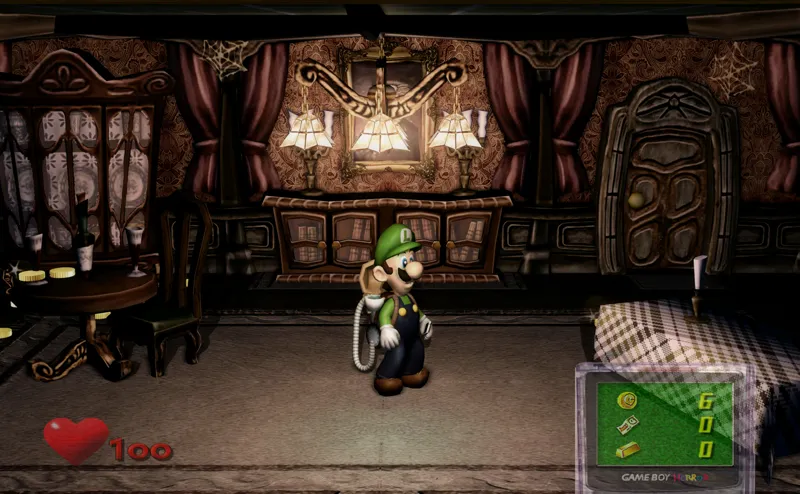
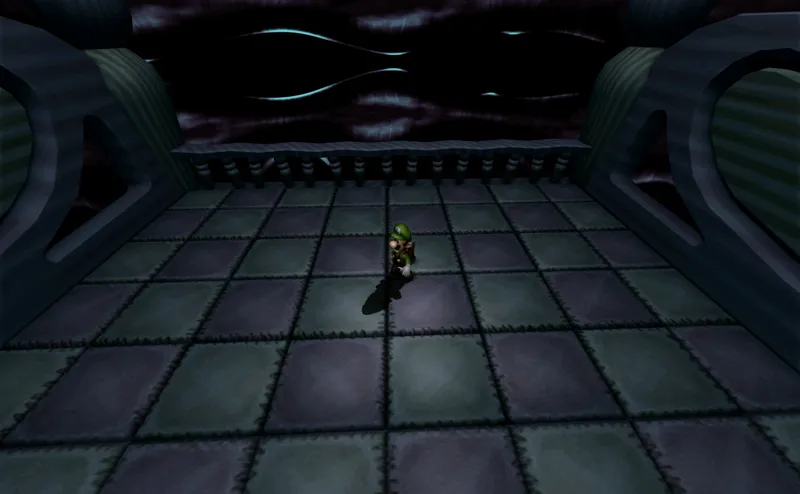
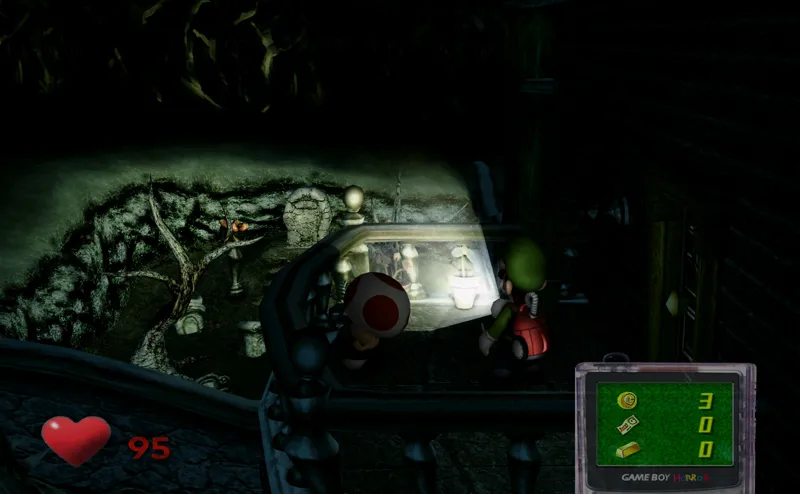
After more than a year of waiting, I'm pleased to announce the next major update to the Luigi's Mansion 4K texture pack! This update adds over 200 new 4K textures, adds new shader presets, fixes many bugs and issues, improves performance, streamlines the installation process and much more!
New things in this update include:
* 200 new textures covering all areas of the game including UI, environments and characters. And that's not including material maps!
* New material maps in higher quality than previous versions.
* Fixed bugs with transparency in many textures.
* Added a new shader preset called "HenrikoMagnifico_Horror". It makes the game darker and more contrasty, and also adds some other effects like film grain to make things more spooky. Can be fully configured and tweaked as you please, too!
* Improved instructions with clearer definitions than before.
* Optimized performance and reduced file sizes of textures (with some clever compression!)
* Merged the post-processing and standard edition Dolphins into one directory, removing duplicate files (reduced file size).
* Added SteamDeck instructions
* And more!
Enjoy! 🎃
There is also a 4K version available, if your computer can handle it! Please feel free to try it out!
Notice: The 4K version will look better than the 1080p version, even if you don't have a 4K display.
(Provided "as is": the texture pack does not work on real consoles).
Read more information about the texture pack on my website!
You can find the download link and more information on this page here
I am only able to make things like this thanks to your support, so from the bottom of my heart, thank you for helping me do what I love!
❤️
Comments (23)
Will this work on both the Gamecube and 3DS versions? The 3DS version has better lighting
dude i have been so down and out and playing your 4k updates has given me more happiness than drugs could. seriously reliving my childhood games remastered has stopped me from putting my brains on the wall. when i get back to work i will be donating thanks more than you know.
definitely a silly question but can i just take the texture pack out and use it with my main dolphin installation an look fine or does it rely on specific settings?
You can! Follow the Mac/Linux instructions if you're on Windows and you'll do just that.
Link currently not working
i can not for the life of me get the controller to work on this version for some reason
Is it a GameCube controller? If so, you might need to use Zadig to get it to work, since Ishiiruka Dolphin does not natively support GameCube Adapters without manually installing the drivers for it first. See these instructions: https://www.dolphin-emu.org/docs/guides/how-use-official-gc-controller-adapter-wii-u/?cr=sv
this pack work for me, amazing this texture for gamecube,thanks for your work.
My pleasure, glad you like it! :)
Hi, there is no vibration in the game. Is this a problem with Dolphin?
There should be! Check in the Dolphin Input Settings in the "Rumble" menu, check that at least one vibration motor is selected
Hello Henriko! Thank you for all your work on the radios and textures packs. I was wondering if you were planning to make a texture pack for the 3ds version of Luigi's Mansion and Luigi's Mansion 2 at some point?
I don't have anything to announce at the moment, but never say never ;)
The whole mansion looks transparent for me, I thought it may have been a stylistic choice until I started playing and everything looks like it's broken. Things are transparent and coins are blue and glowing, Luigi's hat is transparent, looks really weird.
Hi TheDerp57! There was a serious graphical bug in the initial 1.1.0 release caused by wrongly named material maps. The issue has now been fixed in a patch, called "1.1.0a", which you can download from the same link as before above. You can delete the "MaterialMaps" folder in the user > textures > GZ2 folder in the texture pack directory to fix the issue manually, as well, without having to re-download the whole thing. I'm terribly sorry for this inconvenience!
I'm having the exact same issue. Luigi's hat, many of the trees and objects around the mansion are translucent, and the blue/green color palette is everywhere.
Hi Taylor! There was a serious graphical bug in the initial 1.1.0 release caused by wrongly named material maps. The issue has now been fixed in a patch, called "1.1.0a", which you can download from the same link as before above. You can delete the "MaterialMaps" folder in the user > textures > GZ2 folder in the texture pack directory to fix the issue manually, as well, without having to re-download the whole thing. I'm terribly sorry for this inconvenience!
His hat is transparent yes, but the colors of the ground and everything are green/rainbow like an oil spill.
Yeah, I am experiencing the same issues. Does it have to do with some of the texture path are incomplete and when the game loads, it cannot find the textures? Maybe there needs to be an update to make sure the files are in the correct pathways.
The problem i'm having is luigi is transparent? Everything else is fine but luigi is see through like a ghost?
Hi Laurence! There was a serious graphical bug in the initial 1.1.0 release caused by wrongly named material maps. The issue has now been fixed in a patch, called "1.1.0a", which you can download from the same link as before above. You can delete the "MaterialMaps" folder in the user > textures > GZ2 folder in the texture pack directory to fix the issue manually, as well, without having to re-download the whole thing. I'm terribly sorry for this inconvenience!
I could really use some help. I downloaded this version and moved my save over but the colors are bugged out. I've tried changing all the settings I can think of but it's still broken. https://ibb.co/sFWvcXk is a screenshot of the issue at play. Thanks!
Hi Bo! There was a serious graphical bug in the initial 1.1.0 release caused by wrongly named material maps. The issue has now been fixed in a patch, called "1.1.0a", which you can download from the same link as before above. You can delete the "MaterialMaps" folder in the user > textures > GZ2 folder in the texture pack directory to fix the issue manually, as well, without having to re-download the whole thing. I'm terribly sorry for this inconvenience!