

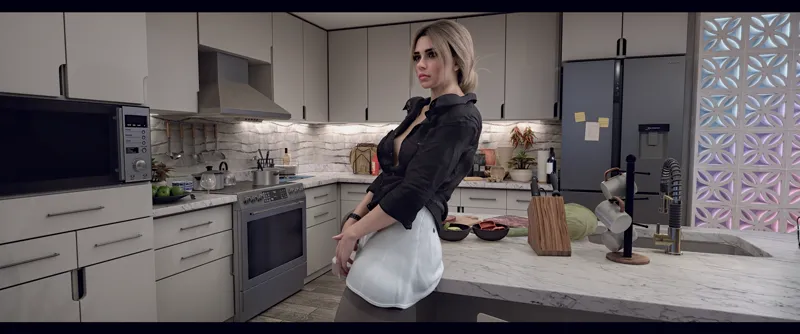

DLSS 5 in VaM!!1 And my PC is back!
PC is back — and somehow I'm testing DLSS 5 in VaM from UncleBurrito
Good news first: the PSU has been replaced and my main PC is finally back up and running.
Everything seems stable so far, but I'm still testing the system properly. And apparently my idea of a proper stress test is to throw it straight back into VaM under some rather heavy field conditions — this time with DLSS 5 Neural Rendering running on my RTX 4090. And yes — it works on RTX 40-series cards!
And this is where I want to recommend the work of UncleBurrito.
I tested his VaM DLSS NR and DLAA Plugin, and honestly, I couldn't just walk past this one without saying something about it. It works — and considering we're talking about an early DLSS 5 implementation running inside VaM and its ancient Unity version, it works surprisingly well.
The visual difference can be substantial. In my environments especially, materials, surfaces and fine details can look dramatically better. It's one of those rare modifications where I turned it on and immediately wanted to start looking through my old scenes again just to see what they look like with Neural Rendering.
If you're interested in experimenting with DLSS 5 / Neural Rendering in VaM, I strongly recommend checking out UncleBurrito's work and supporting him if you can.
https://hub.virtamate.com/resources/vam-dlss-nr-and-dlaa-plugin.69122/
You can support him and get access to the DLSS plugin on his page here:
https://www.patreon.com/UncleBurrito/posts/vam-dlss-update-168236826
Your girls are going to look gorgeous — you won’t regret it. 😄
Oh, and one useful tip: you can reduce VaM’s built-in MSAA to 2x or even disable it completely to save some performance. In my case, that gave me back around 8–10 FPS, and DLSS does a much better job with anti-aliasing anyway.
This is a seriously cool piece of work. Thank you, UncleBurrito!
Comments (16)
We need iDLSS5 in VR. Desktop works but not VR
45 FPS on a 4090. Glorious
xD Yeah, we probably just have to wait for NVIDIA to officially bring it to our generation of GPUs. I recently read that DLSS 5 is supposedly planned for the 40-series sometime early next year. No idea if that’s actually true though.
Mind sharing who’s scene is that?
It’s mine. The scene is available here: https://www.patreon.com/evilbox/posts/dinner-can-wait-167091006
Wow. Lovely shots. I like them.
Thank you for dlss and your work!! I didn’t really put much effort into the screenshots your plugin basically did the work for me. I hope you’ll be able to improve the scene controls in the game somehow. P.S. One of my subscribers actually subscribed to you on my behalf. I can’t support you directly myself.
Question, I just subscribed to uncle burritos patreon, and I see in one of his posts he mentioned a zip file from BepinEx. Is this file necessary?
Yes, that archive is required. It’s basically an injector that hooks into the rendering process. It won’t work without it. You’ll find it on GitHub.
Hey, awesome to hear PC is back and that was only PSU :) and, Welcome back to 3d ;) And Holy Smokes! That Neural/DLSS5 just transformed my VAM1 visuals to next level. Well, Maybe even 2 steps up. This latest 1.02 and now hitching is gone and all is smooth! So Thanks alot for recco! :)
Thanks! So far the PC is running normally, and hopefully it stays that way. I’m glad you’re enjoying the improvement I really like it too! Unfortunately I’ll probably have to wait for 1.0.2 to show up on the high seas :( I’m unable to subscribe to other creators on Patreon. By the way, I did mention to Burrito that it would be nice to have some alternative platforms for support and payment. It seems like setting those up isn’t really in his plans at the moment =\
Thanks for the tip on the MSAA, hadn't thought of that. I haven't tried the plugin itself yet, just had a local setup running it all. On my 5090 it just pushes me from 60% to 80% usage and no drop at all in FPS with a full 2 person scene running. So I'm guessing it is going to matter a lot what gpu you are running. I bet your environments will look amazing indeed. I'm gonna revisit a few.
That doesn’t sound right 40 fps with a 4090 . Maybe corrupt vars or too many vars in the addonpackage folder
Maybe. My AddonPackages folder really is a mess and I do get some errors during startup. Most of them are just missing dependencies though, so there’s nothing particularly critical there. Also, my GPU is currently power-limited. I deliberately capped it at 75% power for now and I’m just watching how the system behaves.
That's all well and good, but you're getting 40 FPS with only one character in the scene. I don't even want to imagine what happens with 2 or 3 characters in the middle of an action scene. You'll easily drop below 20 FPS! VAM simply isn't configured for this kind of technology. It's fine for taking screenshots, but it's not really usable for animation! And all the feedback I've seen so far is pretty telling: with DLSS 5 enabled, you lose almost half your FPS!
Yes, that’s true! But let’s be honest VaM already manages to lag all by itself, especially in scenes with complex hair or lots of light sources. What I like is that we at least have something now. There’s also another important point: you don’t have to spend hours tweaking settings like you often do with ReShade. You just press one button and it’s ready to go. In theory for people who create videos using frame-by-frame capture plugins, DLSS could significantly improve image quality. Rendering would simply take longer. But that’s only a theory for now I haven’t tested it yet with two or three characters in the scene.