
VNTranslator Pro v1.0.0
User Guide: https://docs.vntranslator.com
If you have any issues, please post on Discord in the #report-an-issue channel
Download
🔥 What's New in This Update?
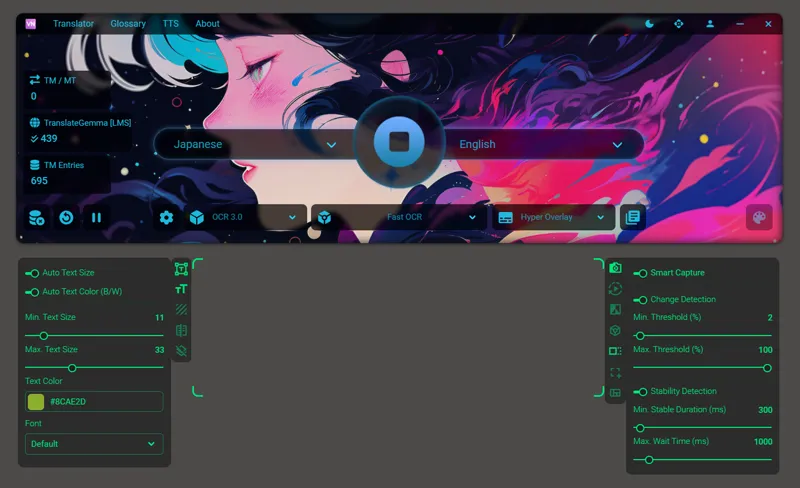
OCR 3.0
Stable version with Hyper Overlay
New Settings Panel on the left side of the OCR Screen Window, including:
Auto Hide Menu
Auto Text Size
Auto Text Color (Black/White)
Text Styling Options
Bounding Box Background Effects
Smart Capture - right-click the capture icon to open
AutoTrans
Smart Scan in Extract & Translate for RenPy games
TTS support for RenPy games
TransCheck and Word Wrap improvements for RPGM
Launcher
Launcher Customization - personalize your launcher experience
TTS (Text-to-Speech)
Per-character voice settings - assign a different voice to each character name
Text source selection: choose between Source Text or Translated Text as the TTS input
Audio Streaming: audio plays immediately without waiting for full generation to complete
Auto-save audio: automatically saves generated audio to a folder; the same audio can be replayed instantly without sending a new request to the TTS engine (optional)
Supported TTS engines: https://docs.vntranslator.com/features/extensions/text-to-speech