
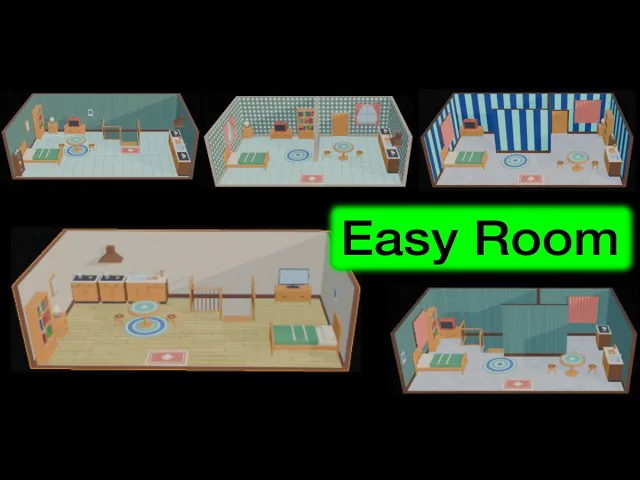
Blender Easy Room
https://superhivemarket.com/creators/onion365studio
Easy Room
Build a complete room in seconds, tweak it live, and export it to GLB
Easy Room generates a full interior scene right in the 3D Viewport sidebar. Press Generate Room, then change anything with sliders. Walls, floors, doors, windows, curtains and furniture all update live. When you are happy, press Finalize to turn the room into a normal mesh, or Export GLB to take it into a game engine, web viewer or any other app.
Highlights
Live room generator: set room length, width, wall height, wall thickness and floor thickness. Switch the front, back, left and right walls on or off.
Partition walls: add up to 10 divider walls. Set each one’s direction, length, height, position and slide.
Doors and windows: cut up to 8 windows, doors and doorways into any wall. Control position, width, height and window sill height.
Floor styles: plank, wood grain, tile or cement, with colour, plank size, tile size and seam width controls.
Wall styles: plain colour, wooden boards (vertical or horizontal) or repeating patterns (stripes, dots, diamonds), each with its own colours and size.
Trim and baseboards: a baseboard with adjustable height and depth. Trim surface can be plain, wood or cement.
Curtains: four fold shapes (wave, pleat, box, scallop) with controls for wave depth and width, open amount, tie height and floor length.
Furniture, rugs and stairs
Thumbnail furniture picker: more than 50 pieces across Bedroom, Living, Kitchen, Storage, Rug and Stairs. Click a thumbnail to add a piece, or type a quantity.
Pieces include beds, bedside tables, dressing table, TVs, table and stools, benches, stoves, sinks and cabinets, bookshelves, jar shelf, wooden crate, wall mirrors, wall calendar and six rug shapes.
Stairs: straight, L-shaped (left or right) and down stairs, in 3, 5, 8 and 15 steps. Down stairs cut a hole in the floor and add a railing.
Smart auto-layout: pieces place themselves against the walls and avoid doors, windows and each other. Pieces that do not fit are skipped.
Random Layout with a seed, Flip Layout, and one-click presets (Living, Bedroom, All, Clear).
Edit Furniture mode: pick up any piece and move, rotate (0 to 360 degrees) or scale it by hand. Your changes are kept even when you change the room.
Rounded-corner controls to soften the shape of the furniture.
Export GLB with baked patterns
One-click Export GLB of the walls, floor, partitions and furniture.
Bake Patterns turns the floor, wall and trim patterns into image textures, so the GLB keeps them. It is a flat colour bake: lights, shadows and shading are never baked in.
Choose a texture size of 1024, 2048 or 4096 px.
With Bake Patterns off, the patterns are saved as plain colours instead.
A progress bar with percentage replaces the Export button while the export runs, and ESC cancels between steps.
Your original room is never touched by the export.
Requirements
Blender 5.2 or newer
Cycles is used for Bake Patterns
The built-in glTF exporter add-on must be enabled for Export GLB
How it works
Open the Easy Room tab in the 3D Viewport sidebar (N panel).
Press Generate Room.
Adjust size, floor, walls, doors, windows, curtains and furniture.
Press Finalize to keep the room as a normal mesh, or Export GLB to save it as a .glb file.
Good for
Game environments and prototypes, room mockups, interior blockouts, stylised scenes, architecture previews and quick backgrounds for renders.