


Common problems with Optimum Realism
This is a list of all the common problems and their fixes.
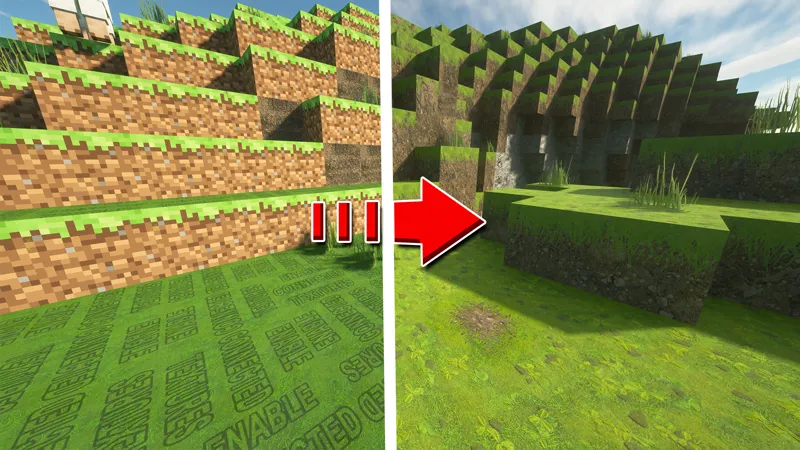
1. 'ENABLE CONNECTED TEXTURES' -
If you're using Optfiine, go to Video Settings -> Quality -> Connected Textures located on the bottom left of all those other options and enable it. If you're on Fabric, download the Continuity mod.
2. MISSING REFLECTIONS-
If you're using shaders that Rre36 creates like the Kappa or Nostalgia shaders, resourcepack reflections are not enabled by default. Go to Video Settings -> shader packs -> shader pack settings -> terrain -> reflections -> resource pack reflections. Enable this and you should see reflections on metallic blocks. If you're using the SEUS PTGI HRR 2.1 Shaders and find this problem, in the shader pack settings -> raytracing options, enable full ray trace reflections and screen-space reflection tracing. These options are not available on SEUS renewed and hence you won't see reflections on such blocks, therefore it is not recommended that you play with SEUS renewed shaders unless you're certain about what you're trying to achieve.
3. NO COLORS ON BLOCKS-
If you're not using Optifine, colormaps won't work on your instance of Minecraft. You need to install a mod that supports colourmaps, such as Polytone. There are other alternatives as well which can be found on the internet but Polytone is recommended.
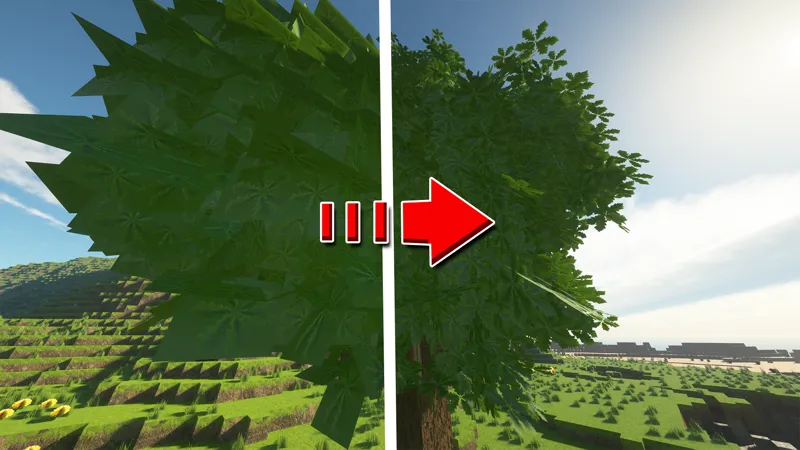
4. OPAQUE LEAVES-
If you're on fast graphics, your leaves will be opaque. Firstly, change your graphics to fancy in options -> video settings, additionally, also make sure that leaves are set to fancy as well. You will not find these settings if Optifine is not installed. To get these settings on Fabric, install Sodium and Sodium Extra
Comments (10)
Mine says there is missing meta data
so for some reason my wood have the texture for the side but not the top part any fix? cause in my hand i see it fully textured but when i place it its not
How I Can Make It Work On My Bad PC?
Then he's certainly not getting Christmas presents from Santa. But how bad is your computer exactly?
Hey mate how can I solve the issue when I am in nether the lava is changing the brightness from dark to bright and so on
Which shader? Try resetting your shader settings and redoing the settings
Thanks for the response. Unfortunately, all of my settings are in line with yours, and It's still not working. For the Continuity Mod with Fabric, is there any specific order for the resource packs within that menu?
Then I can't say anything for sure. Perhaps you could provide more information on something like Discord. But that's all that comes to mind.
Hello! First off, I greatly appreciate the work you've done. The feel it gives to Minecraft is just remarkable! My question is regarding connected textures. It shows for dirt blocks and random others (definitely the minority) even with Connected Textures enabled. I've follow your guidance for both Optifine instances and Fabric instance and have the same issue. I'm using your x512 Texture pack with 1.21.4. Not sure if the newest release of Minecraft is the issue, but figured I'd see if it was something that was known. Thanks again!
Hey, it’s probably not enabled. Make sure that it’s enabled, best way to check is on the test map