
Document Workflow Manager Review & Feature, Fix or Focus Request [GOLD & Silver]
Hello Members,
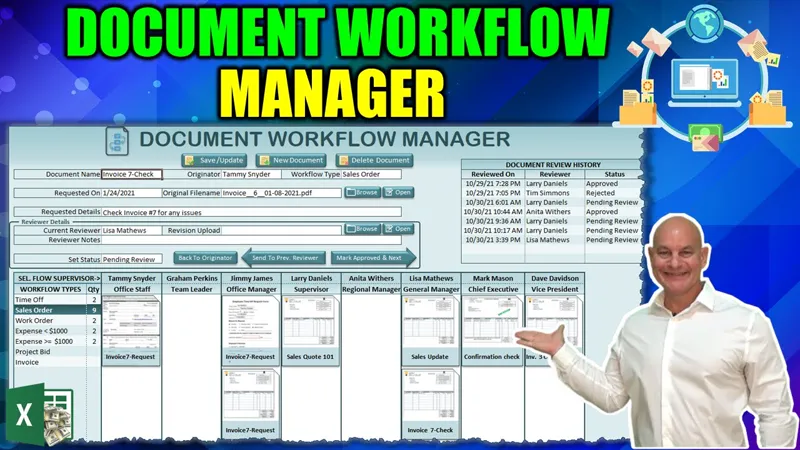
The training we have for this week that I have shared with you was about the Unique Document Workflow Manager. If you have not seen it yet, you can view it right here on YouTube.
Now that the training has been released, I am looking for your feedback to make this even better, just for you, our incredible Patreon Members.
So, what Feature can I add for you? Did you find an issue you want me to fix? Or is there a particular area you would like me to focus on?
Please comment your ideas and feedback to any of these below and I will do my best to not only create an updated workbook but release a private training video next Monday, right here on Patreon.
I am looking forward to hearing from you and thanks so much for your support.
Regards,
Randy
Comments (7)
Dear Excel for Freelancers, after reviewing the document manager, I find that each document on the dashboard is pointing towards a file that should be on my hard drive. Ex: Student_Enrollment_Form_docx however, this file (after doing a complete search with Agent Ransack) does not exist on my hard drive. Plus, the thumbnails related to each document (shown in the admin margin to the left in doc thumbnail - *.jpg also do not exist on my hard disk. The supporting zip file with extra documents only has an icons folder but nothing else. Could it be that I am missing these other documents?
Hi Dwight you need to make sure the file path is accurate and points to actual documents that exist on your hard drive. Once you remove the existing data and add your own data it will work fine as long as the folder paths are correct in the Admin sheet. I hope this helps and thanks so much.
Thanks Randy for your quick reply! I will take my time like you say and go through the code and work with the video as well. Your courses are simply incredible nonetheless. I wasn't into Excel that much until I came across your Excel for Freelancers. Thank you.
Thats great to hear and thanks so much
In addendum to the above message: I setup the shared folders as instructed in the video. I then created a new document from another location, entered in all the required fields and then saved the document with no issues. The margin on the left shows the invoice category (which I had selected) as showing a 1 which means it did register my document, and the document was successfully copied to the shared folder. However, when I look at the dashboard where all the documents are at, there is no document at all in the invoice section.
Hi Dwight, make sure you double check that the file path is correct. Step through the code and check the variables and also for the drag and drop, selecting a document starts the macro. You may need to watch the training several times in order to follow the code to find the issues on your computer. You may also post your screenshot along with the detailed description of the issue in our Excel for Freelancers Group where we have over 45,000 members who are happy to help you. http://bit.ly/groupexcel. I hope this helps and thanks
Dee Arroyo Dee Arroyo 2 hours ago (edited) Hello Randy, I hope you get to see this comment. I had downloaded the Document Workflow and when I dragged and dropped a document from one location to another, the thumbnail would still be visible. Now I try to do the same and the thumbnail stays blank. The information is updated on the form above, however, again, in the thumbnail section (where you drag and drop) the document visually stays blank now, not like before. Is there anything I can do to help rectify this or am I missing something? Thanks again.