

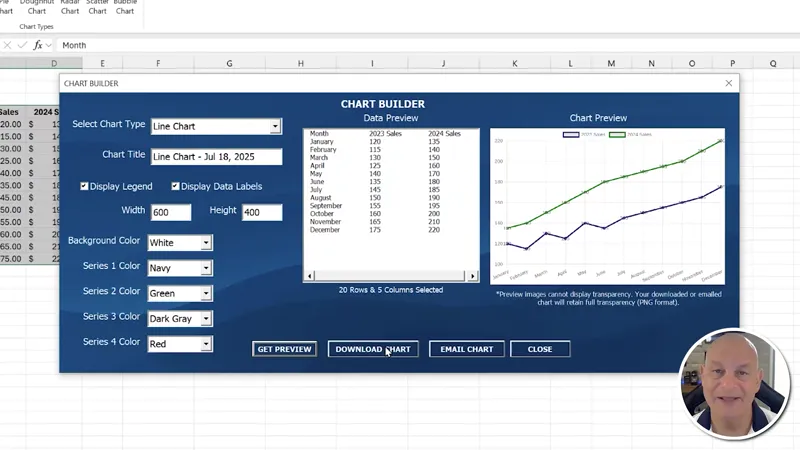
QuickChart Add-In: Review & Feature, Fix or Focus Request [Gold & Silver]
Hello Members,
The training we have for this week that I have shared with you was about the Amazing QuickChart Add-In. If you have not seen it yet, you can view it right here on YouTube.
Now that the training has been released, I am looking for your feedback to make this even better, just for you, our incredible Patreon Members.
So, what Feature can I add for you? Did you find an issue you want me to fix? Or is there a particular area you would like me to focus on?
Please comment your ideas and feedback to any of these below and I will do my best to not only create an updated workbook, but release a private training video next Monday, right here on Patreon.
I am looking forward to hearing from you and thanks so much for your support.
Regards,
Randy
Comments (4)
2. Instead of only traditional charts, you can create dynamic bar charts (Both vetical/Horizontal) using Label controls inside a UserForm. Each label represents a data value. set Label controls in a UserForm to build dynamic bar charts. Each label’s height is calculated proportionally based on the maximum value, and different colors help distinguish the bars visually. Set lbl = Me.Controls.Add("Forms.Label.1", "lbl" & i, True) lbl.BackColor = RGB(Rnd * 200, Rnd * 200, Rnd * 200) ' Random color ------------I have sent to you an e-mail with Clear exemple of my both request.
Hi Armando, thanks for your details and screenshot in the email as well. I will do my best,
Hi Randy. .Add support for background images Allow users to load a background image dynamically (like a notebook theme or custom backdrop). You can: • Use an Image control sent to back with .ZOrder; • Let users browse and select a the custom image with a FileDialog;
Very helpful Armando, thanks so much. I will do my best to add additional features as mentioned