
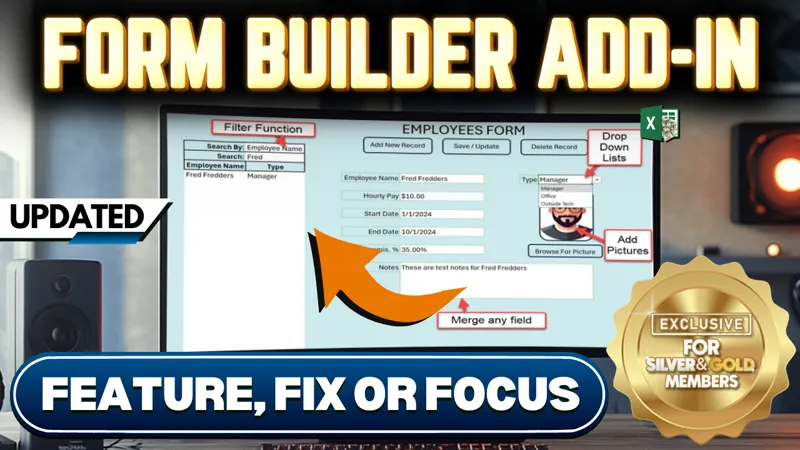

Form Builder Add-in Update [Gold & Silver]
In this week’s Feature, Fix, or Focus, we take last week’s Form Builder Add-in training.
Here's the list of updates I made for this training:
· Merged Cells Feature requested by TungSon, Peter Kind, Larry Duffie
· Fixed Save Feature (If new workbook is xlsx type) added by Randy Austin
· Added Drop Down List Feature & data validation added by Randy Austin
· Delete Field Feature Added added by Randy Austin
· Format List Field Updated added by Randy Austin
· Added Search By Any Field & Filter added by Randy Austin
· Form Picture & Browse Picture added by Randy Austin
Please don’t forget to add your requests for your own Feature, Fix or Focus each week when I post a new video, right here on Patreon. Each week I will either add a new feature, fix a bug or an issue, or create another training with a special focus on any part, all based on your feedback and comments.
Comments (12)
I would ideally like to create a userform for calendar input instead of having it live on the dashboard. I also want to use a form for invoicing. I haven't watched the invoicing vid yet. So glad to see this video and about to dig in.
Hi Tina, thanks so much and great to have you here: I have a great pop-up date picker addin with lots of features here: https://www.patreon.com/posts/date-picker-add-104582398 Thanks again and great to have you here
with my monitor settings the bottom of form builder is offscreen and cannot see part of the buttons. Is there a way to change the size of the form builder without changing my monitor resolution settings?
Hi Daniel, Thanks for your message. You can change the dimensions of the form to a size that better suits your resolution by going into the VBA Editor, then edit the userform itself, You can resize the form to make i wider, instead of taller and you can also adjust the location of some of the components of the userform. I hope this helps and thanks so much.
Hello Randy, I have a question about the pictures that can be used in a userform such as this. I have to take photos of customer vehicles with my cellphone for now (android if that makes a difference) and when I add the jpeg to the profile for the vehicle, it is always upside down no matter the orientation it is saved in. I did also take them in landscape mode (or had my phone sideways) when I took them. How would this be fixed?
Hi Amanda, thanks for your message. If the pictures were on a sheet (which they are not) then it would be easy using something like ActiveSheet.Shapes("PictureName").Flip msoFlipVertical However on a userform, you will want to flip the pictures vertically before they are brought into a userform. You can use a free picture software like XnView which can do 'Batch Processing' so that you could select all of the pictures in a folder and flip vertically at one time. With that said, its very strange that the pictures would be upside down. Consider using a free software such as Dropbox so that every picture you take is automatically on your computer as perhaps the import process is causing some issue with the pictures. I hope this helps and thanks so much.
Randy, How do I clear out the original to be able to use the updated?
Hi and thanks for your comment. You can switch the template to a regular workbook VBA > ThisWorkbook > Properties > IsAddin = False Then the worksheets become visible and you can remove the data. Then just return the IsAddin back to True and save the workbook I do cover this in the original video training I hope this helps and thanks so much.
The Database doesn't clear out when you delete the Fields. Is it possible to add where you can add a name range in the list box instead of adding each of them especially if you have more than 10 items on a list
HI and thanks so much. Yes it is certainly possible to use a dynamic named range to populate the list box using the RowSource property Just make sure that this RowSource is refresh each time the list changes such as Userform.ListBox1.RowSource = "NamedRange" I hope this helps and thanks so much.
Cool, Randy. Where can we get the updated version? Thanks for your work! Cheers Chris
Hi Chris, the updated version is available in this post right here, just look for the attachment Form_Builder_Add-in_Updated.xlam I hope this helps and thanks so much.