

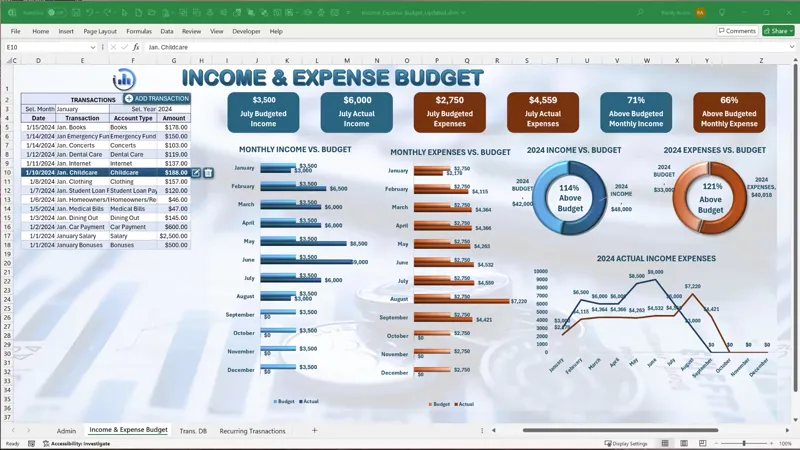
Income & Expense Budget Update [Gold & Silver]
In this week’s Feature, Fix, or Focus, we take last week’s Income & Expense Budget training.
Here's the list of updates I made for this training:
· Added Recurring Transactions added by Randy Austin
· Added Recur. Transactions Userform added by Randy Austin
· Recurring Automation added by Randy Austin
Please don’t forget to add your requests for your own Feature, Fix or Focus each week when I post a new video, right here on Patreon. Each week I will either add a new feature, fix a bug or an issue, or create another training with a special focus on any part, all based on your feedback and comments.
Comments (8)
I'm having a difficult time in making this work. The recurring feature appears to do everything right except populate. What am I doing wrong?
Hi and thanks so much it would be hard to know for sure, perhaps you can email me your version with the details? Randy@ExcelForFreelancers.com Thanks so much
Can you add a date picker in the transaction form instead of manually entering the date?
Hi and thanks very much for your comment. I make updates to templates within 6 days of the launch, and this training is more than a year old. With that said please check out my Date Picker Add-in here to help with that: https://www.patreon.com/posts/date-picker-add-104582398 I hope this helps and thanks so much.
Hi Randy. In the Visual Basic there is a RecTransFrm template....to enter recurring transactions... but i don't see this template in the Excel file to enter recurring transactions... please help I downloaded this .xlsm file dated 15 July 2024
Hi WIllie, thanks for your message. When you edit any existing transaction you can make it recurring, which will launch the recurring form. I covered this in the video above, so make sure you watch the updated training above. I hope this helps and thanks so much.
This is fantastic! Are you able to include a bill tracker/reminder?
Thank you so very much, I really appreciate that and glad you like it. I do have a Bill Tracker here which can be combined with this Accounts Payable Manager here https://www.patreon.com/posts/accounts-payable-65568982 I hope this helps and thanks so much.