

VTT Desktop Client
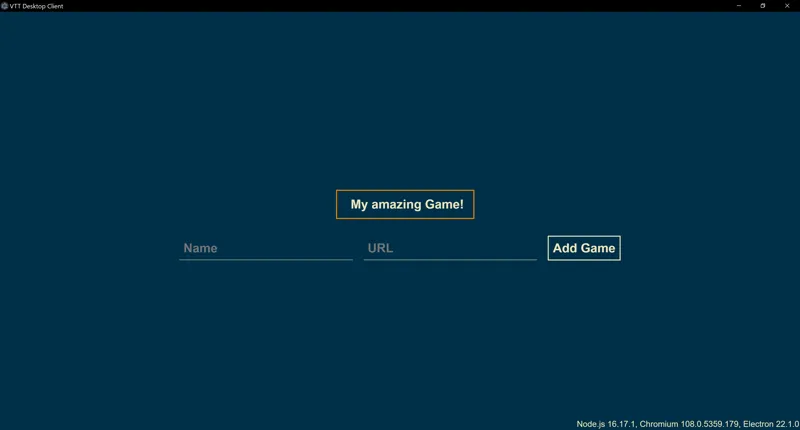
This is a simple desktop client where you or your players can connect to a game, has a simple interface where you can save bookmarks to games and supports Pop-outs
To use download the zip file, unzip and run vtt-desktop-client.exe
Comments (30)
Is an update planned because of JavaScript compatibility?
I was using the awesomeness foundry module to launch the standalone Chrome client from the Forge shield icon on my Windows 11 quickbar. I tried this VTT Desktop Client and it works excellently!! First game launch (DM) it asked and I said Super Potato. Anecdotally, the performance is much faster for everything--moving and resizing scenes; music launch; menus and configuration launch; compactness of UI (still running full screen); etc. Thanks!!
And by the way, the link to the wiki page above brings me to a place that tells me I f-ed up.
Just tried it (the V11 version). Unzipped it, ran the executable, put in a name and a URL (which in my case is a IP:Portnumber since I run a Foundry Server on my LAN). Then click what I configured, put in a Username and Password. When I click the button for the game, I get a white screen and it does not load the game. Is this supposed to work with local Lan IP:Portnumber combinations (and yes I can access the server from a browser).
Sorry, i updated the wiki link, i had moved the page. Check the wiki, specifically the "Connections with invalid certificates (SSL)" part which is the reason you get the white screen
I can see a Use for this in combination with another plugin possibly but I'm wondering if it could be used through something like DuckDNS so you don't have to give out your IP, also what ports does it require or are they just what the application uses? Have you tested it with VTTs other than Foundry?
Its just an electron app, you could use it for other vtts but I haven’t tested
Cool but what I really want is an easy way for folks to pull up their character sheets on tablets/phones. Especially with pf2e. It’s like the simplest thing in person thing but gets all messed with hybrid gaming.. dealing with laptops kind blows. Even with a big touch monitor on the table it’s a PITA to not have people roll from a separate device.
Does it work on macOS?
Windows only at the moment, im not sure how I can compile it for other platforms without other platforms
This is awesome. Had my tato players try it out, both said it felt like it ran better. Only problem is PopOut thinks its in the GM foundry client lol... i can't use it as DM so doesn't bug me but i know a few of my folks love keeping their character sheet out. Is that possible for a future release maybe? that'd be my only request. the customizable 1.1 makes this a treat to just share with folks. so, thank you so much for this man. From two of my players in particular but really from all of us :3 for a first release, this is pretty stellar.
I’ve been asking for someone to make this for a while now. Thank you Ripper for picking up the call.
Ripper, would be great if you can add HTTP Authorization to client. Anyway, thank for client!
It says it supports Pop Outs ? Do you mean the module ? Since it creates the warning about not being able to create pop-outs in standalone VTT Application
correct
That is basically the client many of the FVTT patrons were voting for in V11. Now people might understand better that this is not the solution to potatoes or bad internet connection which many according to the V11 comments hope it will be. Thanks for that - I think, from the high vote it got, that there is a need for that out there. And I will certainly give it a try without expecting wonders 😊
yes, this is 100% correct, it really mostly a matter of convinience
I'm still pretty new to foundry, why would this be beneficial over just opening the game is a web browser?
Some extra screen space, and maybe a bit extra performance on super potatoes, but i wouldn't expect any tnagible improvement. it's mostly a convinience
Thank you, Ripper! This is great just for the additional screen space it gives without having to make the browser go full screen.
Currently I use Kenku's browser so that I can use the bot to play sounds and effects directly in to our foundry voice chat. Is this possible with this? Also forgive my ignorance, what is the advantage of this over Chrome?
This is a super basic browser, i doubt your bot will work with this. It's just a light browser with extra screenspace and convinient bookmarks
Any plans to build a version for linux?
It's a bit of a PITA because you need a linux machine to build for linux, but it can definatelly be done, i'll see if there is a workflow that is not extremely painful
Can I send it to my group with my server info already loaded in?
no, they'll have to copy\paste the server url first time they use it, then it's stored
Is it essentially a custom browser? Is it chromium based?
yep, that's all it is
WHAT
I'm going to need some docs this sounds awesome