




Tekken Tag Tournament 2 PC PORT - TEST - TUTORIAL - NEW v0.1.7 - SERVERS
Requirements:
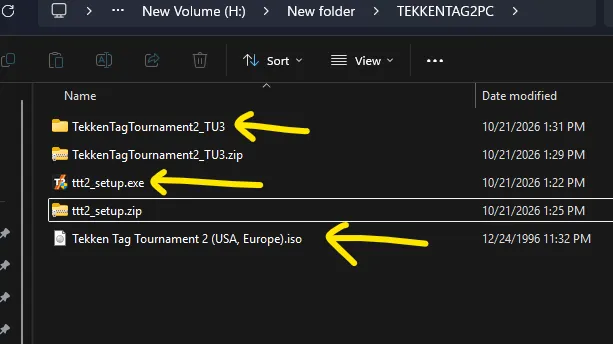
TTT2 PC PORT
https://github.com/shihabal3amri/tekken-tag-tournament-2-pc/releases/tag/v0.1.7
Xbox 360 image or ISO
TTT2 Title Update 3
Download from official github site.
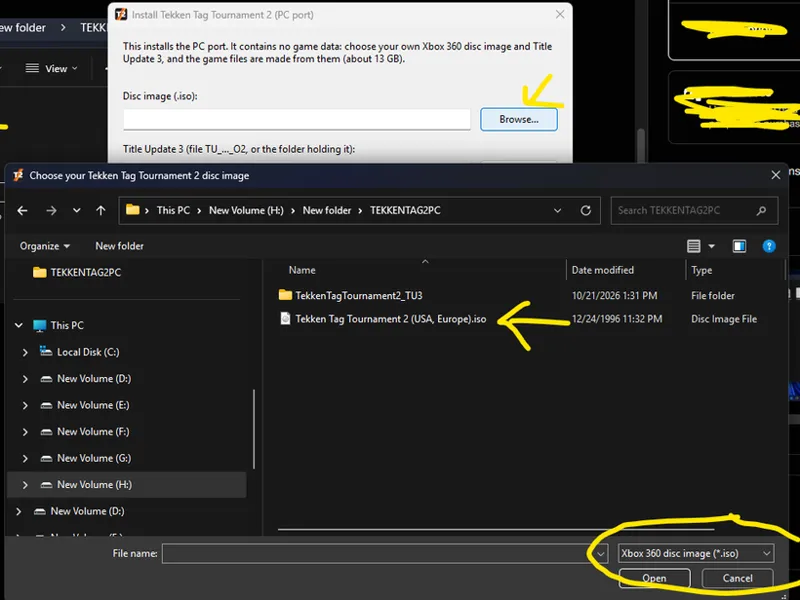
Run the ttt_setup.exe
Choose iso file
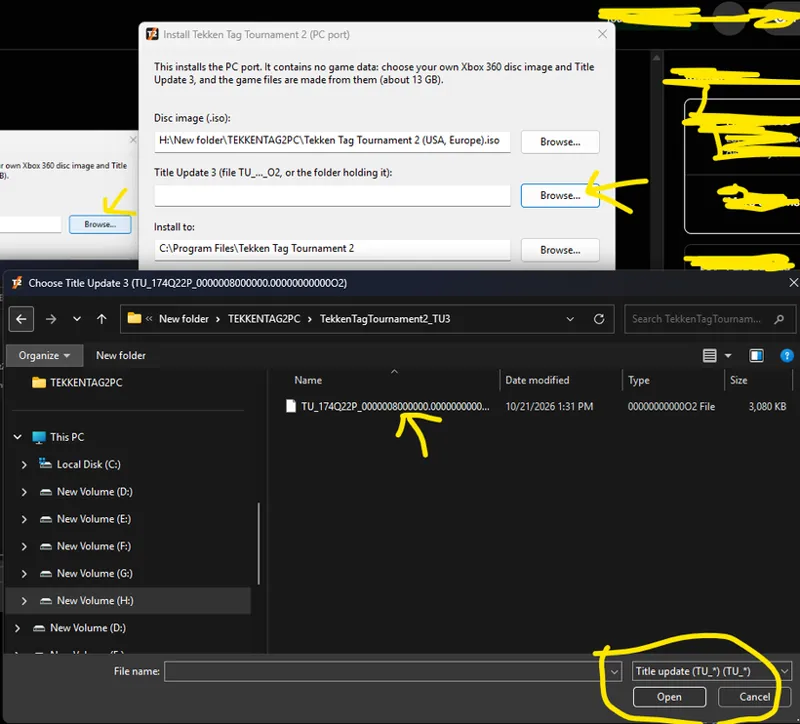
Choose Title Update 3
Choose install directory
Hit install when ready. Then wait until its done.
Run Tekken Tag Tournament 2.exe to start
Enjoy the game.
Support Files:
https://mega.nz/folder/OxJymJKB
Key
hhhLnYkxLLvsIIwJvT_MLQ
Pass: jolygim
Notes
Install over your existing copy: run ttt2_setup.exe and point it at the same disc image and Title Update 3. Your saves and profiles are kept.
To play online together, both players should be on this version.
The installer is not code-signed: SmartScreen → More info → Run anyway. A few antivirus engines flag unsigned installers like this one by heuristics;
Play online with friends
Both of you install the same version of the port and keep Steam running.
Host: ONLINE MODE → PLAYER MATCH → CREATE SESSION
Your friend: ONLINE MODE → PLAYER MATCH → SEARCH SESSION, then pick your session.
Fight!
The first time you open Online Mode, the game shows Namco's online terms; accept them to continue. Steam will show you as playing Spacewar. That's normal: it's the free Steam test app the port uses to connect players.
Controls
Controller: works just like on Xbox 360. Whoever presses a button first is Player 1.
Keyboard (Player 1):
Key Does Key Does Arrow keys Move / D-pad A S Z X A / B / X / Y Enter or Space START Q W LB / RB Backspace BACK E R LT / RT Alt + Enter Window ↔ full screen D F Left / right stick click
Change the keys in the game: OPTIONS → CONTROLLER SETUP → on BUTTON SETTINGS press left/right to switch it to KEYBOARD, then A to edit. Pick a button, press A, then press the new key. LB / RB show the movement, START and BACK keys, plus DEFAULTS to undo everything.
Display mode and resolution are in the game's own menu: OPTIONS → DISPLAY SETTINGS.
Input delay: the original game adds 2 frames of delay to every button press in offline modes. This port removes them by default; turn them back on in OPTIONS → GAME OPTIONS → INPUT DELAY. Online matches always use the game's own delay, the same for both players.
NOTICE: Online Features
For now, we do not recommend using the online features of this setup. Our current focus is on providing an enjoyable offline party experience with friends.
We are still waiting for a proper netcode rollback solution for Tekken Tag Tournament 2 (TTT2), similar to what has been achieved with the Tekken 6 Recompilation project.
You may still choose to use the online features, but please do so at your own risk. We cannot guarantee their stability or performance.
Thank you for your understanding and have a great day!
Please support the channel by being a Patron: https://www.patreon.com/jolygimgameandtech
If you share my passions and like to support the channel, feel free to donate. Thank you! https://www.paypal.me/JolygimGameandTech