








TeknoParrot Ultimate Installer BETA 2 - Full Tutorial - August 22, 2026, BUILD UPDATE
First and foremost, we would like to extend our sincere gratitude to all our patrons who continue to support the channel. Your support makes all of this possible. As a token of our appreciation, we remain committed to continuously improving our work and delivering high-quality content and updates.
This tutorial is designed to guide you through the proper setup of TeknoParrot on your system.
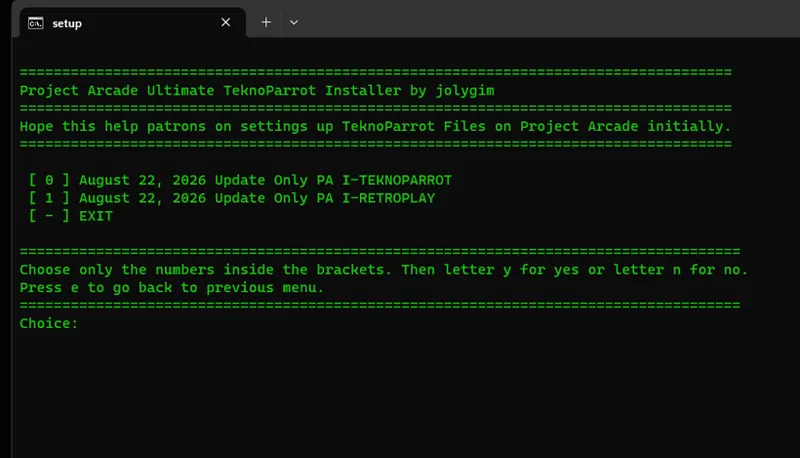
We are proud to introduce the TEKNOPARROT ULTIMATE INSTALLER – BETA 2. In this version, all base file installers for both I-TEKNO and I-RETROPLAY builds have been fully updated—eliminating the need for confusing micro-updates. Simply run the installer options for the base files to ensure your setup is always up to date. Future updates will be further optimized to provide a simpler and more user-friendly experience.
Requirements:
• NO BASE FILE Requirements if I-TEKNOPARROT STANDALONE BUILD INSTALL
• TeknoParrot Emulator (Download via TeknoGods Bootstrapper)
• Project Arcade I-RETROPLAY Build (ADDON UPDATE)
• Ultimate Installer Batch File Updater (Beta 2)
⚙️ WHAT DOES IT DO?
* Installs the latest TeknoParrot add-ons for:
* Project Arcade i-RETROPLAY
* TeknoParrot Standalone
* Beginner-friendly setup — no advanced knowledge required
* Includes a complete updated game set (pre-patched + clean versions)
* Automatically extracts and installs archives (with a few exceptions)
* Creates proper folder structures and file naming
* Detects existing games and skips overwriting
* Installs only missing titles
🎮 FLEXIBLE INSTALL OPTIONS
* Remove unwanted games before installation
* Install specific titles using game codes
* Choose any drive location per game
* Auto-creates TeknoParrot profiles (no GUI setup needed)
✔️ No more manual directory mapping!
🎮 CONTROLLER SUPPORT
* Default mapping: Xbox Controllers
* Other controllers require manual mapping
+++++++++++++++++++++++++++++++++++++++++++++++++++++++++++++++++++++++++++
PHASE 1 – DOWNLOAD REQUIRED FILES
PHASE 2 – Installation Using the Ultimate TeknoParrot Installer (BETA 2 – 2026)
PHASE 3 – Game Installation
PHASE 4 – User Profile Installation
+++++++++++++++++++++++++++++++++++++++++++++++++++++++++++++++++++++++++++
TeknoParrot Homepage:
+++++++++++++++++++++++++++++++++++++++++++++++++++++++++++++++++++++++++++
Project Arcade I-RETROPLAY Install Tutorial
https://www.patreon.com/posts/159287462?collection=840137
+++++++++++++++++++++++++++++++++++++++++++++++++++++++++++++++++++++++++++
+++++++++++++++++++++++++++++++++++++++++++++++++++++++++
If you share my passions and like to support the channel, feel free to donate. Thank you!
https://www.paypal.me/JolygimGameandTech
NEW LINKS WILL BE SENT TO YOUR PROVIDED EMAIL...
++++++++++++++++++++++++++++++++++++++++++++++++++++++++++
August 22, 2026, UPDATE INSTALLATION
Greetings, everyone!
Thank you for your patience and continued support.
We are pleased to present the latest update for the TEKNOPARROT Add-Ons for both Project Arcade I-TEKNO and Project Arcade I-RETROPLAY.
📦 Download Instructions
Please use the same download links that were provided to you previously. There is no need to request new links.
Once downloaded:
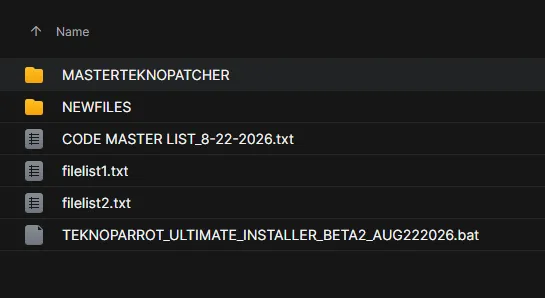
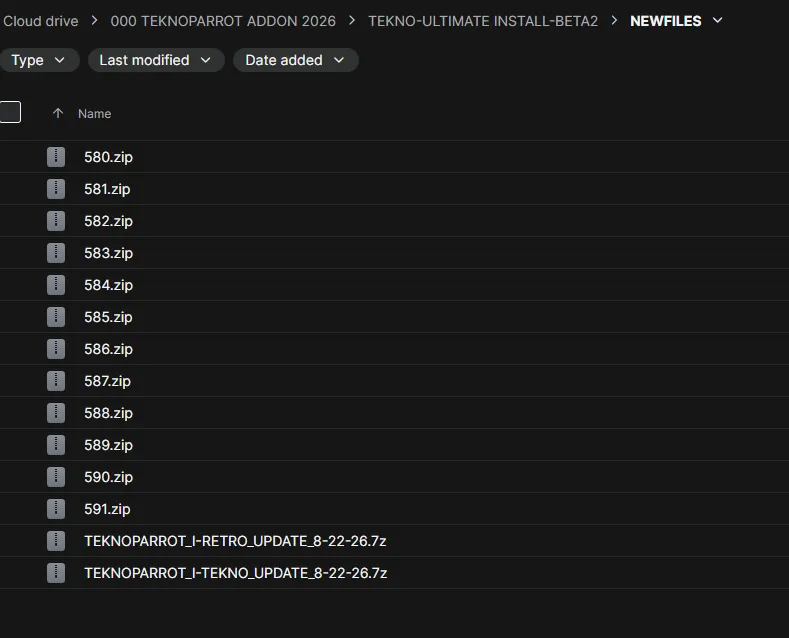
Locate the NEWFILES folder.
Do not move, rename, or modify the files inside the NEWFILES folder.
Leave the folder exactly as it was provided.
The new updated batch-file installer will automatically process the required files.
Simply follow the instructions displayed by the installer.
⚠️ Important
You may run the installer from any location on your computer. However, do not change the directory structure of the downloaded files. The installer relies on the original folder structure to locate and process the required files correctly.
Please read the instructions carefully before running the installer to avoid unnecessary issues.
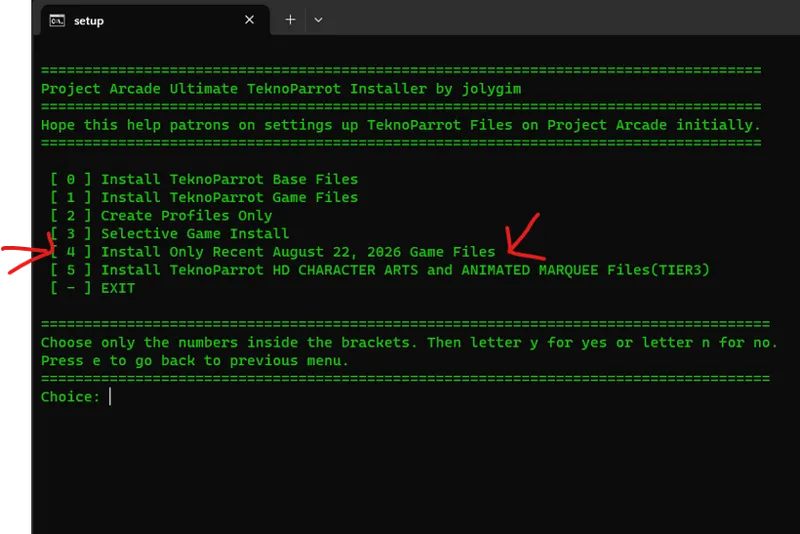
If your just updating, just run the batch file and select option number 4
Then choose your Project Arcade Build that you want to update. You can update both if you want it.
⚠️ SPECIAL NOTES
This release supports all August game titles currently available.
🔄 Existing Installations
If you already have previous installation files, don't worry. The installer will automatically detect files that are already installed and skip them.
This means you do not need to manually remove or reinstall existing files. The installer is designed to avoid unnecessary duplication and reduce the possibility of mistakes during the installation process.
👤 USER PROFILES — IMPORTANT
During the installation, you will be asked whether you want to install the USER PROFILES for TeknoParrot.
Please consider this option carefully:
If you already have a working TeknoParrot setup with your own profiles and configurations, you can choose to skip the User Profile installation.
If you are setting up your system from scratch, we recommend installing the provided User Profiles.
The included User Profiles contain pre-configured settings for most supported games. Game paths are already mapped accordingly, making the initial setup much easier.
The default control configuration is:
Keyboard
Xbox 360 Controller
If you use a different controller, arcade control panel, wheel, light gun, or another input method, we strongly recommend reviewing and adjusting the controls after installation.
💾 USER PROFILE BACKUP
If you accidentally choose to overwrite your existing USERPROFILES, don't panic.
Before installing the new profiles, the installer will automatically create a dated backup of your current USERPROFILES.
The backup will be stored in the root directory of your emulator/TeknoParrot folder, allowing you to restore your previous profiles later if necessary.
💿 WORKING DRIVE & ROM DRIVE / GAME DRIVE
The installer will always prompt you to select two locations:
1. WORKING DRIVE
This is the drive where your Project Arcade build is located.
Examples:
E:\PROJECT i-TEKNOPARROT
D:\PROJECT i-TEKNOPARROT
or:
E:\ProJectArcadeBitsBits
D:\ProJectArcadeBitsBits
2. ROM DRIVE / GAME DRIVE
This is the drive where your ROMSTEKNO folder and game files are located or will be installed.
You are free to use a different drive for your ROM/GAME files than the drive containing your Project Arcade build.
✅ IMPORTANT
Before proceeding, make sure you select the correct Working Drive and ROM/GAME Drive when prompted by the installer.
Once these locations are correctly selected, the installer will use them to determine where your Project Arcade files, game files, and profiles should be processed.
Please read each prompt carefully before confirming your selections.
ROM DRIVE / GAME DRIVE
The ROM DRIVE, also referred to as the GAME DRIVE, is the location where all of your games are stored or will be installed.
The default folder directory is:
XXX:\ROMSTEKNO
You are free to choose which drive you want to use for your ROMSTEKNO folder. For example:
D:\ROMSTEKNO
E:\ROMSTEKNO
G:\ROMSTEKNO
If the ROMSTEKNO folder does not exist on your selected drive, the installer will automatically create it for you.
Important: You may choose any drive you prefer, but please make sure the ROMSTEKNO folder remains in the correct directory structure so the installer can properly locate and install the required files.
WHAT'S NEW
Updated media files for all recently added titles this month.
Improved and refreshed artwork/media for the latest TEKNOPARROT additions.
Thank you again for your patience and continued support of Project Arcade. Enjoy the latest TEKNOPARROT update!
++++++++++++++++++++++++++++++++++++++++++++++++++++++++++