


Project Arcade Install Tutorial 2026
Greetings everyone, and welcome!
First of all, we would like to extend our heartfelt thanks to all our Patreon supporters and fellow retro gaming enthusiasts. Your continued support and passion are what keep this project alive and evolving.
In this video, we’ll walk you through a quick and simple tutorial on how to download and install the latest *Project Arcade i-RETROPLAY Base Build*.
✨ New Additions
New system icons and logos
New logo playlist sets
New icon playlist sets
Brand new main menu interface
New intro sequence
⚙️ Enhancements & Improvements
Settings menu enhanced
Layouts and themes rebuilt and optimized
Added a large collection of new media files
Ability to change system themes in dual-monitor mode
Improved layouts, animations, and overall performance
Cleaned and optimized media assets
Enhanced dual-monitor functionality
🎮 System Support & Features
Support for MAME 0.284
Support for non-merged MAME sets
(approximately 4,000 working games)Optional HD and 4K marquee packs
Selectable:
MAME-themed videos
Hyperspin-style videos
Support for Mr. LUST 4K bezels
LINK:
https://mega.nz/folder/GoglCRoY
KEY
QysxYD6UTbVwC6o5MkKPyw
__________________________________________________________________________
Install Note:
Just download and run installer from any drive.
Note:
This is for Full install and update only installation.
Installation Troubleshooting fix:
Issue1: Main Files are missing prompts. We apologize for this error...
Solution: Under the MAINFILES create a sub folder named "Main" then put all files under the MAINFILES folder to the Main folder. All files under MAINFILES should be inside the Main folder.
UPDATES:
For I-RETROPLAY or I-ARCADE Build
June 5, 2026 - 4K Overlay and Bezels Updated (use same links and redownload)
Install Notes:
Manually extract the contents to your MAME emulator directory, making sure to overwrite all existing files when prompted.
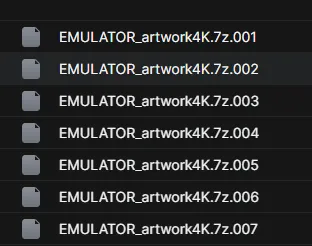
Extract the first archive only the rest will follow. (EMULATOR_artwork4K.7z.001)
Target Directory Examples:
E:\ProJectArcadeBitsBits\emulators\mame
H:\PROJECTi-ARCADES\emulators\mame
D:\ProJectArcadeBitsBits\emulators\mame
How to Use:
Launch Project Arcade.
Navigate to: Settings Menu > Interface Menu.
Enable the following option:
MAME Bezels – Lights Out – 4K Bezels
Enjoy enhanced visuals with high-quality bezel support!