



GDC Wardrobe V2 – Final Update Before Release
Hey Guys! This is a lot! so y'all better get some popcorn and maybe some coffee! Please remember i'm not a plugin creator i'm a fully dedicate clothing creator for hs2! if i been spending my time on this just to build a very solid base for upcoming clothing!
Release Date
If everything goes as planned, GDC Wardrobe V2 is scheduled to release in approximately 2 days, thank you to everyone in the community for your support, feedback and testing. We can't wait for everyone to experience Wardrobe V2!
Video Tutorial
Kimberly, who created the original Wardrobe V1 tutorial on YouTube, will release a brand-new Wardrobe V2 tutorial tomorrow for everyone to get familiarized with the new integrations! then Wardrobe V2 release is the day after.
⚠️ Important
To use all Wardrobe V2 features, you must download: The latest versions of your GDC outfits The latest GDC shader package Older versions will continue working but will not include the new V2 systems.
Outfit & Shader Compatibility
To support Wardrobe V2, all GDC outfits released after the original V1 launch have been updated for V2 compatibility, once the plugin is released all this will be inside your mega folder so make sure you get the latest outfits as well as the new plugin version!
---------------------------------------------------------------------------------------------------------
Lets start with this
🛠️ Bug Fixes & Improvements
One of our biggest goals for V2 was listening to your feedback and improving the overall experience. Many of the issues reported after the V1 release have now been resolved.
👗 Clothing Stack Loading Inside Studio
Fixed an issue where stacked clothing would sometimes fail to load correctly after loading characters inside Studio. Previously, many users had to replace or reload the character to restore stacked clothing correctly. Wardrobe V2 now restores the entire stacked outfit automatically, making character loading much more reliable.
👁️ Clothing Stack Visibility Inside Studio
Fixed an issue where hiding a character inside Studio would leave stacked clothing visible. Stacked clothing now automatically follows the character's visibility state, eliminating the need to manually hide every stacked item.
🔄 Reset Button
Fixed an issue where pressing Reset on a single clothing piece could accidentally reset the entire outfit. The Reset button now only affects the currently selected clothing item, leaving the rest of the outfit untouched.
🎨 Material Presets
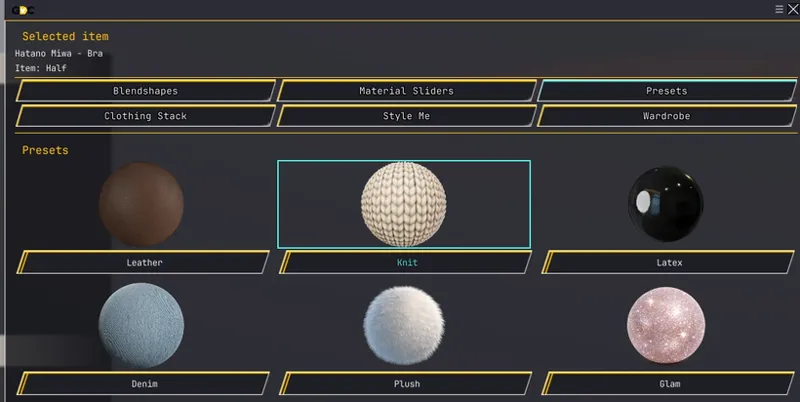
Material presets now automatically configure the proper gloss, smoothness and other material properties needed to better match the intended appearance. Previously, users often had to manually tweak these values after applying a preset. This goes for Denim, Knit, Latex,Leather,Plush and Glam
☔ Rain Shader
The Rain shader has received a major overhaul with more natural flowing water, droplets and surface behavior.
❄ Snow Shader
The Snow shader now features improved accumulation, cleaner coverage, better masking and a more natural appearance.
⚙ Material Editor
The Material Editor window in side the GDC Plugin has received additional editable properties and reorganized collapsible sections for easier navigation
⋆✴︎˚。⋆ New Glam Sliders
New Glam sliders has been added to the Material sliders windows, now you can play and edit the glam inside your outfit, this only appears if you are currently using the GDC Glam Preset.
🧸 New Plush Sliders
New Plush sliders has been added to the Material sliders windows, now you can play and edit the Plush inside your outfit, this only appears if you are currently using the GDC Plush Preset.
🎯 General Improvements
Many systems have also been optimized behind the scenes to improve stability, compatibility and responsiveness.
↔ Blendshape Sliders
The Blendshape Sliders tab now displays compatible blendshapes from multiple outfit pieces at the same time, eliminating the need to constantly switch between clothing pieces.
🧸 New Material Preset –
Plush One of the biggest additions in Wardrobe V2 is the new Plush material.
Plush was designed to simulate soft fabrics without relying on additional meshes or accessories.
Using a custom shader, Plush gives clothing a fluffy, fuzzy appearance while preserving clean transparency thanks to its true alpha cutoff system. But Plush isn't just static. It also includes dynamic wind animation, allowing the individual fibers to gently sway and move with the environment. This gives fabrics a much softer and more natural appearance, especially during movement, making clothing feel much more alive instead of looking like a rigid surface. Perfect for:
• Sweaters • Blankets • Winter clothing • Fleece • Plush fabrics • Furry trims
Features Soft fluffy fabric appearance Dynamic wind animation that makes the plush fibers gently sway True alpha cutoff for clean transparency Compatible with the Snow system Fully integrated into the Wardrobe Material Editor
Please note: Plush is compatible with Snow, but not with Rain, as both systems modify the clothing surface differently.
New Material Preset -- Glam
✨ Glam is a brand-new glitter material that reacts dynamically to scene lighting. As lights move around your character---or as your viewing angle changes---the glitter naturally catches and reflects the light, producing realistic sparkling effects.
👚🧦🎀🩰 Clothing Stack 2.0
The Clothing Stack system has received one of its biggest upgrades in Wardrobe V2.
Previously, stacked clothing was much harder to modify after it had been added to an outfit. If you wanted to change the material, adjust sliders, or recolor one of the stacked pieces, you often had to remove that piece from the stack, edit it separately, save it again, and then add it back.
That extra workflow is now gone.
Every stacked clothing item can now be edited directly without removing it from the outfit.
The new Edit button opens the selected stacked item inside the Wardrobe editing tools, giving you access to its compatible Material Editor sliders, presets, shader controls, and other available settings.
This means you can make changes to one specific stacked piece while leaving the rest of the outfit exactly as it is.
Adjust the material of a stacked jacket Change Plush or Glam settings Edit Snow controls Modify supported material sliders inside the Material slider tab Update the selected clothing piece without rebuilding the stack
#please note that this is not compatible with material editor Yet, maybe in V3 :)
Recolor Stacked Clothing
A new Color button has also been added. This lets you open the recoloring system for the selected stacked item and recolor it directly while it remains part of the outfit. You no longer have to remove the stacked clothing, recolor it separately, save it again, and then restack it. You can now select the piece you want, press Color, make your changes, and continue working.
No More Removing and Restacking The old workflow was: Remove the stacked item → edit or recolor it → save it again → add it back to the stack In Wardrobe V2, the new workflow is simply: Select the stacked item → press Edit or Color → make your changes This makes Clothing Stack much faster and more practical for building layered outfits.
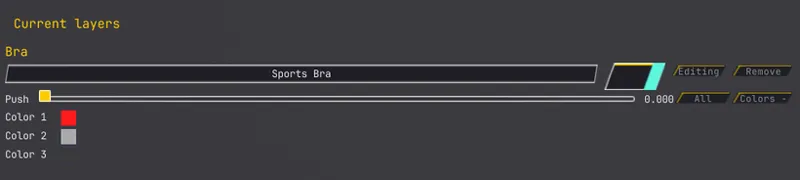
Improved Push Control The Push control has also been improved. It now expands stacked clothing more naturally, making it easier to reduce clipping between layered pieces while preserving the shape of the clothing. Together, these changes make Clothing Stack feel much less like a temporary workaround and much more like a complete layered-clothing system.
---------------------------------------------------------------------------------------------------------
👚🧦🎀🩰 Style Me
One of the biggest new additions in Wardrobe V2 is the Style Me tab.
Style Me was designed to make creating outfits faster, easier, and more enjoyable while still giving you complete control over the results.
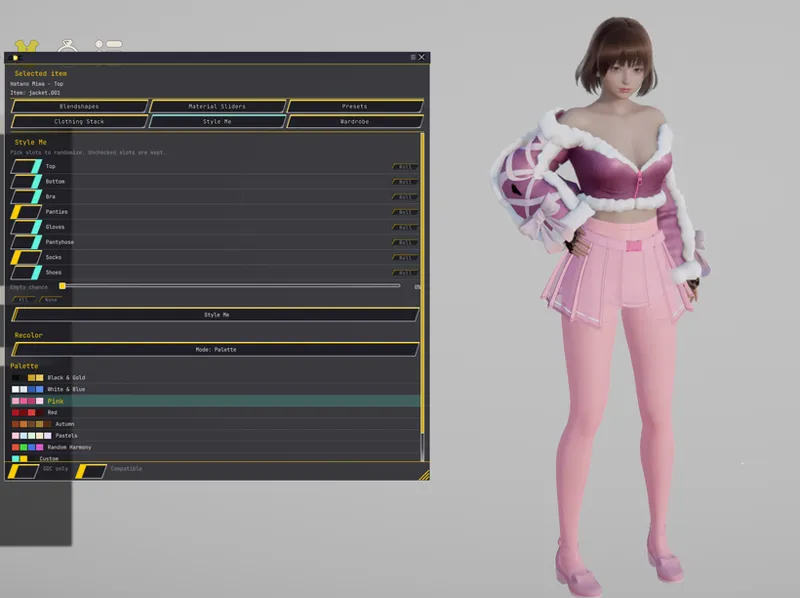
You can randomize your outfit with just a single click, Style Me lets you choose exactly which clothing categories will participate in the randomization process
Whether you want to generate an entirely new outfit or simply replace a single clothing item, Style Me gives you the flexibility to do both.
This includes a Clothing Category Selection
Every major clothing category now has its own selection button. Examples include: • Top • Bottom • Bra • Panties • Gloves • Socks • Shoes • Accessories …and more.
Simply enable the clothing categories you want Style Me to randomize.
Disabled categories will remain exactly as they are, allowing you to preserve parts of your outfit while generating new ones.
For example, you can keep your favorite jacket while generating a new pair of pants and shoes, or generate a completely new outfit with a single click.
Style Me Button
Once you've selected the clothing categories you'd like to randomize, simply press the Style Me button.
Wardrobe will instantly generate a brand-new outfit using only the categories you've enabled
This makes experimenting with different clothing combinations incredibly fast without affecting parts of your outfit you want to keep
Empty Chance
One of our favorite additions is the new Empty Chance option.
Real outfits don't always use every available clothing slot.
Empty Chance allows Style Me to intentionally leave selected clothing categories empty during outfit generation, creating much more natural and varied outfit combinations.
For example, an outfit may generate without: • Gloves • Stockings • A jacket • Accessories Depending on your settings.
This helps prevent every randomly generated outfit from feeling overly crowded and creates more believable fashion combinations.
Generate Again
Didn't find an outfit you like? Simply press Style Me again. Every click generates a completely new clothing combination while respecting all of your selected clothing categories and Empty Chance settings. There's no need to reconfigure the panel every time—you can continue generating new outfit ideas with a single click until you find one you love.
Designed for Creativity
Style Me isn't just a random outfit generator. It's a powerful outfit creation tool that gives you control over what changes while leaving the rest of your character exactly the way you want. Whether you're looking for inspiration, creating new fashion combinations, or quickly designing outfits for multiple characters, Style Me makes the process faster, easier, and much more enjoyable.
---------------------------------------------------------------------
🎨🖌️ New Recolor System
One of the biggest additions in Wardrobe V2 is the brand-new Recolor System.
We wanted recoloring to be more than simply picking random colors. Whether you're creating coordinated outfits, restoring an outfit back to its original colors, or experimenting with completely new looks, the new system gives you multiple ways to customize your wardrobe with just a few clicks.
Every recolor mode was designed for a different purpose, allowing you to decide exactly how your outfits should behave.
As Shipped
Want to return an outfit back to the colors originally chosen by the clothing creator? Simply select As Shipped, and every supported clothing piece will automatically restore its original color scheme. Perfect for undoing experiments or returning an outfit back to its intended appearance, then by click the recolor outfit the outfit will recolor the outfit with the 3 color palletes shipped the mod with
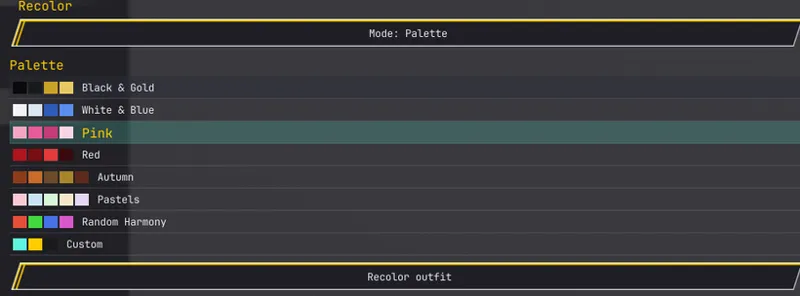
Mode: Palette
Sometimes you don't want random colors—you want colors that actually work well together. Palette Mode applies professionally designed color palettes across your selected outfit, creating coordinated looks without manually adjusting every color. Wardrobe V2 includes multiple built-in palettes, including:
• Black & Gold • White & Blue • Pink • Red • Autumn • Pastels • And more...
This makes creating stylish outfits much faster while still allowing variety.
Mode: Random
Feeling creative? Random Mode generates completely new color combinations every time you press the button. It's perfect when you're looking for inspiration or simply want to discover color combinations you may not have thought of yourself. Every click creates a completely different look.
Mode: Previous
One of the most requested features. Normally, when generating new outfits, the colors would also change. With Keep Previous Colors, Wardrobe preserves the color scheme already applied to your character while still allowing clothing pieces to change. This lets you experiment with different outfit combinations without losing a color palette you've already created. It's especially useful when combined with Style Me.
The new Recolor System works seamlessly with the new Style Me feature, giving you even more control over outfit generation. For example, you can: • Generate a random outfit while preserving your existing colors using Keep Previous Colors. • Generate a random outfit and apply one of the built-in Palette color schemes for a coordinated appearance. • Restore every item back to the creator's original colors using As Shipped. • Create completely unique outfits using Random colors. • Build your own signature color combinations with Custom mode. By combining Style Me with the Recolor System, Wardrobe V2 gives you complete control over both what your character wears and how those outfits are colored, making it easier than ever to create outfits that match your own style
-----------------------------------------------------------------------------------------------------------------
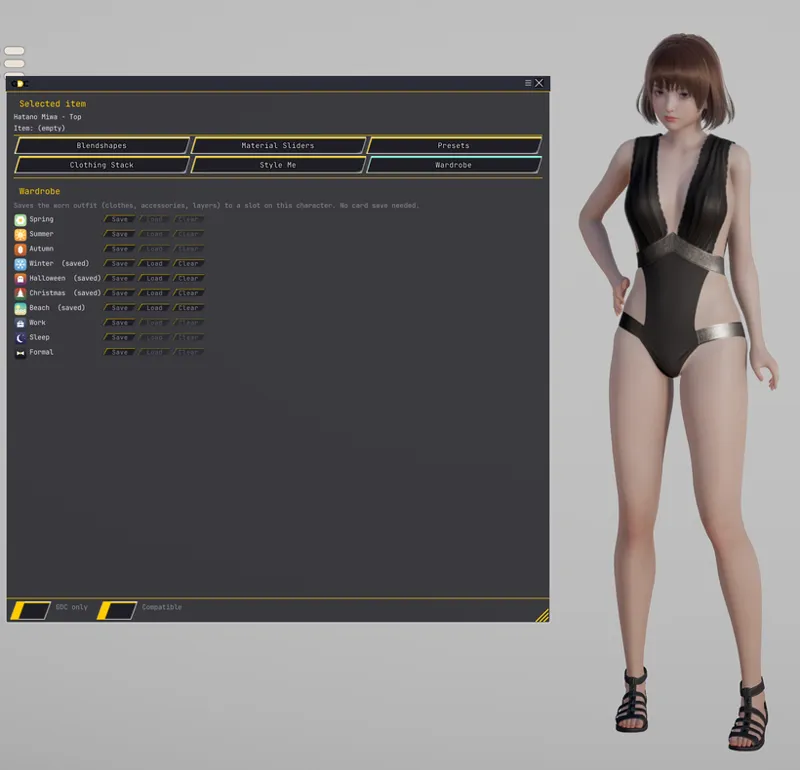
👗 👢 🎀 🧣 Character Wardrobe System
One feature Sly and I always wanted was for Wardrobe to feel like an actual wardrobe instead of simply another clothing editor.
With Wardrobe V2, every character can now have their own personal wardrobe, allowing you to organize and instantly switch between multiple outfits without searching through coordinate folders every time.
Save Outfit After creating an outfit you like, simply press Save Outfit. Wardrobe will save the character's current clothing setup as a new wardrobe entry. Instead of replacing previous outfits, every new save is added to that character's personal wardrobe collection. This allows a single character to own multiple outfits at once.
Outfit Name
Every saved outfit can be given its own custom name. For example: • Casual • Summer • Winter • Beach • Work • Sleep • Halloween • Christmas • Formal • Party • Armor • Custom Giving your outfits meaningful names makes them much easier to organize and find later.
Character Wardrobe folder, Every outfit you've saved for that character appears inside their own Wardrobe list. Whenever you load that character again, all previously saved wardrobe entries are automatically available. No searching through folders. No remembering file names. Everything stays with that character.
Load Outfit Want to change your character's clothes? Simply click one of the saved wardrobe entries. Wardrobe instantly loads the selected outfit, allowing you to swap between different looks in just seconds. This makes changing outfits feel much more like opening a real wardrobe instead of loading separate coordinate files.
Update Outfit Made changes to an existing outfit? Simply select the wardrobe entry and choose Update Outfit. The saved outfit is replaced with your new version while keeping the same wardrobe slot and name. No need to delete it and create another entry.
Delete Outfit Outfits you no longer need can be removed individually without affecting the rest of your wardrobe. This makes it easy to keep your wardrobe organized as your collection grows.
Character Specific One of the biggest advantages of the new Wardrobe System is that wardrobes belong to each individual character. Every character has their own separate outfit collection. This means one character can have an entire wardrobe of casual clothing, while another character can have a completely different collection of fantasy, formal, or seasonal outfits. Their wardrobes remain completely independent from one another.
Designed to Feel Like a Real Wardrobe The goal of this system was to make changing outfits feel natural. Instead of constantly browsing through coordinate folders or searching for files, your favorite outfits stay attached to the character they were created for. As your wardrobe grows, switching between outfits becomes as simple as opening a closet and choosing what to wear.
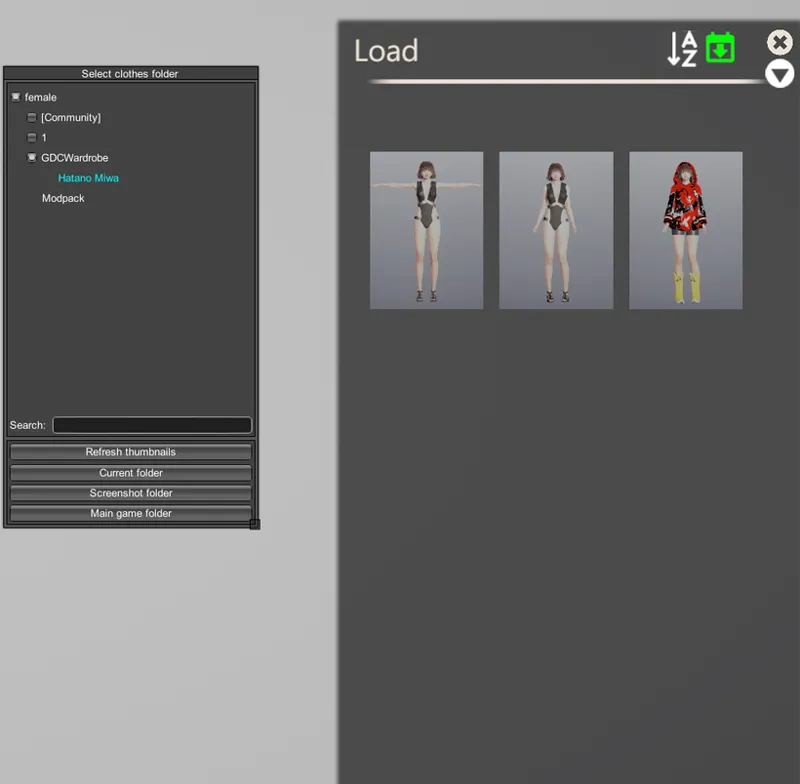
What happens to the clothes i saved in the wardrobe?? No worries wardrobe will make a separated folder you name "GDCWardrobe" Inside here youll find your character and their respective outfits! Yes if you clear an outfit it will also be deleted from the wardroble folder!
❤️ Thank You
First of all, thank you all for your patience, your bug reports, your suggestions, and your continued support.
A huge thank you also goes to @Sly, whose hard work and dedication continue to push the limits of what we thought was possible with the Wardrobe system. None of these improvements would have been possible without the countless hours invested into making this project better.
We also want to thank every single beta tester and community member who has taken the time to report issues, suggest new ideas, and help us improve the plugin. Your feedback has directly influenced many of the features and fixes included in Version 2.
Wardrobe V2 is not the end of development—it's just the beginning.
We will continue expanding the plugin with new features, workflow improvements, quality-of-life updates, and bug fixes based on your feedback.
The Wardrobe shader system will also continue receiving updates. Plush, Glam, Snow, Rain, and future materials will keep evolving as we improve their visuals, compatibility, performance, and add entirely new effects over time.
Our goal is to make GDC Wardrobe feel less like a simple clothing plugin and more like a complete clothing creation and customization platform for Honey Select 2.
There is still so much we want to build, and we're incredibly excited to share that journey with all of you.
Thank you again for being part of this project, and we can't wait for everyone to experience Wardrobe V2.
And yes this plugin is
FREE
See you all in 2 days! ❤️
Comments (2)
¡Lindas vestimentas!.
Hola Abel! gracias como has estado??