
GDC Wardrobe Plugin Free
Hey everyone!
As I mentioned before, this plugin was created out of love for the community and to give my supporters a more fun way to interact with my clothing mods. I won't be putting it behind a paywall or selling it separately—I want everyone to enjoy it! If you'd like to support our work, you're always welcome to join us on Patreon.
We're just getting started. The plugin will receive regular updates with improvements to the stacking system, more presets, new features, and even more functionality over time. Feel free to share this plugin anywhere!
Installation:
Place GDCPlugin.dll inside your BepInEx\Plugins folder
Place GDC Mods inside your mods folder
The plugin can be used on its own for the stacking system and shaders, but it becomes even more powerful when used with my clothing mods.
Enjoy!
Plugin download: GDC Wardrobe Plugin
---------------------------------------------------------------------------------------------------
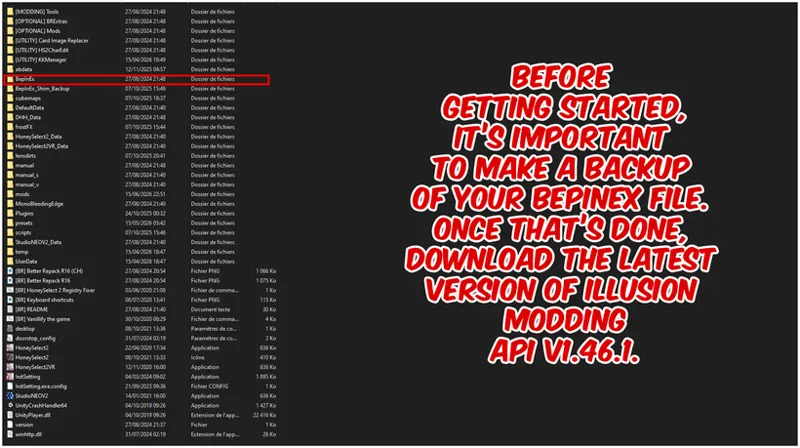
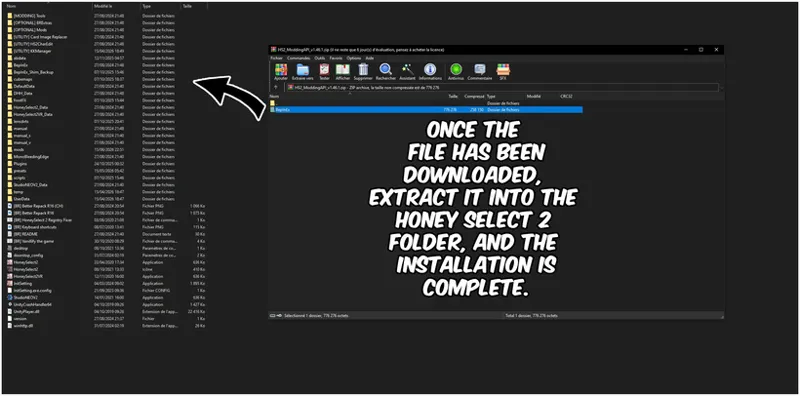
IPI Dependency
If the plugin doesn't work for you please follow the instructions bellow, also its very well recommended to have the latest repack installed R16
Download Releases · IllusionMods/IllusionModdingAPI
API v1.46.1
Thanks CPTseyka for this amazing tutorial
Comments (14)
It's only for HS2. I installed it on AI Shoujo and it doesn't work, or maybe I'm doing something wrong.
Thank you for sharing this awesome feature, it really improves a lot the customization.
Is there a way to swap back to a piece of clothing that I put into a layer? I'm constantly swapping back and forth between clothing to change colors and textures to see what looks good and doesn't but it seems that there is no way to go back. Also, how do I open material editor for clothing added into layers? Currently, it seems you have to work on each layer of clothing, get it exactly how you want it before moving on to the next layer because it's impossible to go back and change the previous layers. It makes working on multiple layers a nightmare. Also, I'm only using this in studio so maybe this works for main game?
Hi SatinAndIvory! It also works on the main game. The way the layers work currently, after created, it is fixed and you can't change any properties (you can't access material editor for a created layer), but this is something we are discussing to change for future updates.
Thank you so much for your hard work GDC <3
Thank you for being amazing!
Wardrobe shaders where?
its inside the same Download file, it has the plugin and a folder name "mods" inside there is the shaders
And to be clear, this is for studio only?
Maker and Studio
¡Gracias!.
Denada!
Ah, so it's actually free! That's awesome, thank you. But then allow me bombard you with some QoL suggestions already for the Studio: a toolbar icon for easy access without hotkey, a GUI scale setting in the F1 menu for people with high res displays, an unified list for blendshapes of all current clothes not just selected (most clothing mods dont have anyway).
thanks for all this suggestions! remember this is the base of the plugin many more updates coming soon!