
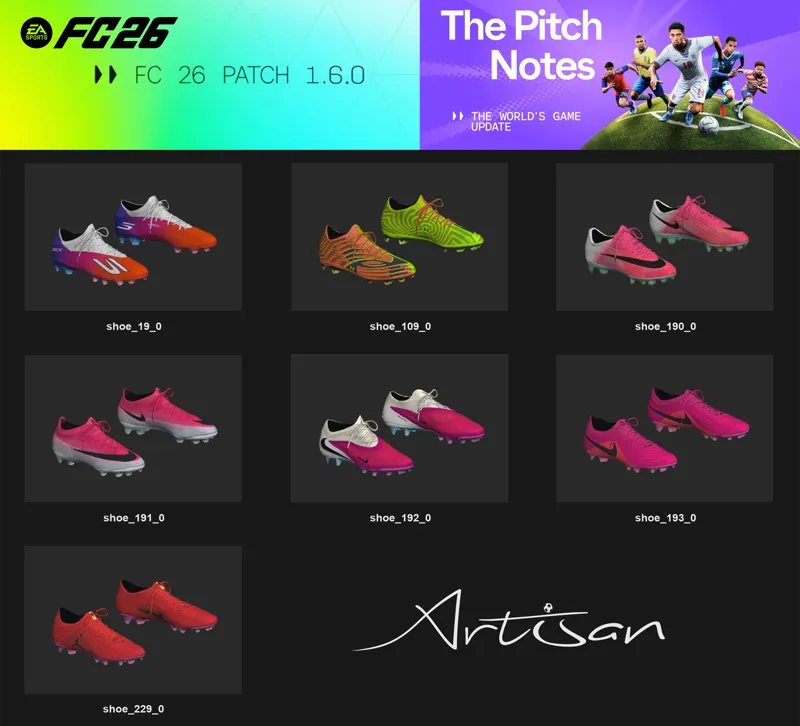
🆕v1.6.0 Boots & 📦42.0⏳🚀
🆕7 Boots added by EA in FC26 v1.6.0, highlighting the next-gen Nike Mercurial Vapor 17 & Superfly 11 models🔥
✍️Given the amount of modifications and corrections I'll have to make to our mods after this new update, it won't be possible to release our updated Bootpack today... Our 📦42.0 was scheduled for Saturday, May 30th, but I will bring it forward to tomorrow already updated to the new version🔜
⏳So tomorrow we should release our 'Artisan Bootpack FULL 42.0 for FIFA23, FC24, FC25 & FC26 v1.6.0 🚀
Comments (6)
do u have a tutorial how i make your mod work?
If you updated your game to FC26 v1.6.0, we don't have a compatible version yet, as I explicitly stated not to update the game before everything was ready and released for the new update 🔗👇 https://www.patreon.com/posts/fc26-v1-6-0-159407349 https://www.patreon.com/posts/fc26-v1-6-0-41-2-159459825 ...The version compatible with v1.6.0 will be released later today 🔗👇 https://www.patreon.com/posts/42-0-159515868 =========================================================== If your game is still on version v1.5.6, here are the recommendations 🗒️👇 Open the Mod Manager and import the mods located in the Bootpack folder 📽️👇 https://drive.google.com/file/d/1nbB2DYFTSJntasDv1xb2f8qG4mxZHIb5/view?usp=sharing ----------------------------------------------------------------------------------------- 👉 For all the Boots & GK Gloves to appear in the game, you must use the mods in the order and position I recommend. The image is inside the Bootpack folder 📁👇 https://drive.google.com/file/d/1mVITb5etSRYf3fRi8gr-kp-iHfcw2Tp9/view?usp=sharing 📸👇 https://drive.google.com/file/d/1SDeY6wrrCkv_M5Ofi_NBtSChOTO98YDj/view?usp=sharing ...With the Unlock mod in that exact position, as the highest priority, at the very bottom of the list of mods applied in the Mod Manager, it's number #1 on the list. ----------------------------------------------------------------------------------------- 👉 Do not use other Boots mods from other Modders together, as this may cause incompatibility. ---------------------------------------------------------------------------------------- ...If you are using them in the correct order, and still not all the boots are appearing, it is very likely that the Unlock Mod is not working properly, in this case, perform this procedure 👇 - Do not allow the game to connect to the internet, if it did before, delete the ''assets'' file in the **settings folder of the FC26 and put the EA app in offline mode before running the Mod Manager. **if you can't find the settings folder this video will help you 👇 https://www.youtube.com/watch?v=1i3yNVUTV20 - Try the alternative method ''Delete FIFAModData and launch'' of running Mod Manager 📸👇 https://drive.google.com/file/d/14tZFo8jX6k49JV1K_2FQn_3WFisZlpA1/view?usp=sharing ========================================================== If your problem is related to issues with the Mod Manager after version 1.5.6, you need to perform these procedures 👇 https://www.patreon.com/posts/solving-problems-158190261 https://x.com/LTA_MOD/status/2054977079502889270?s=20 ----------------------------------------------------------------------------------------- I would also recommend, if you aren't already, using the Live Editor, as I show in the test video of our mods. Here's the link to the latest version, which is compatible with v1.5.6 🔗👇 https://www.patreon.com/posts/155852881 ---------------------------------------------------------------------------------------- If simply following FIFER's instructions and using the Live Editor doesn't solve your problem, I would recommend repairing your game in the EA app, or uninstalling and reinstalling everything as a last resort.
But where do i put the playerboots.txt then?
The Unlock Tables are the primary files for our Unlock Shoes & GK Gloves mod... I'm making them available to modders and users who want to make their mods compatible. Unlock Shoes & GK Gloves is a mod that edits the database, so there may be incompatibility with other mods that also make changes to the database... Importing these tables into the database of other mods with the FIFA Editor Tool makes the mods 100% compatible.
i have a error importing the bootpack in rdbm
I have no experience or knowledge in RDBM and I won't be able to help you with that... I don't use and have never used this tool for anything related to my work.