

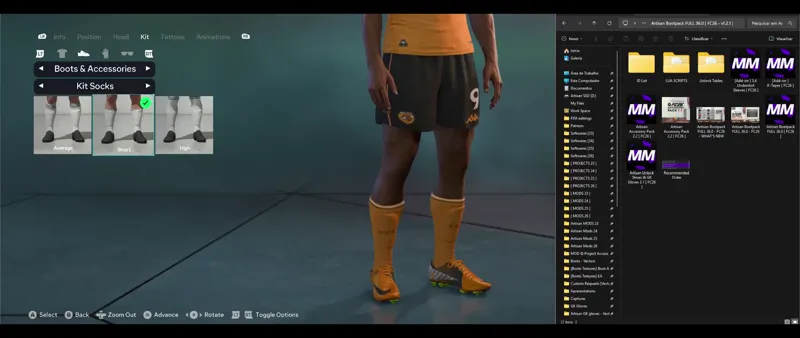






📽️Artisan Accessory Pack 2.2 [ FC26 ] 🔥
Almost everything is ready to release our 'Artisan Accessory Pack 2.2 along with our 📦36.0 🚀
Low Socks, Arm Sleeves, Nasal Stripes, Gripper Socks, Ankle Tapes, Winter Gloves and Much More 🔥
All the accessories we've made so far are already included... Our 3/4 Undershirt Sleeves and K-Tapes will come as add-on mods, as I remember many people asking back in FC25 for them to be separate from the main pack so they could choose whether or not to use them 👇
The Arm Sleeves and Nasal Stripe were created using models from the game itself... The "Extension" feature of the Live Editor (📽️👆) allowed us to do this and will provide even more possibilities in the next version of our Accessory Pack, the "3.0," which will begin development in early 2026⌛🔥
Comments (22)
When I try to edit a player through LE get a code a the bottom saying "Not authenticated" .. any help would be appreciated.
I have no idea brother; it’s never happened to me, and I don’t know about any potential errors with the tool... I’d recommend asking the creator🔗👇 https://www.patreon.com/c/xAranaktu/home?vanity=xAranaktu https://discord.gg/yxAbpmNaFX https://x.com/FCLiveEditor
Gracias brooooo sos el mejor me salvaste la vida con mi modo carrera
SO I JUST DOWNLOD REGULAR LIVE EDITOR AND THEN WHAT
The VIDEO DOSENT HAVE SOUND SO I CANT REALLY FOLLOW
How can I apply the nose tape to my pcm ?
📽️9:25 / 12:04
hey artisan im getting a message a file with name shoe_349_brt already exists any help
Update your FC26 to v1.5.5 and use the latest released Bootpack 🔗👇📦 https://www.patreon.com/posts/artisan-bootpack-157756934
hey bro, some boots arent loading, can you help?
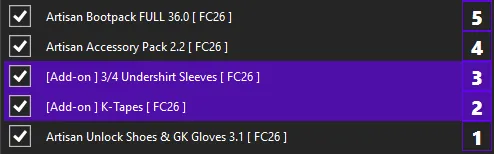
👉 Do not use other Boots mods from other Modders together, as this may cause incompatibility. ----------------------------------------------------------------------------------------- 👉 For all the Boots & GK Gloves to appear in the game, you must use the mods in the order and position I recommend. The image is inside the Bootpack folder 📁👇 https://drive.google.com/file/d/1mVITb5etSRYf3fRi8gr-kp-iHfcw2Tp9/view?usp=sharing 📸👇 https://drive.google.com/file/d/1SDeY6wrrCkv_M5Ofi_NBtSChOTO98YDj/view?usp=sharing ...With the Unlock mod in that exact position, as the highest priority, at the very bottom of the list of mods applied in the Mod Manager, it's number #1 on the list. ---------------------------------------------------------------------------------------- ...If you are using them in the correct order, and still not all the boots are appearing, it is very likely that the Unlock Mod is not working properly, in this case, perform this procedure 👇 - Do not allow the game to connect to the internet, if it did before, delete the ''assets'' file in the **settings folder of the FC26 and put the EA app in offline mode before running the Mod Manager. **if you can't find the settings folder this video will help you 👇 https://www.youtube.com/watch?v=1i3yNVUTV20 - Try the alternative method ''Delete FIFAModData and launch'' of running Mod Manager 📸👇 https://drive.google.com/file/d/14tZFo8jX6k49JV1K_2FQn_3WFisZlpA1/view?usp=sharing ---------------------------------------------------------------------------------------- If there is incompatibility with another mod you are using (whether it's your own mod or one from another creator), I provide the primary files for our Unlock Shoes & GK Gloves inside the "Unlock Tables" folder. This is the mod that edits the database and may be incompatible with mods that function similarly. In this case, it will be necessary to include these files from the Unlock Tables folder in the other mod that is having incompatibility issues... if it's your personal mod, you should import these files into your mod's database using the FIFA Editor Tool in your project, save, and re-export the mod. If it's a mod from another creator, I recommend trying to contact them and see if they can do this.
Yo bro, I got a quick question. Which Live Editor are you using? I downloaded an EA FC26 Live Editor tool that I found online but its not the same as yours.
Hey my brother, I always use the latest version... this is the last one released 🔗👇 https://www.patreon.com/posts/155852881
Buenas amigo,no consigo ponerle las mangas 3/4 a mbappe,es posible o solo se puede en modo carrera??
Hey my brother, if you have the ''[Add-on] 3,4 Undershirt Sleeves [FC26]'' mod activated and in the recommended order, it will appear in the player customization 📸👇 https://drive.google.com/file/d/15aBq8VgYkwvEy1xxhhCfsaekcfYt2eVM/view?usp=sharing
How to show all option like your video? Do you use unlock all mod?
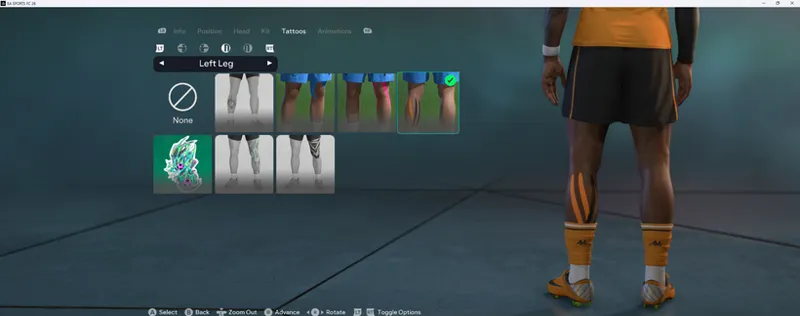
These "Tattoos" and "Facial Accessories" tabs customizations only appear in the player's career mode, but these accessories can be selected for any other player using the Live Editor, following the same process as the other accessories shown in the video.
How do I unlock all the boots?
Use the Unlock Shoes & GK Glove mod in the recommended order and position, as shown in the post above 👆
Gracias amigo 🤝
Espectacular bro👏👏. Te hago una consulta, como le coloco esos pantalones tan cortos, como el del ejemplo del video. Tiene el short más corto de lo normal
Hey my brother, BodyType in Appearance in the Live Editor... this specific body type belongs to Ruud Gullit 📸👇 https://drive.google.com/file/d/1z8czz8jgQQ7pvIZ8XcuGLq7a7Xw2yx22/view?usp=sharing There are some body types that have shorter shorts, like Kyle Walker's and Jack Grealish's... there may be more, each with their own particular characteristics. If you're into that, I recommend browsing through the types that exist in the game, It's pretty cool.