






How To Make An Overrides Folder Tutorial
So you are downloading a mod and the post says to place it in your overrides folder, but you don't have one! What are you going to do?
Well I am here to help you make an overrides folder and make the game recognize it!
There are two ways we can do this, 1) is you download my resource.cfg file and replace yours with mine, or 2) you edit yours with the code matching mine! I will show you both ways.
Backup your saves by copying and pasting the saves folder from C:\Users\Your User Name Here\Documents\Electronic Arts\The Sims 4\saves (Windows) OR Finder->Documents->Electronic Arts->The Sims 4->saves (Mac) to a safe place on your computer, either an external harddrive, your desktop, another drive on the same computer, a flash drive, or so on.
Windows Users:
Easy Way
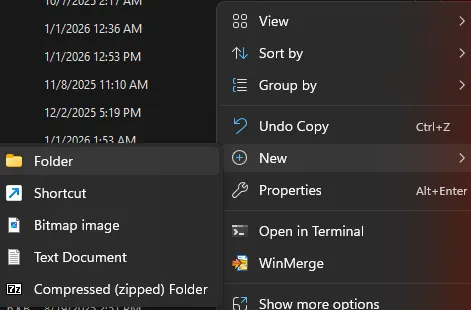
Go to C:\Users\Your User Name Here\Documents\Electronic Arts\The Sims 4\Mods and replace your resource.cfg file with my attached file. (Say yes to overwriting it!) Then make a new folder (right click in the mods folder and select new->folder) and name it Overrides inside your Mods folder.
And then place your mods that require an overrides folder in this new folder!
OR
Less Easy Way
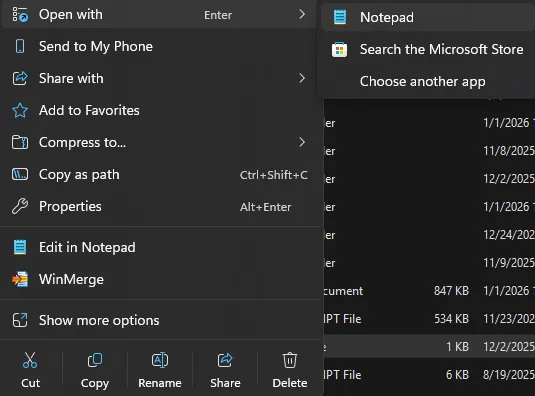
Go to C:\Users\Your User Name Here\Documents\Electronic Arts\The Sims 4\Mods and open your resource.cfg file by right clicking on it and selecting open with notepad. NOT MICROSOFT WORD or the like.
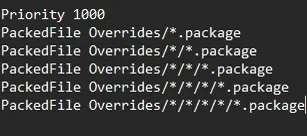
Then add this text under the text in the file exactly as you see it (can't copy + paste it, Patreon messes it up, sorry):
Save your file (make sure it doesn't save as a .txt file, but it saves as a .cfg file).
Create a new folder (right click in the mods folder and select new->folder) and name it Overrides.
And then place your mods that require an overrides folder in this new folder!
Mac users:
Easy Way
Go to Finder->Documents->Electronic Arts->The Sims 4->Mods and replace your resource.cfg file with my attached file. (Say yes to overwriting it!) Then make a new folder (right click then select New Folder) and name it Overrides in the mods folder.
And then place your mods that require an overrides folder in this new folder!
OR
Less Easy Way
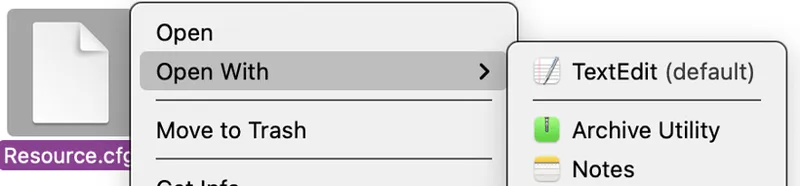
Go to Finder->Documents->Electronic Arts->The Sims 4->Mods and right click on your resource.cfg file to open it with TextEdit. NOT MICROSOFT WORD or the like.
Then add this text under the text in the file exactly as you see it (can't copy + paste it, Patreon messes it up, sorry):
Create a new folder (right click in the mods folder and select New Folder) and name it Overrides.
And then place your mods that require an overrides folder in this new folder!
------------------------------------------------------------------------------------------------------------------
You can organize Custom Content in your new Overrides folder too. But, you should only go four folders deep into your Overrides folder, from what I've heard at least. So it would look like "Mods\Overrides\ClaudiaSharon\New\Clubs\Music\" and that would be where you put my music related Club mods, etc.
If you have any questions feel free to comment here or in my chatroom on Patreon for help!
Comments (5)
Lol, all I did was create the overrides folder 🤦🏼♀️🤣 Oops. Wonder how my game will work with it actually working.
I'm curious why you need the overrides label. I have overrides in my mods folder without the overrides label and they still work fine CFG File below Priority 500 PackedFile *.package PackedFile */*.package PackedFile */*/*.package PackedFile */*/*/*.package PackedFile */*/*/*/*.package PackedFile */*/*/*/*/*.package
It’s all about mod load order tbh!
It offers great way to manually manage mods load order. Quite "affordable" method to do some simple incompatibilities fix... first loaded mod will be the one used by the game (to not overcomplicate...) It's also possible to create "lower priority folder" to make sure the mods inside will be the last to load in game For ex, my cfg file look like this atm : Priority 200 PackedFile .LoadLast/*.package PackedFile .LoadLast/*/*.package PackedFile .LoadLast/*/*/*.package Priority 1000 PackedFile .LoadFirst/*.package PackedFile .LoadFirst/*/*.package PackedFile .LoadFirst/*/*/*.package Priority 500 PackedFile *.package PackedFile */*.package PackedFile */*/*.package PackedFile */*/*/*.package PackedFile */*/*/*/*.package PackedFile */*/*/*/*/*.package PackedFile Data/*Strings.tmcatalog PackedFile */Data/*Strings.tmcatalog I had a priority 600 folder that i recently deleted after new year mods cleaning eheh
Yep there are many ways you can do it!