



NalulunaSaber
Description
Completely new custom saber mod.
- All custom sabers can still be used with Beat Saber 1.29.4 (spec change) or later
- Different custom sabers can be selected for 1st person view, 3rd person view (camera), right saber, left saber, right trail, and left trail.
- Common settings for all sabers and individual settings for each saber are available. You can set the offset for a specific saber, for example.
- In the old CustomSaber mod, the Beat Saber's trail renderer caused some custom sabers to cut off the trail tips or make the trail choppy during processing downtime, but this has been resolved in NalulunaSaber.
- Includes built-in tricks that are activated by the controller's triggers. These include Rotate (saber rotation), Swap (saber swap), and Babylon (saber launch).
Settings
On the left side of the settings screen, you'll find general mod settings.
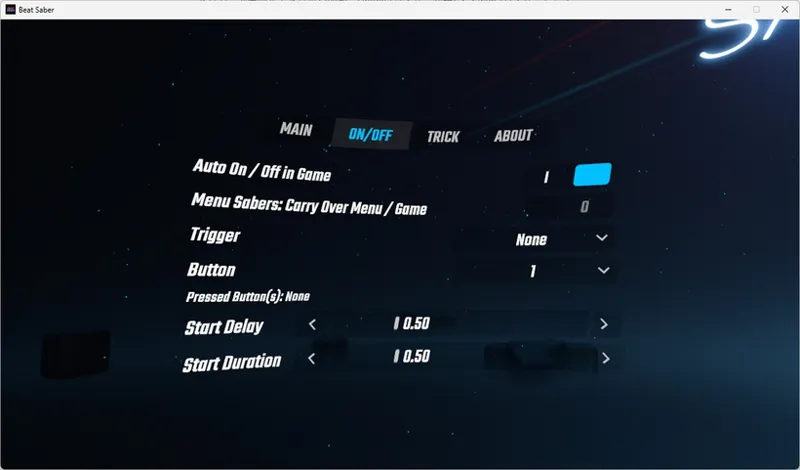
In the ON/OFF tab, you can configure the settings for extending and retracting your sabers.
• Auto On / Off: Automatically turns the sabers On when the song starts, and Off when the song ends.
• Auto On Delay: When Auto On / Off is enabled, this sets how many seconds after the song starts the sabers will turn On.
• On / Off Duration: The amount of time it takes for the sabers to extend or retract.
• Menu Sabers: Carry Over Menu / Game: When Menu Sabers (the setting in the MAIN tab that displays sabers on the menu screen) is enabled, this maintains the sabers' On/Off state between the menu and the game.
• On / Off Trigger: Toggles the sabers On/Off using the controller triggers.
• On / Off Button: Toggles the sabers On/Off using a controller button. (To see which button corresponds to which number, press and release the buttons while checking the real-time "Pressed Buttons:" display.)
The right side of the settings screen allows you to toggle between global settings for all sabers and individual settings for each specific saber.
• ALL (Top Left): When selected, settings apply to all sabers globally.
• Saber Name (Top Right): When selected, you can apply unique, separate settings exclusively to that specific saber.
Since the application range is configured per tab, you can use global settings for trails while setting individual offsets for each saber.
Please note that the Offset settings are strictly visual and do not change the actual hitbox of the sabers.
Download
Download via NalulunaModAssistant.
Comments (1)
Hi, some custom sabers like PlasmaKatana have a FC effect, which appreas in the beginning of the map and doesn't go away until you miss a note. Is there any way to fix that or at least remove the FC effect completely?