
NalulunaDesktop
Video:
https://youtu.be/j-GuHk4poMw
Download:
All my mods are distributed via NalulunaModAssistant.
NalulunaModAssistant
https://www.patreon.com/posts/74489335
Description
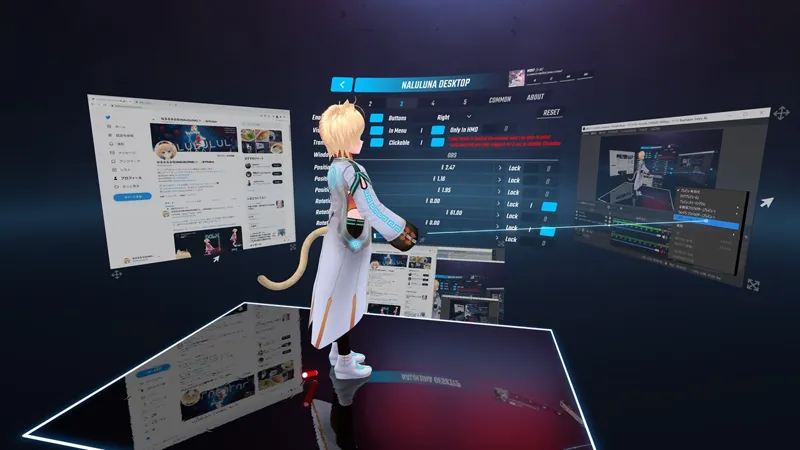
A mod that displays the Windows desktop and applications in Beat Saber. You can also control them with an in-game pointer.
Grabbing the crosshair in the lower left corner with the pointer moves the window. Use the thumbstick while grabbing to move the depth. Grabbing the bottom-right crosshair with the pointer to zoom in and out of the window. Click on the cursor at the bottom center to switch window control on/off.
While operating a window, holding down the trigger corresponds to right-click, and thumbsticks correspond to mouse wheel rotation. Note that you cannot touch the part of the window that is outside the monitor.
Settings
Buttons: Location for Move, Window control on/off, Zoom in/out buttons
Visible: Show/hide in menu, Show/hide in game (song)
Only in HMD: Hidden in third person view of CameraPlus and Camera2
Translucent: Translucent window
Clickable: Toggles Window on/off
You will not be able to operate the Beat Saber user interface behind the window. In the worst case, the entire screen will be covered and you will not be able to return to the setting. If this happens, hold down both triggers on the left and right controllers at the same time for 5 seconds to disable this setting.
Window Title: Which application should be displayed. The application is specified by the title string (partial match). If blank, the desktop is displayed. In a multi-monitor environment, specifying "desktop1, desktop2, ..." as the Window Title will display other desktops.
Lock: When moving the window with the pointer, the locked axis will not change
Common: Settings to share in all windows
Pointer Stabilizer: Pointer stabilization is activated while the pointer is visible
Double Click Wait: Time range for a double trigger press to be considered a double click
Right Click Wait: Time until a right click is performed by holding the trigger
Click Recognition Distance: Pressing the trigger twice while the pointer does not move beyond this distance will perform a double-click, holding down the trigger without moving the pointer beyond this distance will perform a right-click, and holding down the trigger and moving the pointer beyond this distance will perform a mouse drag.
Mouse Cursor Position Fix: Adjusts the mouse cursor position
NalulunaDesktop.json
(Beat Saber Dir)\UserData\NalulunaDesktop.json
You can directly rewrite the configuration file to make settings that are not in the game. The file can be edited while the beat saber is running, and will be reflected in the game when the file is saved.
Note that if you fail to edit the settings file, the settings will be lost, so it is recommended that you make a backup of the settings file before editing.
In NalulunaDesktop.json,
"windows": [
],
section corresponds to the settings tab 1-5 in NalulunaDesktop.
If windowSizeLock is true, NalulunaDesktop forces the window size to the number set below when the window is captured.
"windowSizeLock": true,
"windowSize": {
"x": 1000.0,
"y": 1000.0
}
It allows clipping of the portion of the window that is not needed to be displayed.
Specify a ratio of 0.0-1.0. The following example shows clipping by 1% on the left and right, and 16.5% on the top and bottom.
"clipLeft": 0.01,
"clipRight": 0.01,
"clipTop": 0.165,
"clipBottom": 0.165,
----
Older versions
Will not work or will be faulty in newer Beat Saber versions.
NalulunaDesktop 0.0.16 for Beat Saber 1.24.0
https://www.patreon.com/file?h=58538911&i=11277678
NalulunaDesktop 0.0.15 for Beat Saber 1.21.0
https://www.patreon.com/file?h=58538911&i=10523198
NalulunaDesktop 0.0.12 for Beat Saber 1.20.0
https://www.patreon.com/file?h=58538911&i=10349065
NalulunaDesktop 0.0.10 for Beat Saber 1.19.0
https://www.patreon.com/file?h=58538911&i=9871233
NalulunaDesktop0.0.6 for Beat Saber 1.18.3
https://www.patreon.com/file?h=58538911&i=9407563
- This mod is available only to my supporters, so please do not provide the mod file or download link to anyone else
- No problem publishing images and videos showing this mod
Updates
0.0.16
- Fixed some cases where Only in HMD did not work properly
0.0.15
- Fixed for clipping feature
0.0.14
- Added window clipping feature (NalulunaDesktop.json edit required)
0.0.13
- Support Beat Saber 1.21.0
0.0.12
- Fixed detection when user edits NalulunaDesktop.json directly
0.0.11
- Support Beat Saber 1.20.0
- Add button settings. Allow click and right-click with controller buttons instead of triggers
0.0.10
- Changed handling of triggers to be easier to double-click
- Added Reset button to Common tab.
- Adjusted default settings
- Other fixes
0.0.9
- The function of holding down both triggers for 5 seconds to release all Clickable is limited to the menu screen
0.0.8
- Fixed a bug where an exception is raised and the mod does not work when starts without a configuration file
0.0.7
- Faster initial display of the setting screen
- When you manually edit and save the config json, it will be reflected immediately
0.0.6
- Add "Link Translucent and Clickable" setting
0.0.5
- Extend the distance of the pointer
- minor fixes
0.0.4
- Adjust the controllers handling
- minor fixes
0.0.3
- Add wait and distance settings
- minor fixes
Install
1. Install BS Utils and BeatSaberMarkupLanguage by ModAssistant
(If your mod environment is already set up, it's probably already in there.)
2. Extract the downloaded zip file to the following location (overwrite)
* C:\Program Files (x86)\Steam\steamapps\common\Beat Saber
3. "Naluluna Desktop" has been added to "MODS" (left side of the screen)
4. In order to use the Index controller's thumbstick in Beat Saber, you need the following settings
https://nalulululuna.fanbox.cc/posts/2582440
* The above description is for the default installation of Beat Saber for Steam.
If your installation location is different, please change the description accordingly.
Comments (4)
On 1.27 I've been having the issue that after an indeterminate amount of time, the windows will turn to black squares that, can be moved, but can't be clicked or resized. This happens all at once if multiple are active. Is this a known issue?
I have never experienced such a situation and never heard either. Maybe a thread for screen capture is dead, but I am not sure what is causing it, sorry.
The desktop/windows end up flipped upside down for me.
Maybe you are looking at it from the back, can't you fix it by rotating the X or Y 90/180 degrees?