
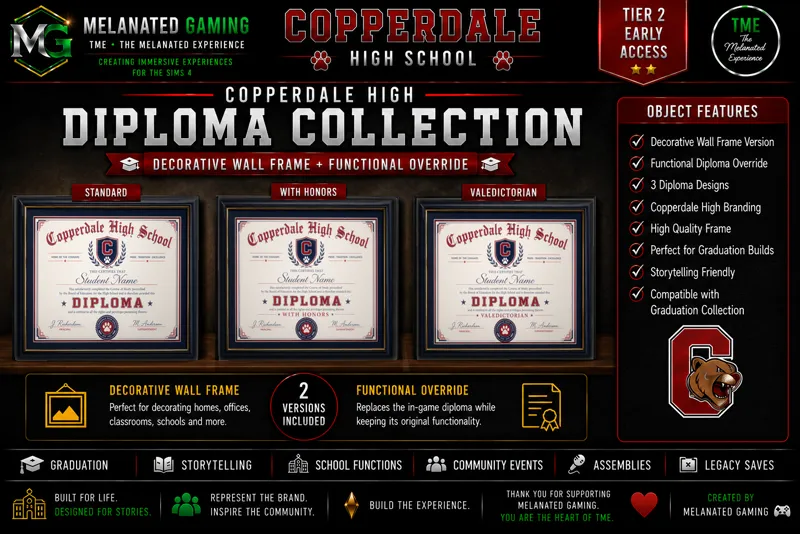
🎓 Copperdale High School Diploma Collection 🎓
Give your graduates the diploma they deserve!
The Copperdale High School Diploma Collection adds custom graduation diplomas inspired by Copperdale High School, making every graduation feel even more immersive.
This collection includes both override and decorative wall versions, giving you the flexibility to choose how you'd like your game to work.
✨ Download Includes
🎓 Standard Copperdale High School Diploma
🏅 Copperdale High School Diploma with Honors
👑 Copperdale High School Valedictorian Diploma
🔄 Override Version
Want every graduating Sim to receive a Copperdale High School diploma automatically?
Simply install the Override package.
With the override installed, every Sim who graduates using High School Years will receive the custom Copperdale High School diploma instead of the default EA version.
Requires the High School Years Expansion Pack.
🖼️ Decorative Wall Versions
Prefer to keep EA's original graduation diploma?
No problem!
The decorative wall versions are standalone objects that can be placed anywhere in your builds. They're perfect for:
🏡 Family homes
🎓 Graduation displays
🏫 Schools
📚 Trophy rooms
🖼️ Hallways and offices
📸 Storytelling and screenshots
These versions do not replace the in-game graduation diploma and can be used regardless of whether you install the override.
💻 DX11 Users
⚠️ Created using DirectX 9 (DX9).
If you are playing The Sims 4 using DirectX 11 (DX11), you may need to Batch Fix your Custom Content using Sims 4 Studio to ensure full compatibility.
📥 Installation
Download the package file.
Place it in your Mods folder.
Enable Custom Content & Mods in your game settings.
Launch your game and start creating unforgettable prom memories!
📜 STANDARD USAGE GUIDELINES
⚠️ Do not claim this content as your own.
🚫 Do not re-upload or redistribute these files.
💚 THANK YOU
Your support makes projects like this possible.
Whether you download, like, comment on, or share my work, every bit of support helps me continue creating immersive experiences for The Sims 4 community.
If you enjoy this build, don't forget to leave a ❤️, share your screenshots, and tag Melanated Gaming so I can see your Sims bringing this build to life!
Thank you for being part of this journey and for helping bring these stories to life.
Happy Simming! ❤️💚💛
Represent the Brand. Inspire the Community. Build the Experience.
TME • The Melanated Experience
Creating Immersive Experiences for The Sims 4
© 2026 Melanated Gaming. All Rights Reserved.
Comments (6)
do we download all 3 overrides or just one?
Yes
Can you make copper-dale cheer and football uniform?
I have a revamp of the highschool coming, so i will include them
🔥🔥 Do you know if it’s also possible to make an override of the promposal sign?
I can try. Im still new to doing overrides