


ATS Dispatch Pro: New Multi-Drop Plugin for American Truck Simulator
Introducing ATS Dispatch Pro
What started as an idea to bring more realism and purpose to every haul has grown into a complete companion experience for American Truck Simulator.
ATS Dispatch Pro was built for drivers who want more than a basic pickup and delivery. It adds realistic multi drop routes, live job tracking, additional stops, trip history, shareable receipts, and more, all while running safely alongside the game.
My supporters helped make this project possible, so you are the first to receive access to the official release. Here is everything you need to know about ATS Dispatch Pro, why I created it, and what is included at launch.
What Is It?
ATS Dispatch Pro is a companion application that runs alongside American Truck Simulator while you play.
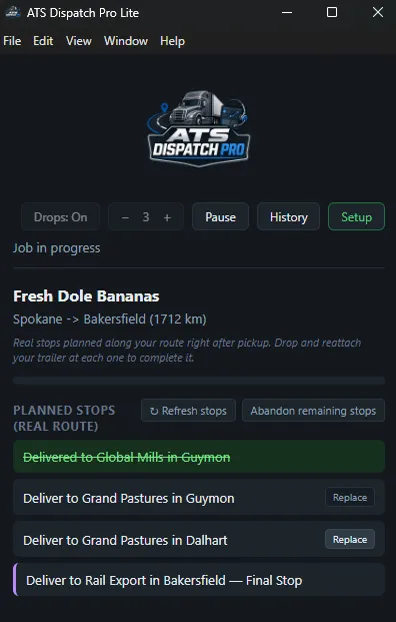
It monitors your current job in real time and adds a realistic multi drop dispatch experience on top of the job you accepted in the game. You will receive additional stops along your route, a live progress bar, and a complete trip summary once the job is finished.
One of the most important things to understand is that ATS Dispatch Pro is completely read only.
It only monitors information such as your truck’s position, speed, trailer status, and current job data. It cannot add money, modify the game, or make changes to your save file.
Think of it less like a traditional mod and more like having a second monitor dedicated to your dispatch career.
Why I Built It
Real trucking often involves more than one pickup or delivery. Drivers may transport partial loads, make several stops, and complete multiple deliveries during a single trip.
American Truck Simulator normally gives you one pickup location and one final destination. I wanted to create something that made longer hauls feel more like real dispatch runs without changing the game’s economy or putting anyone’s save file at risk.
Instead of modifying the game directly, ATS Dispatch Pro reads the information the game already provides and builds a believable multi drop experience around it.
It uses real company locations, cities, and roads pulled directly from your own installed game files instead of relying on randomly generated information.
What It Can Do Right Now
Real GPS Radius Stops
After completing the one time setup, ATS Dispatch Pro calculates a route toward your destination city and searches for real companies along the way.
Your additional stops can be created before you even leave the pickup location.
When the app cannot find suitable stops during the initial route calculation, it can discover real companies while you drive and park near them.
Even when the full setup has not been completed, the app can still operate using distance based checkpoints with real company names.
The system is designed to continue working and automatically adjust based on the data available.
A Real Final Delivery Stop
Your actual in game destination appears as the final tracked stop.
The delivery will not be marked complete just because you are close to the destination. You must be properly parked at the delivery location with the trailer physically detached.
Mod Cargo Support
ATS Dispatch Pro already includes cargo support for the trailer mods I have released through Dro Modding.
No additional setup is required for my supported trailers.
When using another creator’s trailer or cargo mod, you can point ATS Dispatch Pro toward the mod folder or ZIP file. The app will scan the files and learn the additional cargo types.
This allows custom cargo to be routed to locations that make sense instead of being treated like generic freight.
One Click Setup
The built in Setup panel installs the telemetry plugin and extracts real company, city, and road information directly from your game installation.
A live progress log is shown inside the application so you can see what is happening during the setup process.
Adjustable Multi Drop Behavior
You have full control over how many additional stops are added to your trip.
You can choose between one and ten stops or turn the multi drop system off completely when you want to complete a regular direct delivery.
When you change your mind during a trip, the Abandon Remaining Stops option clears anything still pending without affecting your actual in game delivery.
Trip History and Shareable Receipts
Every completed trip is automatically added to your trip history.
You can review previous jobs at any time and export a clean trip receipt showing your route, cargo, stops, and completed delivery information.
These receipts are perfect for sharing on Facebook, Discord, or with your virtual trucking company.
Phone Companion
ATS Dispatch Pro also includes a phone companion.
Scan the QR code inside the desktop application to view your live job status from a phone connected to the same WiFi network.
You can view your cargo, route, progress bar, stop list, and trip history directly from your phone. The companion can also be added to your home screen so it feels like a standalone mobile app.
The phone companion is view only. It cannot control the game or make changes to the desktop application.
A Proper Overlay That Stays Out of the Way
ATS Dispatch Pro runs in a compact window that stays on top of the game without covering important information.
A global hotkey allows you to quickly show or hide the overlay. You can also pause tracking whenever you need to step away without losing your current progress.
How It Was Built
This project was built using real information extracted directly from the game’s files.
ATS Dispatch Pro reads company, road, and city data, calculates routes using pathfinding, and has been tested during real driving sessions.
When something did not line up correctly during an actual haul, I went back through the real game data to find the cause and correct it properly.
This has been a long process, and the application will continue to improve as more drivers begin using it.
Getting ATS Dispatch Pro
Access is available to active supporters through Patreon or an eligible Dro Modding supporter plan on the website.
If you are already supporting, visit the My Downloads page on dromodding.com to download ATS Dispatch Pro and your activation key.
Important Installation Notice
Before opening or installing ATS Dispatch Pro, please read the included installation PDF from beginning to end.
The PDF contains the official setup instructions, activation key placement, telemetry installation steps, required file locations, and troubleshooting information.
Please do not skip the guide or attempt to guess where the files should be placed.
The activation key must be placed in the exact folder shown in the installation PDF. Placing it in the wrong location, renaming it, or leaving it out may prevent the application from opening or activating correctly.
Reading and following the guide will help prevent installation errors, activation problems, and unnecessary game crashes.
What Is Next?
I have several improvements planned, including adding sounds and notifications when stops are completed, additional interface polish, and more features for trip history and receipts.
I also plan to expand the real map data system beyond the United States so it can eventually support the European map in Euro Truck Simulator 2.
Supporter feedback will continue to shape the future of ATS Dispatch Pro. Several features included in this release came directly from real situations and suggestions shared during development.
Thank you to everyone who continues to support and make projects like this possible.
Please read the installation PDF carefully, follow every setup step, and enjoy the new dispatch experience. More updates are coming soon.
-Dro Modding
Comments (23)
Love using this however im having an issue where it never completes my jobs even when I finish the job. It registers my stops fine but doesnt complete my jobs Help
I’ll need a little more information to figure out what’s happening. Is the job not completing in the plugin/overlay, or is it showing as incomplete on the website? Please elaborate on what happens after your final stop, or send screenshots to my email so I can take a closer look.
No matter what I did I can’t get it to actually make the route for me. It shows the stops but the gps route is always direct to my delivery
Unfortunately, ATS Dispatch Pro cannot currently add the planned stops directly to the game’s native GPS route. I tried nearly every method I could think of, but the game continues to route only to the original delivery destination. For now, the stops will appear inside ATS Dispatch Pro, and you will need to manually place a waypoint on the in-game map for each stop. I will continue looking for a way to make the stops appear automatically in the native GPS, but at the moment, that part is not possible.
I wish a video could be made i cant get this mod to work
I understand. The current setup can be confusing, especially since this was only the first release. The next update will have a much more straightforward setup process, clearer instructions, and several improvements based on the problems users have reported. I’m also working on a video guide that will walk everyone through the installation and setup process step by step.
Appreciate the work you do, sir!
I truly appreciate that, brother! Thank you for the support and patience. I’m working hard to make sure this next update is much smoother and worth the wait. 🙏🏾
I did not get a PDF, how to I install this??
Ive been doing everything its saying but i still cant get the activation key to work
Apologies for the trouble. First, make sure you’ve downloaded and installed the latest hotfix from the website. Open the Setup panel and use the new option to manually locate your `key.json` file. Do not rename, edit, or move the key after selecting it. Then completely close ATS Dispatch Pro and relaunch it. If it still won’t activate, send me a screenshot of the exact error message so I can see what’s preventing the key from being recognized.
la liga de descarga. ni el PDF que dicen al principio. Lastima se me hacia interesante
nunca vi ....
nunca vi e
Runtime library expects version.sii in the install directory of ATS Dispatch Pro. Help!
I just released a new hotfix for ATS Dispatch Pro that addresses many of the bugs and errors reported since launch. Read the latest blog post for a full breakdown of the fixes and improvements included in this update. Please head to the website and download the setup file again to make sure you’re using the latest version. Feel free to reach out if you have any questions or continue experiencing issues.
Followed the PDF to the letter but I am unable to enable GPS. DotNet throws an exception. I have included the error message: Extracting real map data (this can take a couple of minutes)... C:\Program Files\ATS Dispatch Pro Lite\resources\maps-tool\node_modules\@truckermudgeon\base\assert.ts:3 throw new Error(msg); ^ Error: version.sii does not exist at assertExists (C:\Program Files\ATS Dispatch Pro Lite\resources\maps-tool\node_modules\@truckermudgeon\base\assert.ts:3:11) at Function.checkExists (C:\Program Files\ATS Dispatch Pro Lite\resources\maps-tool\node_modules\@truckermudgeon\base\precon.ts:23:12) at convertSiiToJson (C:\Program Files\ATS Dispatch Pro Lite\resources\maps-tool\packages\clis\parser\game-files\convert-sii-to-json.ts:15:33) at parseVersionSii (C:\Program Files\ATS Dispatch Pro Lite\resources\maps-tool\packages\clis\parser\game-files\map-files-parser.ts:144:7) at parseMapFiles (C:\Program Files\ATS Dispatch Pro Lite\resources\maps-tool\packages\clis\parser\game-files\map-files-parser.ts:99:21) at main (C:\Program Files\ATS Dispatch Pro Lite\resources\maps-tool\packages\clis\parser\index.ts:61:30) at (C:\Program Files\ATS Dispatch Pro Lite\resources\maps-tool\packages\clis\parser\index.ts:118:1) at ModuleJob.run (node:internal/modules/esm/module_job:222:25) at async ModuleLoader.import (node:internal/modules/esm/loader:316:24) at async asyncRunEntryPointWithESMLoader (node:internal/modules/run_main:138:5) Node.js v20.16.0 Extraction exited with code 1 -- see the messages above. A common cause is pointing at the wrong folder (it should directly contain bin\win_x64).
I just released a new hotfix for ATS Dispatch Pro that addresses many of the bugs and errors reported since launch. Read the latest blog post for a full breakdown of the fixes and improvements included in this update.
Awesome, can’t wait to give it a test drive
This is truly stunning, Dro!!!!
Thanks, man. It’s been in the works for a minute.
Yessir excited to use this‼️😎
Yessir, appreciate you! I’m excited for y’all to finally get your hands on it. Hope you enjoy it‼️😎