If you are updating then you only need GraphicRules and SimpSetters from the zip file.
⚠️ DO NOT overwrite your MySetters file or you will lose your custom setup
Introduction
Sul Sul 👋 Simp4Sims here!
I'm proud to introduce this update to the GraphicsRules file. I'm calling it Simp's Setters. The project has evolved into something completely different! It's still fundamentally about improving the GraphicsRules.sgr but now with the added ability for you to personalise it according to your needs!
In technical terms a setter is a variable. A variable is simply a stored value which can be used, manipulated and changed at a later time - much like Algebra where X=1 and Y=2.
Great but what do variables have to do with GraphicsRules?
The file is already (by default) constructed with variables. What I've done is add a bunch more into the mix (36 new options at the time of writing this). I'm calling these new variables setters, and they are everything that I feel is important or things that have been asked about on numerous occasions.
So what do setters mean for the GraphicsRules file?
Well, they open up a new door to personalising the file that I didn't even know existed a few weeks ago. The way this is achieved is by importing 2 new files into the GraphicsRules. The first is all my defaults in SimpsSetters.sgr and the second is your chosen overrides in MySetters.sgr.
ℹ️ The MySetters.sgr file will never be updated, this means whatever you add to that file will persist even if I update the other 2. As I release new setters you can add them to your overrides if you want. Otherwise enjoy your custom configuration without fear of losing your changes!
Sounds good, where can I find a list of setters?
Due to the amount of documentation required for this and due to Patreon's limited text formatting I put all the setter choices into a spreadsheet on Google Sheets.
When looking at the spreadsheet you'll see 5 columns. These are as follows:
Name This is the name of the setter
Type This is the type of setter which defines the kind of value it's expecting.
🔴 seti = intergrer (a whole number)
🟠 setf = fraction (a floating point number (with decimals))
🟣 setb = boolean (true or false)
Description A bit of explanation as to what the setter does
Expected Values A list of expected values with details on the differences
Quick Copy A list of values to quickly copy and add to MySetters.sgr - includes type, name and relevant value for each option.
🟩Green cells represent the default values so don't use these
🟪 Copy purple cells ONLY!
This is too much!! Where do I even start?
No where if you don't want to. The GraphicsRules.sgr along with SimpsSetters.sgr and an empty MySetters.sgr will still run much the same as the previous version of the file (with a couple bug fixes). So if that's all you want then ignore the spreadsheet entirely. Otherwise just take it slowly, go through the options and read about how they affect your game.
The file is smart enough to know the capabilities of your graphics card and will throttle values accordingly. So you don't need to do anything, this is to allow fine tuning for those that need/want the ability.
What if I use the wrong value or have a typo in my setters?
Wrong values will largely fallback to default or to the nearest appropriate value. I probably didn't catch everything so don't purposefully use values out of the expected range.
As for typos, if you spell a setter name incorrectly or use the wrong case (upper/lower) it will have no affect on the GraphicsRules
If you change seti/setf/setb to the wrong type or to something else it will probably break!
I'm sure there will be some unforeseen circumstances but I will address any issues as they arise.
I tried my best within the limitations of the code to make this as user friendly as possible. If your game gives you an error regarding configuration when you try to start up, then you've done something wrong in MySetters.sgr - double check the values and if you can't figure it out then contact me!
Contacting Me
The best way will be to comment here on Patreon or tag me on X/Twitter.
Default with Distance Blur - everything is default other than Ambient Occlusion and Distance Blur being enabled
Ultimate Performance - will give the best possible performance without breaking too much. It's not perfect though, the speed boost comes at a visual cost
Ultimate Quality - unless you have a high end graphics card (6GB or more) then this is probably only for screenshots. Everything is maxed out!!
To use the presets download the .zip file and from the relevant folder move the MySetters.sgr into your Config Override folder. Overwrite the file that exists.
⚠️ If you already have custom config in your MySetters file and wish to keep it then simply rename your file to something else like MySetters01.sgr before moving in one of the presets. A file that isn't named exactly "MySetters.sgr" will be ignored by the game.
The 3 files are in my Config Override folder, now what?
If you don't want to change anything then you're ready to play!
Otherwise start adding setters! Only add the setters you want to change, you do not need to add all of them. Each setter MUST be on a new line.
Using the Quick Copy column on the far right select the option you want
Press [Ctrl] + [C] (Windows) / [Cmd] + [C] (Mac) to copy the selected setter
Open up the MySetters.sgr file using a text editor
Notepad (Windows) / TextEdit (Mac) is perfect for this!
Start a new line by pressing [Enter] / [Return]
Press [Ctrl] + [V] (Windows) / [Cmd] + [V] (Mac) to paste the setter you copied
Press [Ctrl] + [S] (Windows) / [Cmd] + [S] (Mac) to save your changes
That's all! Start your game once you've added all the setters you want!
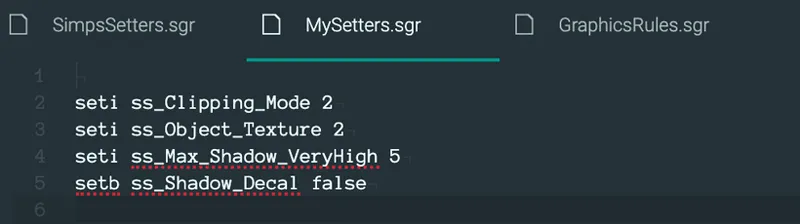
An example of a MySetter.sgr file can be seen in the screenshot below. If all you want to change is one thing then all your file would have in it is a single line
In the previous version of the file I changed the values associated with the View Distance setting to control Distance Blur. This has been removed and the default View Distance values returned. Distance Blur and Ambient Occlusion are now available as setters. They are disabled by default.
NOTE: The way Distance Blur and Ambient Occlusion are implemented in the game (not by anything I did) means that disabling Ambient Occlusion will also disable Distance Blur. I've mentioned this in the spreadsheet as well, to enable Distance Blur you need to set both ss_Ambient_Occlusion and ss_Distance_Blur to true.
ss_Clipping_Mode = New
If you use the new clipping mode option (which was the default in the previous version of the file) then the VideoCamera.ini file needs to be edited to take full advantage of the changes. You may have already made this change before in which case skip this. The file can be overwritten with updates so just check to make sure.
TargetPointDist = 2.0 needs to change to TargetPointDist = 0.18
TargetPointLimit = 150.0 needs to change to TargetPointLimit = 60.0
Find the VideoCamera.ini file in the res folder:
Windows (Origin) - …\Program Files (x86)\Origin Games\The Sims 4\Game\Bin\res
Windows (Steam) - …\Program Files (x86)\Steam\steamapps\common\The Sims 4\Game\Bin\res
Mac - right click Sims 4 in the Applications folder, choose Show Package Contents, then go into Contents > res
ss_Frame_Rate_Limit
In the Options.ini file find the frameratelimit setting. You may have changed this value before from the previous version of the GraphicsRules. Simply add a hash (#) to the beginning of this line so it reads:
# frameratelimit 200
Adding the hash to the beginning will comment out the line of code, basically meaning that it will not be processed (it gets ignored).
Then when you start up The Sims 4 it will detect that the value does not exist and generate a new line at the bottom of the file. The value will be grabbed from GraphicsRules.sgr, which is defined by the setters ss_Frame_Rate_Limit and ss_Frame_Rate_Recording - the default value (60) from SimpsSetters.sgr will get used unless you have overridden either or both the values in MySetters.sgr.
Find the Option.ini file here:
Windows - Documents\Electronic Arts\The Sims 4\
Mac - Documents > Electronic Arts > The Sims 4
Credits
♥Huge thanks and shoutout to all my patrons! Your continued support helps me to keep releasing updates like this! ♥ Huge thanks to the Beta testers for all the valuable feedback! Past, present and future ♥ Huge thanks to everyone who shares and helps to spread the word! ♥ Special thanks to @BluebellFlora for all the Mac testing and feedback! If you play The Sims 4 on a Mac go check out her website bluebellflora.com! ♥ Special thanks to @Schnuck for all the initial testing, feedback and encouraging me to release the file to the public. Go follow her on YouTube if you don't already! ♥ Special thanks to fellow Sims After Dark member @Moxie for all the continued testing. Go check out their Tumblr! ♥ Thanks to @BoringBonesTV on Twitter for the Mac Shadow fix. ♥ Thanks to @montyranch on Twitter for the Skin Details fix. ♥ Thanks to @hoosierslu on Twitter for the Steam Path to the res folder.
Comments (42)
p
pynksimz · August 4, 2026
Hello does this conflict with Khippie?
S
Squid Monster0 · July 22, 2026
Is "no fade on everything/sims" included in this?
M
Mandy Rayner · May 5, 2026
is it available only on a pay wall now as I can download it
・
・。・゚゚。TheSIMFACTORY ・。・゚ · May 3, 2026
is there a new link? that one says oops can't be found.
k
kimberly · January 19, 2025
Hello! I’m a Mac user and have really enjoyed using your GraphicsRules Override for quite some time now. However, I’ve recently encountered a bit of an issue after the latest patch. The shadows in my game have started flickering in both live mode and build mode. I gave this version (empty MySetters.sgr) a try, but unfortunately, the flickering shadows are still there. I also tested removing your overhauls, and the shadows went back to normal. But as soon as I edit the ssaoenabled setting in the default GraphicsRules.sgr, the flickering returned. I’ve attached a screenshot that might help clarify the issue, and I'm more than happy to provide a video if that would be useful. I’m wondering if the Improved Graphics and Performance for Mac might be causing this? Thanks so much for your time, and I appreciate any help you can offer! https://i.imgur.com/jocW7nv.png
J
JungleSim · January 15, 2025
Would this and Overhaul 07 be affected by todays patch? I saw there were performance and memory improvements including mouse movements
J
JungleSim · May 31, 2024
So happy to see you update this thankyou!!!
J
Jacquemus · July 23, 2023
I just got a new gaming PC with an RTX 3080, and wanted to let you know how much I love your mod, and hope you'll continue to update! It has made my game infinitely better!
k
kappasushi · March 20, 2023
Thanks so much for the update! This wonderful mod of yours is a must for me.
F
Foxsi · January 28, 2023
Hello, I really like your mod, but for some reason it does not work together with the HQ mod. You don't know how to fix it?
S
Simp4Sims · January 29, 2023
Hello! You can add this line to MySetters.srg file setb S_Use_HQ_Mod_Switch true
D
Doowydoog · December 17, 2022
Oh ok, kewl! I look forward to the app. I'll just use the older version for now like you said. :)
D
Doowydoog · December 17, 2022
Yep, I'm using the older version and it worked! I will edit the MySetters file. So I can still use the MySetters file even with your older version GraphicsRules?
S
Simp4Sims · December 17, 2022
Nah, with the new files — I think the only thing affecting the textures is that one line The old file hasn’t been updated in a long time now, it might be missing some values and that. If it works it works but it shouldn’t really get used anymore I’ve been working on an app for a while to customise all the files in one place. I’m hoping with time off over Christmas to finally get the chance to finish it off. So if the old version is working for you for now then use that for the time being. The app will be the only version, when it is released I will remove these 2 SGR downloads
D
Doowydoog · December 17, 2022
Hi. :) I've downloaded and used GraphicRules and SimpSetters, along with "Simp's Quick Setters" and I am using Ultimate Quality ( I picked this one to see if I can see any difference). I've place them in the ConfigOverride folder. All of my in game graphics is set to the highest setting. I don't noticed anything different as far as an improvement. Only difference I noticed is that the texture are more blurry with the SGR files. However, there is a little square section where the textures are clear when you zoom in (it's hard to explain). I would show you photos but I'm not sure how to share them with you. I would really like to use this if it improves TS4 graphics. My card is: NVIDIA GeForce RTX 3060 Ventus 3X. I would like to get this to work. Is there anyway you can help me?
S
Simp4Sims · December 17, 2022
Hello 👋 The overhaul isn’t like ReShade in the sense that it won’t look hugely different. There are certain things which are obvious like disabling distance blur and ambient occlusion (fake shadows under objects) but if you’re using the ultimate quality preset then these are reenabled. So the easiest thing to notice might be the edge smoothing and quality of shadows cast by trees and so on, these should look super crisp and clear. It also will disable LOD switching so as you move around and zoom in/out plants and rocks and that won’t change shape, they will always have the best appearance There are a lot of other bits to do with stability and performance but they’re not noticeable as a user so no one really understands these parts Ultimately so long as you have those 3 files, GraphicsRules, SimpsSetters and MySetters (ultimate quality preset) in the ConfigOverride folder then the game will be benefitting. Play with it for a few days and then try remove it and you’ll notice the difference If you want send me some pictures you can message me directly or add me on discord or something
S
Simp4Sims · December 6, 2022
Hmmm 🤔 there shouldn’t be any issues. Did you put the files in the ConfigOverride folder? What computer do you have?
b
blueberryroot · December 5, 2022
mine also gives me an error for startup, is there something i need to tweak?
B
Bee · December 2, 2022
Hey, I’m currently having issues with this mod on my new laptop. Every time I put the files in my configoverride folder I start to see flickering black shadows and the game becomes laggy. My graphics card is NVIDIA GeForce RTX 3060 Laptop GPU :( I don't know what's wrong but here is a preview of what I see https://streamable.com/ogazkt
S
Simp4Sims · December 2, 2022
I've got you on Discord, let's figure it out there. I've not seen this issue before so it's going need a bit of debugging
K
Kim Marie Rinde · August 2, 2022
I am getting an error message trying to use the new files. It says there is an error in processing the startup configuration script and then gives a long string of letters and numbers and the game won't start. If I revert to the old file, it works. I am on Windows 10 and have everything except the new high school expansion pack and Bust the Dust kit. Thanks!
S
Simp4Sims · August 2, 2022
Can you give me any further details? When last did you update the game? The file was updated earlier in the week and is confirmed to be working — even without the new pack. I know there was another patch today which I need to test still
s
szanne7000 · July 28, 2022
☺️❣️☺️
s
szanne7000 · June 22, 2022
Thank you so much for this update (Werewolves) and for all your time!!! 🌺✨🌺
Z
ZoeAnna · June 3, 2022
Hi! This is incredible, thank you so much. My game was borderline unplayable before I installed this. It now runs beautifully. One thing I have noticed however is that my lots have these huge oddly shaped shadows that seem to appear when I turn the camera a certain way. They also clip through walls and into buildings. I had a quick look through the comments and couldn't find anyone else describing a similar issue. I did however find one person on twitter who shared a photo of exactly what I'm experiencing some time last year. I have no lighting mods currently installed so I'm not too sure what could be causing this. It's possible that the latest update possibly messed something up. If you have any ideas what I could do to fix it I would be extremely grateful and I apologise if I missed something and you've already answered a similar query. Thank you again, just want to reiterate that this is absolutely amazing and I'm so grateful for your work!
S
Simp4Sims · June 22, 2022
I'm so sorry for the delay!!! Your shadow issue, I think this is due to the shadow size. Did you use one of the MySetter presets? Or is the MySetter file blank? Either way, you need to edit the MySetter file that is in your Config Override folder and add the following line to it seti S_Shadow_Quality_VeryHigh 3 That should fix the detached shadows. I'm not 100% why this happens for some people, it's usually related to having a smaller screen (not full HD) but this isn't always the case If you have any problems you'd get a much quicker reply on Twitter. I do try check Patreon regularly though, this comment must have slipped past. My apologies again for the delay
L
Laura Mc · April 17, 2022
This looks great and I'm hoping will give me the DoF I want on my mac without reshade available :) Are these OK on the newer non Intel based Macs? I can see in the code that if it detects it's a Mac it sets the Intel CPU to true, but I've got one of the new Apple M1 iMacs, will this cause an issue?
S
Simp4Sims · April 18, 2022
Hey this doesn’t let you fine tune the depth of field. It’s either on or off. Unfortunately on Macs there is no way to have any sort of granular control over this As for M1 macs this should work fine! I’ve been testing on my new MacBook Pro (M1 Pro) and haven’t had any issues yet. If you do encounter problems let me know though and I’ll investigate
s
szanne7000 · April 10, 2022
❣️😍❣️
B
Bee · April 10, 2022
Hey.. I love this mod however whenever I put it in my game "https://conceptdesign97sims.tumblr.com/post/144911701208/ts4-laticis-rock-grass-download-mediafire" CC disappears. I can only see the shadow of the CC when placed outside my house. I can only see the CC inside a house.
S
Simp4Sims · April 10, 2022
Hey I’ll do some testing! Can you give me some more details - are you on windows or Mac? - what brand graphics card do you have? - are using the default? Or maybe the performance preset or a custom MySetters file?
s
szanne7000 · February 27, 2022
Oh, what an update!!! I used DiffMerge to see the difference in the GraphicsRules and, goodness, you did a lot of work!!! Thank you so much for making my game gorgeous and my life so much easier!!! 🌸❣️🌸
S
Simp4Sims · February 27, 2022
It looks a lot more complicated than it is 🤓 Talking about making life easier though, I’ve started looking into the technicalities of making a mod manager. I’ve got some awesome ideas for it. Imagine never having to manually update a mod again, never having conflicts, no scouring across 100 websites to see when mods are updated The biggest issue is going to be to get all the modders on board. They would need to upload their mods to my server in order for me to keep a central database Lots still to look into though 😆
P
Pulpa · February 26, 2022
amazing work! Its complicated for me but still awesome, thank you ♥
M
Makanvi Talawali · January 27, 2022
Hi, I love this mod, it really helps with my game lag. But I’m encountering a shadow problem. The shadows seem to move uncontrollably when I move my mouse and the outside shadows can be seen inside, too. I have all three files with MySetters exchanged for the Ultimate Performance version. Could you help me, please?
S
Simp4Sims · January 27, 2022
Do you use any camera or lighting mods?
s
szanne7000 · January 1, 2022
Question - did you mean January 1, 2022? 🤗🥰🤗
S
Simp4Sims · January 1, 2022
Haha yeah I did 🙈 thanks for pointing it out
J
JungleSim · November 13, 2021
I am unable to click a lot of ground and items in areas in the Jungle in live mode could that be from this?
S
Simp4Sims · November 13, 2021
Hmm doubtful, I‘ll do some testing though. If you go into your Config Override folder and rename “GraphicsRules” to anything else the game will ignore it. So if you rename the file it will use the default settings when you start up the game. Try this and see if you still have the issue
S
Simp4Sims · November 5, 2021
I am working on a tutorial video 😅 it should be done in the next day or 2
l
lio · November 5, 2021
i really tried to understand this but nothing makes sense to me