
Simp4Sims Overhaul 01 - Sims Graphics Rules
⚠️⚠️⚠️ THIS POST IS OLD. VIEW THE 👉👉 LATEST RELEASE 👈
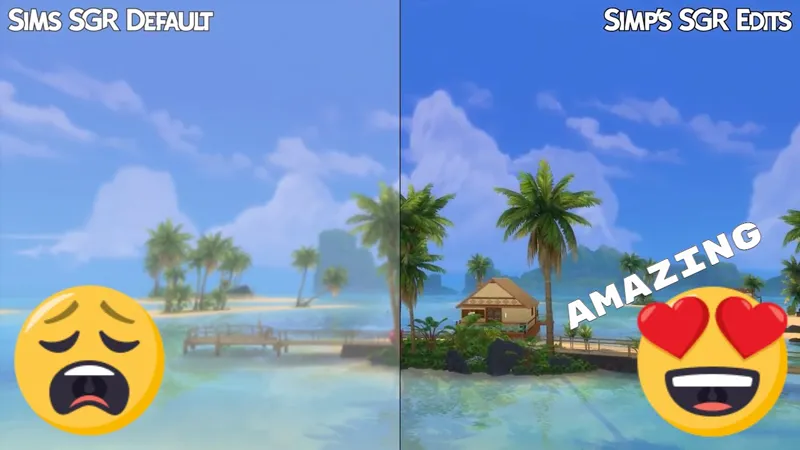
Overhauled GraphicsRules.SGR file suitable for Windows and Mac users. It makes Sims 4 look better, run smoother, helps with lag and fixes several visual bugs. Here's a list of everything:
LightingQuality
⦿ increased ShadowMap quality
⦿ disabled ShadowDecal
⦿ disabled ambient occlusion
⦿ disabled distance blur
⦿ ☆𝕟𝕖𝕨 Mac fix → if shadows are cutting off choose "high" for lighting quality in game options. This will set shadows to 3K instead of 5KGeneralReflections
⦿ tweaked Thresholds and cutoff PlanesObjectQuality
⦿ disabled LOD switching
⦿ ☆𝕟𝕖𝕨 tweaked texture switching
⦿ ☆𝕟𝕖𝕨 moved some values around for better performance on low/med settingsTerrainQuality
⦿ ☆𝕟𝕖𝕨 disabled terrain switchingEdgeSmoothing
⦿ increased edge smoothing
⦿ ☆𝕟𝕖𝕨 increased edge smoothing even more!SimQuality
⦿ disabled LOD switchingViewDistance
⦿ maxed ClipPlaneDistances
⦿ maxed FogDistances
⦿ maxed SkyboxClipDistances (fixes sky clipping in bigger worlds)Other
⦿ ☆𝕟𝕖𝕨 Increased ShadowCache and Instancing size
⦿ tweaked ClipPlane values
⦿ maxed ObjectSizeCullFactor
⦿ ☆𝕟𝕖𝕨 increased DeformerMaps cache
⦿ ☆𝕟𝕖𝕨 disabled Telemetry
⦿ ☆𝕟𝕖𝕨 added a note to the log stating "Edited by Simp4Sims" for troubleshooting
DOWNLOAD LINKS
CHOOSE ONLY ONE - "WITH DOF" includes distance blur and ambient occlusion.
⇒ [ SGR FILE ] ⇐
⇒ [ SGR FILE WITH DOF ] ⇐
This file will always be free! It takes a lot of time and testing though, become a patron to support further updates!
INSTALLATION INSTRUCTIONS:
Pretty much the same as installing a mod but the folder is a different one. Documents > Electronic Arts > The Sims 4 > Config Override -- Download ONE of the files from the links above and put it in the Config Override folder. This file is safe here even after updates.
If you already have a version of the GraphicsRules from before you can just replace it, previous versions are available further down this post in case you want to roll back.
CREDITS
♥ A huge thank you and shoutout to all my patrons for the support! You are all amazing!
♥ A huge thank you to the Beta testers for all the valuable feedback!
♥ A huge thank you to @FantaSims, @MalinDesigns, @Iron_Cgull, and everyone else that retweeted and helped spread the word!
♥ A special thank you to @Schnuck for all the initial testing, feedback and encouraging me to release the file to the public. Go follow her on YouTube if you don't already!
♥ A special thank you to fellow Sims After Dark member @Moxie for all the continued testing. Go check out their Tumblr and download Percival the Snail!
♥ Thanks to @BoringBonesTV on Twitter for the Mac shadow fix
♥ Thanks to @montyranch on Twitter for the skin details fix
PREVIOUS VERSIONS
Previous versions of the files in case anyone needs them!
⇒ [ SGR FILE ] ⇐
⇒ [ SGR FILE WITH DOF ] ⇐
⇒ [ MAC SGR FILE ] ⇐
⇒ [ MAC SGR FILE WITH DOF ] ⇐
⇒ [ PERFORMANCE SGR FILE ] ⇐
⇒ [ PERFORMANCE SGR FILE WITH DOF ] ⇐
CHANGE LOG
**19.08.2021 - Update**
⦿ up to 7% faster than the previous version!
⦿ redone from the ground up
⦿ lots of new edits - details below
⦿ made performance version redundant
⦿ included Mac shadow fix in the same file - details below
⋯⋯⋯⋯⋯⋯⋯⋯⋯
**07.08.2021**
- shadows to 5K (5120) resolution
- fix for skin details
- performance version of the file
⋯⋯⋯⋯⋯⋯⋯⋯⋯
**04.08.2021**
- Bread shop in Henford on Bagley was pixelated and low quality
- Shadow Decals were overpowering bushes when zoomed out
- Pre 2015 Mac Fix for shadows cutting out (separate file)
- Version with DoF (depth of field / distance blur)
- Added big bold links for the download
⋯⋯⋯⋯⋯⋯⋯⋯⋯
**23.07.2021**
- included new values regarding deformer maps and animal ageing from Cottage Living
SIMS 4 OVERHAUL - Graphics Overhaul to make Sims 4 LOOK AMAZING (YouTube)
Comments (40)
Someone put up the downloads on SFS since the above links are broken! https://simfileshare.net/folder/266138/
Hi, do you happen to know the difference between Simp's GraphicsRules Setters and this Sims Graphics Rules? I'm not sure which one to download, since Simp's GraphicsRules Setters seems to be an update.
the link hat is taking me to the download so is there another way to download it?
I can't download it; the site doesn't seem to exist anymore
i can't download it anymore, the site is down
I did do that and I don't see any difference. I am sorry, I am not trying to be difficult, I love the video and want my game to look like that, I can send you the pictures if you like on Discord or something.
Yeah sure. Simp4Sims#0404 add me on discord and drop me a few before/after images
Hi there, I've been trying to get this file to work for over a week now. When I download the file from here, my computer asks me what program I would like to use to open it with and I have no idea what to pick. I saw some people talking on a Sims 4 forum about it and they used the notepad to open it and save it. When I did that, the file turned into a .txt file. I moved the file into the Config Override file and nothing changed graphics-wise. I know how to add mods and use WinRAR to open those files, but I cannot for my life get this file to work.
Hey it should be as simple as just putting the file into the ConfigOverride folder. No need to open it or edit it or anything. Just download and move it to the ConfigOverride
rendering the lights inside useless*
hello! i think the bew update is doing something wrong. Shadows from objects outside of the building are appearing inside, basically rendering any of the lights in my house?
I’ll do some testing and get back to you ASAP
Will you keep providing the standard SGR file without DOF? I'm currently using a "No Blur In Distance" mod and would love to get rid of it if the standard SGR file will be available to remove DOF.
There will always be 2 versions with and without dof. Without dof also removed ambient occlusion (fake shadows) which drives me insane with the flickering between tree leaves. But yeah because turning off ambient occlusion also turns off dof it means I have to offer 2 files
I thought the updated version was *amazing*, looked beautiful in Henford on Bagley! Can't wait to try out yet another update :D
Yaaay Thank you so much im gonna download ❤️☺️
Hi, I had started using all your overhauls and honestly they're incredible and really helped my game. Thanks so much for spending the time to work on everything! Although, I was using the previous version of this Graphics Overhaul and streaming at the same time and everything had been fine, when I updated to this new version my Streamlabs and any other program on my PC basically pauses to allow the Sims to run. I was streaming and came into the issue where I couldn't read chat or anything as it wouldn't update that application. I tried using the performance version with no avail either. I then reverted back to my own backup before any edits were made and it fixes the issue so it must be something in this new graphics version that I'm having issues with. It's not like my PC can't handle it, I'm running a 3090, i9 9900K, 64GB ddr4 RAM and the Sims on my M.2 SSD. But I'm guessing the game is just drawing resources from everywhere and not letting any programs update in the background. I was just wondering if you had a link to the older version of this, as that one worked perfectly without effecting my other programs?
Hey, this is purely to do with the Graphics Overhaul file? I don't see how it could affect your other applications. And with a 3090 you should have more than enough resources to spare. If you've done all the tutorials it might be due to Process Lasso, in the tutorial I made for it I mentioned "OBS.exe" but if you're using StreamLabs then you should put "StreamLabs OBS.exe" If you've got Twitter or Discord rather DM on there I'll be able to help you easier because we can send screenshots and so on
Hello! Thank you for share this file, it's really made my game better! But I use HQ mod and I have a problem. Idk why, but when I changing RenderSimTextureSizes and CASSimTextureSize into 4096, all my sims getting black even if HQ mod off in settings. I back to 2048 and it's work fine, but it's noHQ.. Do u have any idea what I do wrong or how can I fix it? Sorry for bothering, you made really good job.
Hey do you use this mod https://modthesims.info/d/628834/hq-mod-switch.html to toggle in settings?
I love this file. It really seems to make my game run so much better. And it looks great. Thank you so much! But somehow it's messing up my default skin on some Sims. In CAS the skin is showing on all sims, but in game some Sims suddenly are shown with the ea skin. If I remove your sgr file, the default skin is back on them. When I put the file back in, the sims are "bare" again. It's not all Sims, but the same ones every time. I tested it with several different default skins, but the result is the same with all of them. I made one of those Sims completely naked to see, if something else is messing it up, but it didn't change. I can live with that since I can put the non default skin version on them and that's showing up in game. But I noticed it and thought you should know. ♥
Hey! Your new update fixed it. I'm so happy! Thank you so much ♥
Hi! When I zoom out I crash and idk how to fix it??
Is this only with the file? And when you say crash does the game just close down or?
This is amazing, thank you so much for your hard work !♥♥♥ I have a little question : Do the Luumia mods NoBlu and NoGlo are compatible and/or also still necessary with it?
They are compatible and they are still useful! So use both and the SGR file
so where do i find the download then?
There is an attachment at the bottom of the post. It should be red text that reads GraphicsRules.sgr
This is AMAZING! Thank you sooo much for sharing!!!
If we decide to remove the file, do we have to repair the game or is it fine to play right after removing it? I ask this ahead of time so I know what to do since I’m not sure if my computer can handle it 😄
Safe to just remove. You have to quit the game and open it again though
Thank you so much. I played for about 9 hours today and had ZERO lag! Nothing! Thank you so much, now that is worth a Patreon! Thank you a million over!
That is amazing to hear! And thank you for the support. Enjoy the file and let me know if you have any questions
Could you do a version without touching DOF? I love it for picture taking with reshade & I realllllly don't like not having it... but also don't want to ever be without this epicness!! If not I understand!!
Yeah I absolutely can do, but if you’re using ReShade why don’t your depth of field in ReShade?
THIS. IS. AMAZING! I subbed SO FAST!! TYSM!!!!!!! My game was always smooth before but now it ZOOMS around, & NO MORE JAGGED LINES! I want to weep, this is going to save me so much time when editing pictures!!
Hi there. I like it so much. My game has been so much smoother since I install this mod! But I have a question, if I want to use HQ mod, do I have to change each 4 of the lod to 4096 or just the first one?
All 4 values would be best! But if you notice too much performance hit then just do the first one
Thank you so much❤️❤️❤️❤️This has changed my gameplay greatly and I love it. Awesome mod
Thanks for the kind words. Hope you enjoy it! Let me know if you have any questions or issues