







Big MorphMan Update
Hi everyone. I've been working on this update for a while now, it's still a beta version, there are things missing, and various things to polish, but I think it's in a good enough state that I can post it here. Please don't share it anywhere yet, as it's not finished.
I was hoping to get some feedback, on things I missed, some bugs, things you'd like to see added or corrected, whatever it is, please let me know here, or by dm, discord, reddit ....
https://github.com/Jo-Mako-Anki/morphman/releases
I'm writing a guide, but it's not finished so I'm gonna make a quick one here, show you how it works.
Open Analyze Cards
Un pick one note type to analyze the cards I know, that will be my study deck, and another that I'll put in modify, that's my sentence exemple bank.
Modify lets you populate fields on the card. Press recalc to update. I recommend having a field for List of all the words, making it easier to find unknown words from upcoming reports.
My sentence deck is now updated. By analyzing the sentence, it shows the one word that I don't know, with definition. The definition sucks for the moment, but I have another add-on for that.
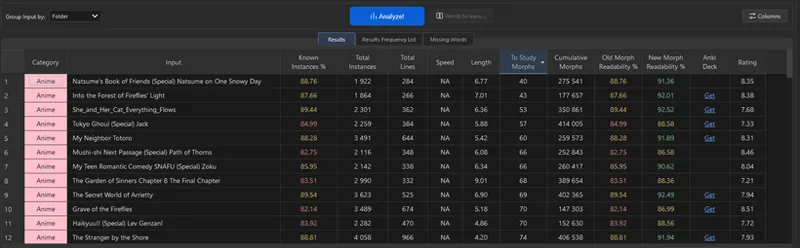
This is where it gets fun. My readability files are directly integrated. On the next tab, you can click on the media you want and you get how much of each title you can read. You can select all of them, but depending on you pc, it may be slow.
You can move columns around, reorder and filter all the data. Different columns will show up depending on which media you analyze. My google sheet is integrated so you link to download the anki deck directly.
After that, you can learn vocabulary in a different ways.
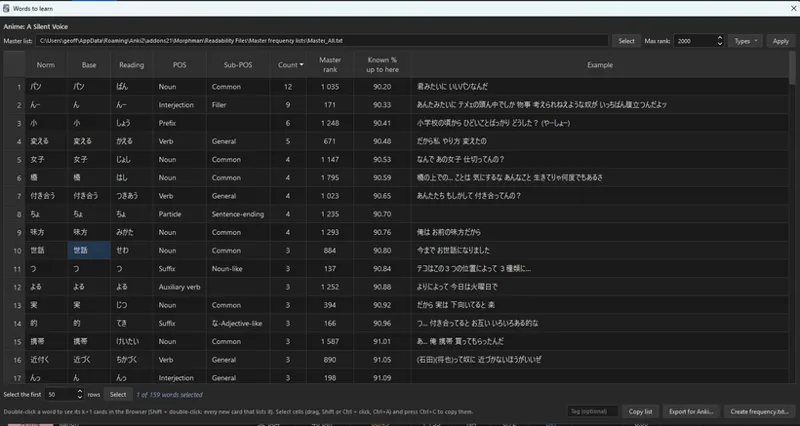
1) If you double click on a title, you'll get the list of words you don't know yet.
- You can export the list to reimport in Anki to make the cards you want.
- You create a word list order that Anki uses the next time you recalc
- You can double click again on a word to find it in your own collection.
You can also do the same thing by selecting multiple titles
2) If you want to learn words in the order of name input, you can use a study plan. Use the custom folder option, analyze a folder where you put subtitles for a show, you'll learn words in same order as they appear in the show.
You can also find for which title you have the less words to study to reach a target % understanding
3) Go straight to the Missing Words Panel. The list of words from the master frequency that you don't know yet. So you can learn words prioritizing frequency regardless of titles. Again double click to find titles in your browser.
That's pretty much it.
There's a bunch a settings available, but I think it's pretty clear what they do.
Let me know what you guys think.
Comments (2)
GitHub link is a 404 for me, maybe it's private?
Ah thanks, it's fixed. Sorry, I really struggle to navigate github.