



A guide to setting up Nukedrop Assetto Corsa tracks.
LIST OF ALL TRACKS CAN BE FOUND HERE:
https://docs.google.com/spreadsheets/d/1gD5G2Uy2oMkgAfeAgAbotpuQ6HexltpLytEnkNvoZkI/edit?usp=sharing
Hi Everyone, if you're a long time subscriber and don't have any issues with my tracks then you can ignore this post, if you're new however, welcome! and please be sure to take a quick look at the information below to get an idea on what may be causing any issues or crashes you may be having.
The tracks I make for AC often take advantage of other mods created by other members of the sim-racing community. These extra features, more often than not, are related to the graphics of the track.
They can be used to add more realistic track-side grass, track-side lighting, animated textures such as water, and TV screens and many other enhancements. Whilst I understand not everybody will want to use these extra features, I do highly encourage that they are used.
All required downloads are free of charge, however I do recommend the paid versions where possible to support the developers.
Requirements:
Content Manager (latest version)
https://assettocorsa.club/content-manager.html
Custom Shaders Patch – AT LEAST version 0.1.78 - Versions older than this will not work.
https://acstuff.ru/patch/
https://acstuff.ru/patch/?info=0.1.78
Video of installing it
https://www.youtube.com/watch?v=bATp1vejHxs
stFlow shader 1.0
https://www.racedepartment.com/downloads/stflow-shader.23999/
PerPixelMultiMap 1.0
https://www.racedepartment.com/downloads/perpixelmultimap-with-emissive-map.22791/
Please follow the relevant guides on the respective pages for each of the downloads above.
Checking your CSP version:
The main cause of tracks not launching is the version of CSP being out of date, here’s how to check.
In Content Manager, click settings in the top right.
then in the Custom Shaders Patch section, you should see the version you are ruunning.
You should have version 0.1.78 or higher.
Here's the old guide if you require more information or details about specific installs.
Deleting this file should fix most of the issues if you are running a bog-standard version of Assetto Corsa. However, if you want to experience everything that Assetto Corsa can offer, and consequently my tracks with all of their features there are a few things you’ll need to install. They’re all free of charge.
Content Manager / Custom Shaders Patch
Content Manager is a custom launcher and content management application for Assetto Corsa. It adds a huge range of extended functionality to AC. Installing Content Manager also adds Custom Shaders Patch.
Program is available in two versions, Lite and Full. Lite version has restricted access to new features, WIP-sections and pre-release builds.
https://assettocorsa.club/content-manager.html
Using AC CM adds compatibility with weather systems, track lights, 3D grass and lots of other features. You will use CM to launch the game going forward, and not the Steam launcher.
stFlow shader stFlow is used to animate textures, so will be used to make water, flags and TV screens etc. You can download it here.
https://www.racedepartment.com/downloads/stflow-shader.23999/
To install it, extract the sdk+system folders into your AC root folder
PerPixelMultiMap
PerPixel MultiMaps are used to make things light up, or be reflective in specific areas, whilst also being able to emit light. Things like windows, TV sceeens etc will require this one.
https://www.racedepartment.com/downloads/perpixelmultimap-with-emissive-map.22791/
To install it, extract the sdk+system folders into your AC root folder
Finishing up.
With all of these in use you should have no issues running any of my Assetto Corsa tracks, as well as getting visual improvements from all of the existing content that the base version of the game offers. However, not all systems are equal so I cannot 100% guarantee that every track combination will work with every car combination.
Installing my tracks.
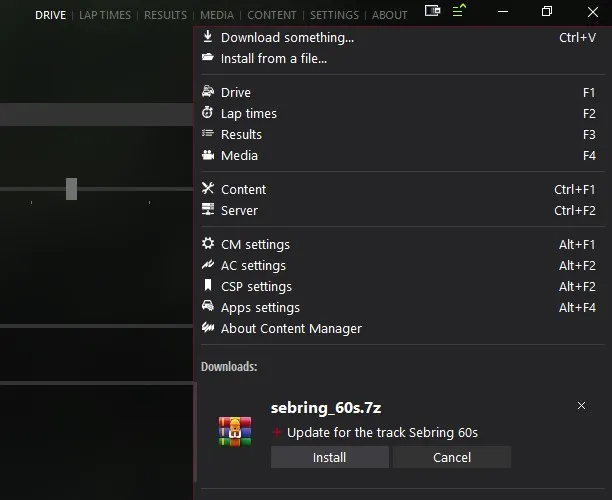
In each post you will find a Google Drive link, you can use this to download a zip file of the track relevant to the post. If you are using Assetto Corsa Conent Manager, simply drag the track zip folder into it, then press on the little three lines in the top right, you should then see the track show up in the window, then press install.
If you're not using Content Manager, then you will need to extract / unzip the file into the Assetto Corsa tracks folder.
The track should then appear in the Assetto Corsa launcher when you start the game.
Hopefully this covers most of the issues some people may have, but if there are still problems I'll try my best to help out.
Thanks for your time, and I hope you enjoy my content!
Tyrone
Comments (39)
Unfortunately Content Manager.exe is flagging a virus: https://www.virustotal.com/gui/file/2367612db7c754bf4f07a0f71188c0cc7ed0e39bef12b7dc3f4af3d0b3ec5bd4 .
Content manager is not a virus. If only one of those scanners is saying it is a virus then I think it's safe to assume it's a false positive.
Hi hi, just wanted to leave a comment, I joined hoping for a update to a old map, but I'm not disappointed in the other tracks on offer and I'll be supporting as long as I can :3
Hey @Gr1ff1n Which map were you looking to have updated?
hello any plans for las vegas speed way outside course
Hi, any planned updates for the Kuwait Motor Town track?
What would you like to see?
can someone tell me how to get a downloaded track from nukedrop into assetto corsa? thanks
Steve, I replied to your email with a video.
how i download this map
When I try to load in to the Area 27 track, it will not load for me and just kicks me back to the track/car selection screen . . . Any thoughts?
Are you using Content Manager? and if so, is it up to date?
Hey, just a quick note, you have wrong url in list for Ridge motorsports park, instead of https://www.patreon.com/posts/ridge-motorsport-87623099 you have https://www.patreon.com/posts/heartland-park-85253659
I also vote for Thermal Club! It would be pretty sweet.
I don't know where to properly ask, and I know I'm not a super contributor due to budgetary reasons. But I'm just putting the suggestion out there: IndyCar announced a race at Thermal Club next year, but there's no Assetto Corsa mod for it. So if you're looking for a track that would get gobbled up by a fanbase, I'm betting it'd be that one. But I'm not expecting it or anything, and love the work you do regardless! I actually came here to make sure my Circuit of the North West was up-to-do as a substitute, but figured it couldn't hurt to be a whisper into the wind :)
Two completely different circuits. Also vote for Thermal Club. There is a lot people interested in Indycar. Problem might be that there is no lidar available. If anyone could provide Tyrone with extra info/data chances to see this track would increase
Any plans on doing Pacific Raceways?
It's certainly a possibility, I have been requested it many times.
I originally intended to take a membership for just a month to thank you for the Tandragee track which I really love. It is a beautifully constructed work. However, now that I have seen the extent of all your work I will keep it going. I love tracks that have a lot of hills so your tracks are amazing for me whether they are real or fictional. What would be helpful perhaps would be a list of all the tracks you have started and completed somewhere in a list format with a link to the latest download. I have probably arrived at this by searching through all the posts but it would be helpful for anyone I think.
Hi Tony, thanks for your continued support, and thanks for this comment. A few other people have commented similar things regarding organisation. It's one of those things I keep meaning to get around to, but never do... I'll work something out tomorrow. Maybe a Google Spreadsheet or something that everyone can see.
thanks for the awesome work. instructions were easy to follow and everything worked great. going to race my 2016 stingray on OIR in March
i keep getting 'race cancelled' issue when i want to play the track. any ideas?
This happens because something fails to load, usually it is your car or the car setup. Try loading same track with an unmodified kunos car and setup. 9 out of 10 times this solves the problem for me
Perhaps it would be helpful if you had a pinned post at the top of your page listing the links to your tracks so people can more easily find the ones they want to download? I'm also a patron to Historic Sim Studios, and he has a pinned post at the top of his page for all of his cars that are in a driveable state. I joined your Patreon to download your Gran Turismo Rome circuit but I can't find it due to Patreon's limited navigation option and the fact that you haven't tagged it with something like "Rome" or "Gran Turismo" meaning I can't just go to the track I'm looking for from the tag menu.
Hey, Rome was one of the tracks I launched this with, so wasn't quite up to scratch with tagging etc. Sorry about that. I like the idea of the top post - I'll get around to setting this up at some point! https://www.patreon.com/posts/38219979 this is Rome btw - it's nowhere near complete, but it is one i'd like to finish at some point. Thanks again, Ty
when i copy the sdk and system folder from the PerPixelMultiMap thing into my ac root folder it says "this destination has 10 folders with the same name" and on the race department it says nothing should overwrite anything. do i just overwrite the other folders? im only asking because i dont want to mess up my whole game
Does anyone know how to turn it to be at night?
You need to install SOL to add the weather and time of day changes. https://www.racedepartment.com/downloads/sol.24914/
i have to installed everything you lised?
Yeah its just drag and drop into the correct Assetto Folders.
Why it says Race Cancelled
Have you installed the two shaders listed in the post?
I can't get Thunderhill to load either. Content Manager with StFlow and Perpixel were installed. Couldn't get it to work without the Extension folder either prior to downloading the CM and shaders either.
Hi, What error messages do you see? Thanks, Ty
I can not get this track to work no matter what I do, it shows up in the track menu in AC but it won't launch the game with that track it just goes back to the track and car setup menu. The extension folder is in the root folder of the game not in the track menu. I've tried CM and it does the same thing.
Hi Scott, if you are using Content Manager and both of the StFlow and PerPixel shaders above, you should leave the extension folder in the track directory.
It's a huge difference! I'm glad I got 15 minutes without kids to figure it out. Cheers!
Thanks so much for making this post! I'm excited to follow the steps and get the tracks running in their full glory. I can see that I don't have some of these plug-ins and I was one of those people always having to delete the extension folder.
You're more than welcome! I've been meaning to make a post like this for ages, to try and get everyone running the same setups. Hopefully this will clear up a lot of issues people have been having, and allow everyone to enjoy the tracks to their full potential. Any questions, don't hesitate to ask, and I'll probably add them to a FAQ section on the bottom of this post, to keep everything in the same place. Thanks again, Tyrone.