
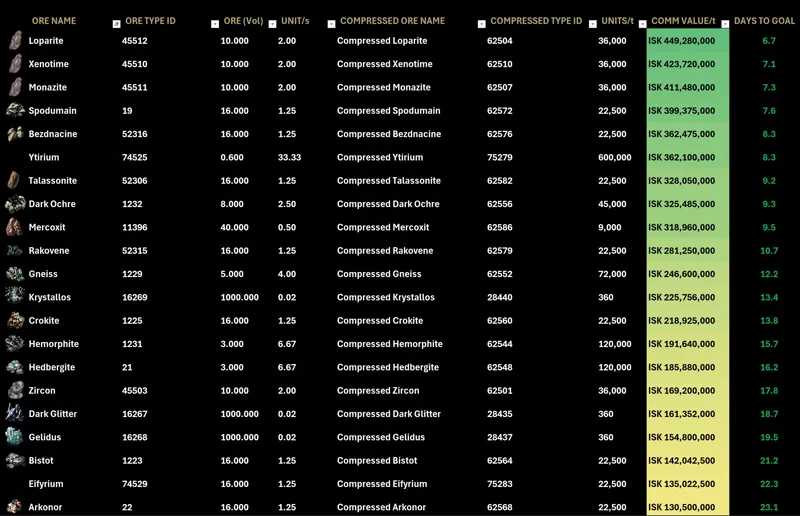
MINING FOR OMEGA (Excel Spreadsheet)
This Sheet Requires The EVE Online Add-In.
Refresh ESI Calls With CTRL+ALT+F9
Add new Items By copying the last row, Paste it below and change the name of the item In the 'ORE NAME' Cell.
Comments (7)
i cant get the plex price to populate, i have used the new global plex id but i have no experience with item id's. yes i have linked the character card in the correct slot and have refreshed it with the new id ( =EVEONLINE.MARKET_ORDERS(19000001,44992,TRUE,60003760).PRICE ) but im not sure what else to try. it is only showing the #spill! on the plex price and isk goal. thank you for taking the time to help me out and it is a very nice sheet.
also how are you calculating the yield per hour? is it not m3/s multiply by 2 (because of 2 strip miners) then multiply by 3600 for the hourly timing? then your "mining heads" can be how many ships you have? i feel like im breaking it trying to calculate my fleet
its showing #field! everywhere
same
Thank you for this! Use it all the time
Trying to use this one the free browser version of excel. Hotkey doesn't seem to refresh the ESI calls but everything else works fine. Anyone know the hotkey/way to fresh them? Thanks
Just sort with one of the filters. That should also trigger it