



Commission #93 - PoV Kelly Cowgirl [animation]
Holy shit, I need to say "good enough" and move on with this one, haha. I was getting caught up in an infinite polish cycle trying to get the motion of the jiggling to obey and do exactly what I wanted. This isn't quite there, but it's pretty close to what I was looking for. I definitely expected this commission to be easier.
Amy has a similar animation, but I lost her .blend file for it in the hard drive failure. Part of why I wanted to build this was so I could overwrite that old Amy animation (Julie has one too, though I never put it into the game and I'm thinking I might just slip it into the couch sex scene or something). We'll see.
-
Anyway, my jiggle physics setup isn't always the "plug and play" that I want it to be 😅
The motions often don't end up being what I REALLY want. There's a finesse to some of the rippling motions that I really like and try to capture, but overall it is tough trying to get things to look right.
I'm part of a Discord group dedicated to using Blender for NSFW stuff, and there are a lot of talented people there who come up with really good techniques for creating supple motions. I decided to try out someone's geometry node setup this time, to give myself some manual control over the "rippling motions" instead of relying on pure jiggle physics settings.
This is the basic idea:
Wherever the plane intersects the cylinder, the cylinder bulges. Move the plane up and down, the bulge travels along the tube with it.
The above example isn't great without motion to show what it's doing, but that orange square outline is basically an invisible plane that I have intersecting Kelly's boobs to make them bulge at the intersection. I'm animating the plane down (and then up at the end) to create the subtle rippling motion you see in the final animation.
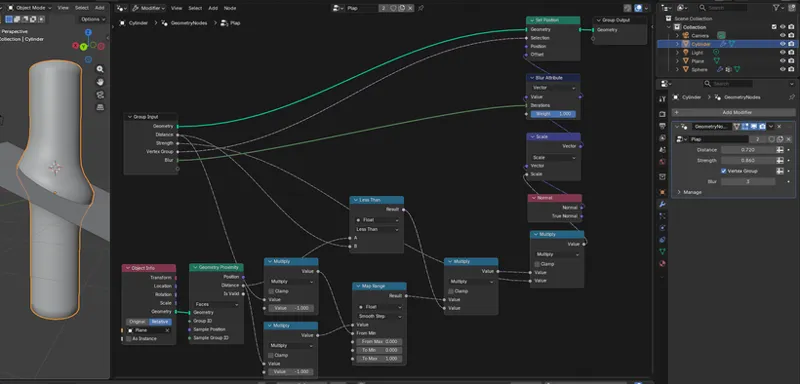
But the example I saw on Discord had a relatively simple node setup:
I tried this, and something was going wrong for me. It wasn't working. I couldn't figure it out, and while I just called the above node setup "simple," that doesn't mean I understood jack shit about how it worked 😅
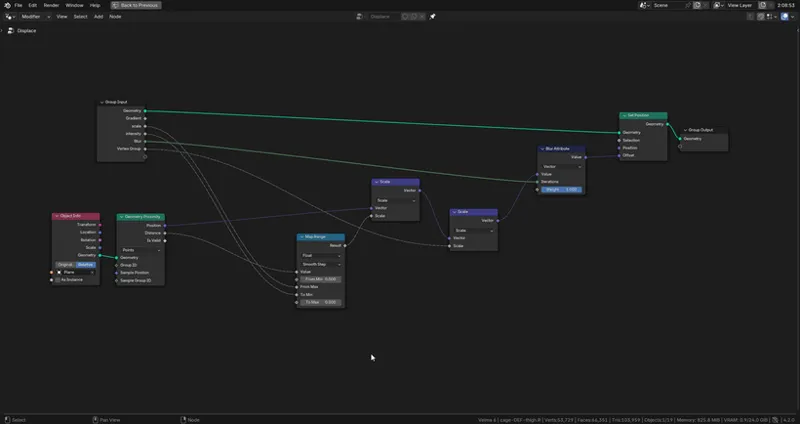
So I started at the beginning, trying to build the same thing myself. It got really confusing and frustrating at a few parts, but eventually I had my own little "eureka" moment where I realized the math I needed to do in order to get it to work, and I built this:
It's very similar, but I had to throw in some extra math nodes to get my brain to wrap around this properly. I have no doubt this node setup could be simplified to get the exact same behavior, but I'm just happy I was able to get it working reasonably well.
One big difference between mine and the other person's example is that they used the blueish "position" vector output on the Geo Proximity node, and I didn't. I felt like using that meant that the center point of the object relative to the center point on the plane would impact the shape of the bulging, and that sucks, so I stuck purely to relying on the raw distance value between the two surfaces. But obviously there's something I'm not getting in the first place so maybe they're fixing it with that Scale node, I dunno.
Anyway, just posting this all here for future me. Helloooo, future me! Making some hot cheating smut? Hope you got what you need!
Bear in mind that this respects surface normal direction, which could be handy.
-
There are regular jiggle physics incorporated in there too, but that's even more subtle than the rippling.
---
I'm liking the nighttime version of this animation, so I think I'm gonna change that entire basement scene to actually use dark nighttime images. Maybe the light doesn't work, or maybe the power could go out like it does for Flin and Amy in that same event.
Enjoy ~💕🎵
Comments (4)
nice pov! is it possible for each breast to have it's own motion or is that pushing it too far
It is possible. Actually, the way I set up the jiggle physics does give each breast its own motion, but if the body is moving straight up, straight down, or forward, back, then those motions tend to be symmetrical. The geometry node "rippling" setup I'm using in this example is symmetrical, and that's the more dominant motion in the animation. It'd be difficult to split that up cleanly, and I'm a little uncertain what I'd do (give one boob a slight delay behind the other?) to make it look good. I also tend to prefer symmetrical boob motion, though if I ever made an animation with someone laying on her side, I'd let the asymmetry do its thing (I'd need to check the collision settings to get that to look right though).
I'm analyzing intently
Holy juggs😳