

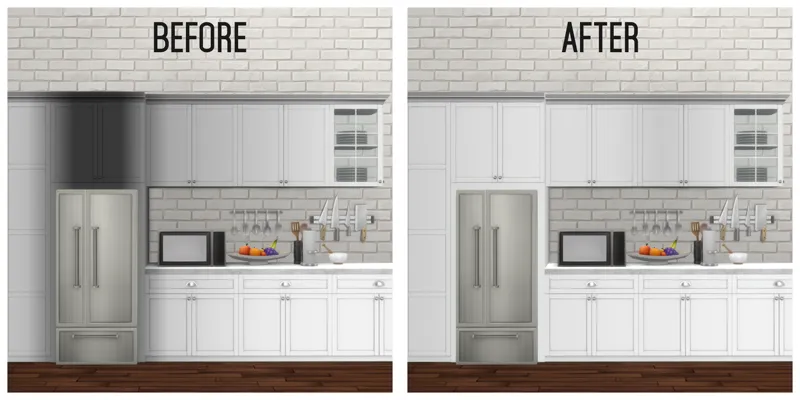
No Occluder Small & Large Appliances Default Replacement
This file is a must-have if you use any of my kitchens. Since I changed the cabinet shader to fix colouring and shading issues, appliances, both small and large, have occluders that darken cabinets and make them look horrible. This solves that for all Maxis objects released so far (or recolours with a linked light source). All this file includes is default replacement light resources for all appliances that had occluders and will fix the issue.
What You Need To Know:
If you have my original version of this, it came in 2 files. I have trimmed that down to 1 so delete both old files and replace with the 1 new one.
Updates:
26/10/2018: Updated with RoM appliances
6/12/2020: updated for snowy escape and now in plain package file format
29/07/2021: updated for Country Kitchen Kit and Cottage Living
21/03/2023: updated for packs up to and including Growing Together
27/4/2023: fixed issue with Growing Together stove marked as CC
16/10/2023: updated for Home Chef Hustle
2/12/2024: Updated for packs up to Life and Death
5/08/2025 - Updated for appliances up to and including Restoration Hardware kit
The Build/Buy items feature:
Default Replacement
Includes overrides for all appliances up to Seasons that have occluders
Download below. To install, if an archive file, extract using inbuilt extractor or WinZIP for PC or double-click on file for Mac, and place the folder or package files in your mods folder, then look for them in your game.
Comments (2)
so if im downloading the cc new, do i still need this file? or are those links all already updated
This is a default replacement for Maxis items only, it doesn't have an affect on CC made by other people