


🛠️ How to Install My GTA V Mods — Full Step-by-Step Guide
Important: These mods are for GTA V Story Mode only. Do not use mods in GTA Online.
1. Find your GTA V main folder
Your GTA V folder is the folder that contains: GTA5.exe
Common locations:
Steam:C:\Program Files (x86)\Steam\steamapps\common\Grand Theft Auto VEpic Games:
C:\Program Files\Epic Games\GTAVRockstar Games Launcher:
C:\Program Files\Rockstar Games\Grand Theft Auto V
GTA V Enhanced
If you're using GTA V Enhanced, make sure you're installing the mod into the Enhanced installation folder, not the Legacy version.
Common Steam location:
C:\Program Files (x86)\Steam\steamapps\common\Grand Theft Auto V EnhancedDepending on your launcher and installation settings, the folder name may vary slightly.
How to Verify You're in the Correct Folder
The correct folder will contain files similar to:
GTA5.exe
PlayGTAV.exe
update
x64
If you can see GTA5.exe, you're in the right place.
Important for GTA V Enhanced Users
⚠️ Not all mods support GTA V Enhanced.
Before installing any mod, check the mod description to see whether it supports GTA V Enhanced as well.
2. Install Script Hook V
Download Script Hook V from Alexander Blade’s official page.
Script Hook V is the base library that allows GTA V .asi script plugins to work.
Open the downloaded ZIP.
Go into the bin folder.
Copy these files into your GTA V main folder:
ScriptHookV.dll
dinput8.dll
Optional:
NativeTrainer.asi
You do not need Native Trainer for my mods unless I specifically say so.
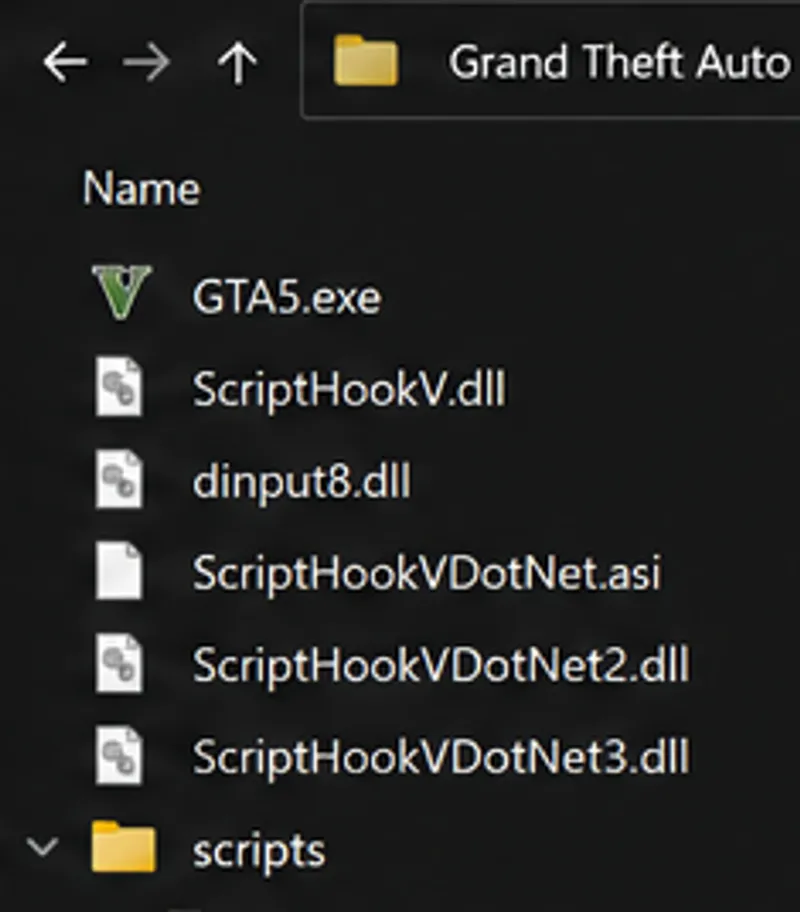
Your GTA V folder should now include:
GTA5.exe
ScriptHookV.dll
dinput8.dll
3. Install Script Hook V .NET Enhanced
Many of my mods require Script Hook V .NET Enhanced, which allows .NET/C# script mods to run on both GTA V Legacy and GTA V Enhanced.
Requirements
Before continuing, make sure you have already installed:
Script Hook V
Microsoft .NET Framework 4.8 or newer
Microsoft Visual C++ Redistributable (x64) for Visual Studio 2019 or newer
Installation
Download Script Hook V .NET Enhanced: Script Hook V .NET Enhanced Download
Open the downloaded ZIP file.
Copy the following files into your GTA V main folder (the same folder that contains GTA5.exe):
ScriptHookVDotNet.asiScriptHookVDotNet2.dll
ScriptHookVDotNet3.dll
ScriptHookVDotNet.ini
MinHook.x64.dll
These files must be placed directly in the GTA V root folder.
Remember after installing Script Hook V .NET Enhanced to change the settings of its config file "ScriptHookVDotNet.ini":
- ScriptTimeoutThreshold=60000And if you don't want the warning message at the start:
- WarnOfDeprecatedScriptsWithTicker=false
Create the Scripts Folder
Inside your GTA V main folder, create a folder called: scripts
Example:
Most of my mods, as well as iFruitAddon2, will be installed inside this scripts folder.
4. Install iFruitAddon2
Some of my mods need iFruitAddon2 for phone contacts, phone UI features, or phone-related mod functions.
Download iFruitAddon2 from its official GitHub releases page.
iFruitAddon2 requires ScriptHookVDotNet v3.
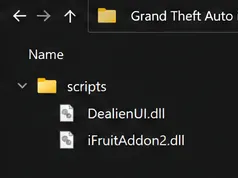
Copy the iFruitAddon2 files into:
Grand Theft Auto V\scripts
Do not put iFruitAddon2 in the main GTA V folder unless the download specifically says otherwise.
Your folder should look similar to this:
5. Install DealienUI
Many of mods require DealienUI, my custom UI framework that replaces the need for NativeUI and provides improved compatibility, performance, and consistency across my projects.
Installation
Download the latest DealienUI package from my Patreon:
DealienUI Download:
https://www.patreon.com/dealien/posts/151227009Extract the downloaded archive.
Copy DealienUI.dll into your GTA V scripts folder.
Example:
4 . Make sure ScriptHookVDotNet3 is installed correctly, as DealienUI depends on it.
6. Install My Mod
Open my mod download.
Most of my script mods go here:
Grand Theft Auto V\scriptsExample:
If the download includes an .ini file, keep it with the mod file. The .ini file usually contains settings.
Final Checklist
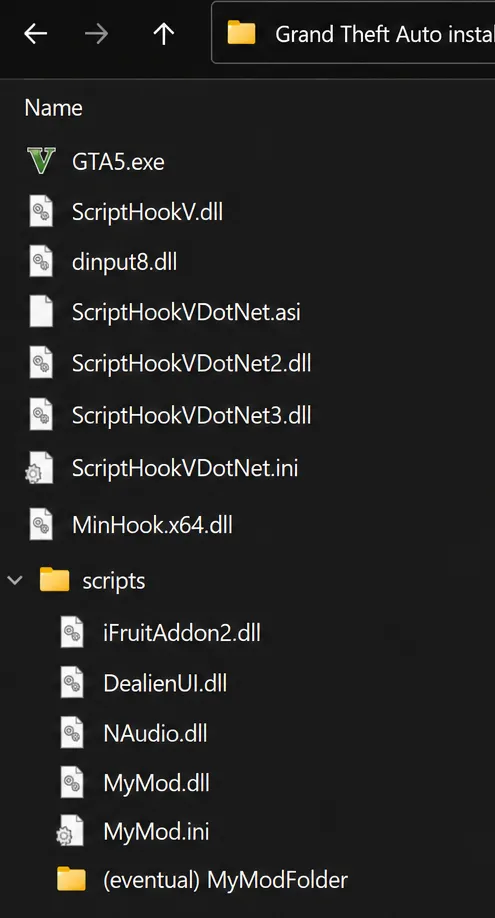
Before asking for help, make sure your GTA V folder looks like this:
If everything is installed like this, launch Story Mode and enjoy the mod.
⚠️ IMPORTANT: GTA V Version Compatibility
My mods are developed and tested using the latest available version of GTA V and the latest versions of their required dependencies.
I cannot guarantee that my mods will work correctly on older versions of GTA V, older versions of Script Hook V, Script Hook V .NET Enhanced, iFruitAddon2, DealienUI, or any other dependency.
Whenever Rockstar releases a new GTA V update, Script Hook V may temporarily stop working until it is updated by Alexander Blade.
If your game suddenly crashes, mods stop loading, or Script Hook V displays an error after a GTA V update, this is usually normal and does not necessarily indicate a problem with the mod itself.
In most cases, you simply need to wait for an updated version of Script Hook V to be released. Updates are often available within a few days after a GTA V update, but there is no guaranteed timeframe.
Before reporting a problem, always verify that:
- GTA V is fully updated
- Script Hook V is updated to the latest version
- Script Hook V .NET Enhanced is updated to the latest version
- All required dependencies are updated to their latest versions
Support for outdated game versions is not provided unless explicitly stated otherwise in the mod description.
Tip: If you want to avoid modding interruptions, consider disabling automatic GTA V updates until Script Hook V has been updated for the latest game version.
Still Not Working?
If the mod does not load:
1. Verify that Script Hook V supports your current GTA V version.
2. Verify that Script Hook V .NET Enhanced is installed correctly.
3. Verify that DealienUI.dll is inside the scripts folder.
4. Verify that iFruitAddon2.dll is inside the scripts folder (if required).
5. Verify that all DLL files are unblocked in Windows.
6. Verify that you're launching Story Mode and not GTA Online.