


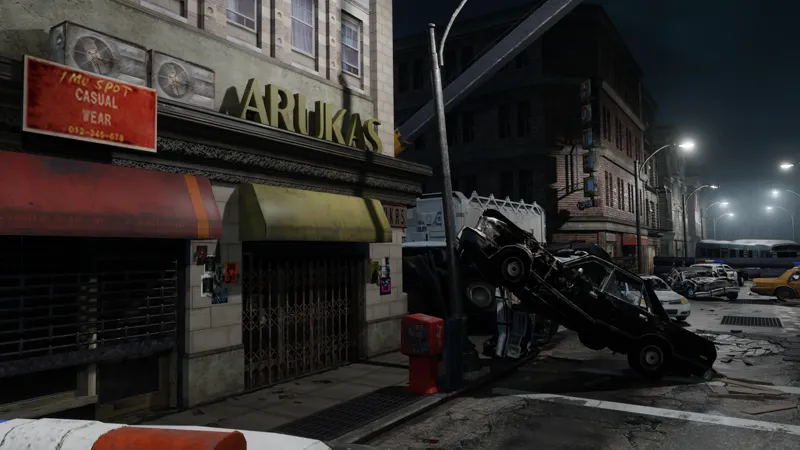


Freebie - RPD Station scene [Blender]
This model contains:
A custom made entrance mixing stuff from the new REmake games and the classic look used in the Operation Raccoon City game.
Volumetric fog for distance effects
Custom street lamps.
Two main gates rigged
Recommendations:
Save the blend file in an unique folder and extract the texture zip in that same folder, if you still get "pink materials" go to file>external data>find missing files and select your texture folder.
If you want to make a wide shot with a visible city background, set your camera Clip End max to 1000 m.
When Appending the scene, try to also use the "world" or just use the HDRI included in the textures for the clouded night scene.
Comments (4)
Thank you for the reply. I wanted to import a character (xps) into this wonderful city. I think the cause is xpstool. It may be due to a newer version of blender. Thank you for your wonderful work.
This is so great. Texture link successfully. I want to place an xps character. However, only xps is not displayed in File → Import. I have installed the add-on. I use xps a lot. This is the only blender file that xps cannot open. What could be the cause? I want to place an xps character and take a photo.
Hey, well this is a blender model not an xps one it's not meant to be used in XPS format. You open it in blender o append it on a new blender project. I'm not sure what you mean? if you want to import xps models into a blender scene you need the add-on to import the xps models into blender, I didn't make the add-on so I'm not sure what the issue could be, you should contact the add-on creator if you are having issues with it. Opening this project in blender would not affect how any add-on works in your computer.
😎 awesome