
🎬 Introducing Reels — A New Way to Learn on Playphrase.me
Lately, I’ve been thinking a lot about how people actually use Playphrase on mobile.
We have desktop.
We have the standard mobile interface.
But while working on kids content, I realized something:
The current interface is not kid-friendly.
And honestly — it’s not mobile-native enough either.
Too many menus.
Too much jumping around.
Too “desktop thinking” on a phone.
And at the same time, I kept noticing something obvious:
The reels format works.
Swipe.
One phrase (or word) — played as a short sequence of clips.
Next phrase.
Repeat.
It’s simple. It’s natural. And it’s surprisingly powerful for language learning.
So I built a third interface.
And yes — it works on desktop too.
🎥 Meet: Reels Mode
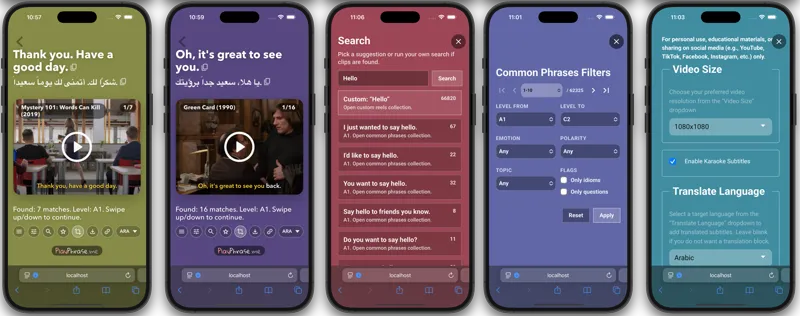
You can access it by pressing the Reels button (the rightmost button in the input).
And you’ll land in a completely new part of the site.
This isn’t just a layout tweak.
It’s essentially a mirror of the platform — rebuilt with:
Larger, cleaner design
Warmer color palette
Centered video focus
Simplified navigation
Big, touch-friendly UI
Yes, I had to duplicate a lot of UI logic from desktop and mobile.
Yes, it was a lot of work.
But the result feels completely different.
📱 Learning as a Swipeable Flow
In Reels mode:
A collection becomes a sequence of slides.
A slide = one phrase (or word) with a mini-playlist of clips — multiple examples played one after another.
You swipe up or down to move through them.
That’s it.
No pagination.
No jumping between pages.
No thinking about structure.
Just a continuous chain of phrases.
Which, by the way, fits perfectly with all the random-learning logic I’ve been building recently.
▶️ Not One Clip — A Sequence
Each Reels “card” plays several examples back-to-back (same phrase/word, different scenes).
Subscribers get an unlimited sequence.
Non-subscribers get 5 clips per card.
⚙️ Everything You Need — In One Action Bar
All functionality is grouped into a single Action Bar:
Download video
Change translation direction
Focus mode
Add to favorites
And more
Everything that makes sense in Reels mode is accessible there.
Clean. Contained. Logical.
🔎 Smarter Search
Search has also been reworked specifically for this mode.
I merged:
Phrase suggestions
Common Phrases search
Manual input search
Now it feels more natural and guided — especially if you’re exploring Common Phrases.
You can also switch between:
Common Phrases
Vocabulary
Favorites
Custom search
Each collection becomes its own swipeable feed.
🧠 Why This Matters
Reels mode solves two things:
It makes Playphrase feel native on mobile.
It simplifies the learning loop.
Swipe → Watch → Repeat → Next.
No friction.
No cognitive overload.
Less structure.
More flow.
More rhythm.
🚀 Try It Now
You don’t even need to look for the icon.
Go directly here and test it:
👉 https://www.playphrase.me/#/reels
Swipe.
Train.
Repeat.
Let’s see how it feels 🎬