
How to use Blender ver
이번 글은 제 블렌더용 아이템을 어떻게 사용하는지에 대한 사용설명서입니다.
다소 복잡하고 긴 글이 되겠지만 도움이 되기를 바랍니다.
This is a manual on how to use my blender items.
This will be a bit complicated and long, but I hope it helps.
[목차 Contents]
Append
object
edit
rig
meterial
text object
[Append]
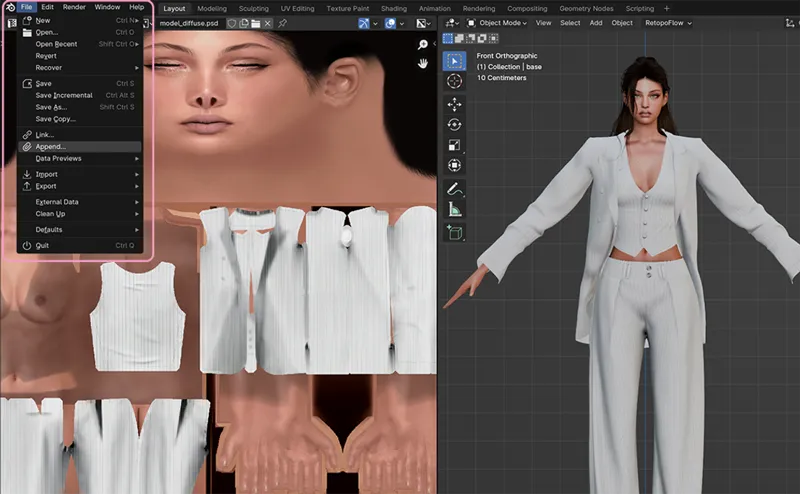
렌더링 할 심을 불러온 상태에서 file-append를 선택합니다.
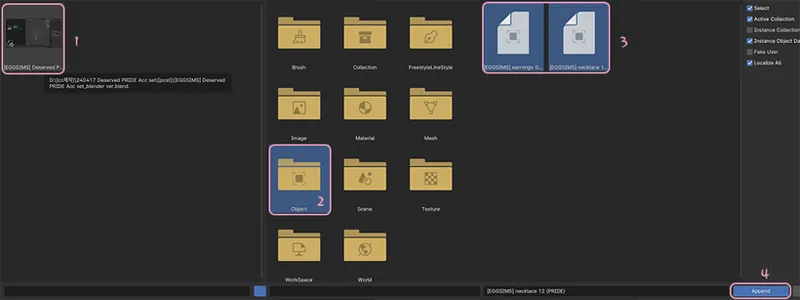
(1) 원하는 악세 블렌더파일 선택 (2) Object 폴더 (3) 오브젝트 선택 (4) Append 순으로 진행합니다.
With the Sim you want to render loaded, select file-append.
Proceed in the following order:
(1) Select the desired Access Blender file (2) Object folder (3) Select object (4) Append.
[Object]
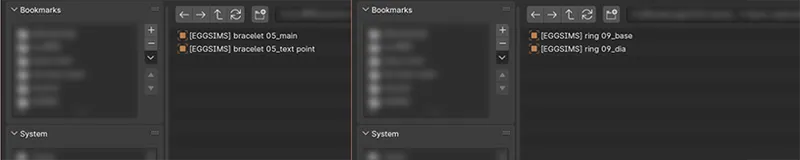
블렌더 파일에는 필요에 따라 1개, 혹은 그 이상의 오브젝트가 포함되어 있습니다. 저는 블렌더 파일에 아이템과 관련되지 않은 오브젝트는 넣지 않고 있으니 아이템을 불러오기 하실땐 반드시 포함된 모든 오브젝트를 함께 불러와주시길 부탁드립니다.(세트 아이템 예외)
아이템명_main , 아이템명_base 말 그대로 아이템의 뼈대가 되는 오브젝트입니다.
아이템명_texture 텍스처 이미지를 첨부하기위해 넣어둔 빈 오브젝트입니다. 실제로는 아무것도 없습니다. 원하는 이미지를 선택하셨다면 삭제해도 무방합니다.
아이템명기타 (dia, text 등등) 메인 오브젝트와 설정이 달라 따로 분리한 것이므로 삭제할 경우 아이템이 정상적으로 출력되지않습니다.
Blender files contain one or more objects as needed. I do not include objects that are not related to items in the Blender file, so when appending an item, please make sure to append all included objects together. (Set items are an exception.)
CC name_main, CC name_base is an object that serves as the basis for the item.
CC name_texture is an empty object used to attach a texture image. Actually there is nothing. Once you have selected the image you want, you can delete it.
CC name_etc (dia, text, etc.) Since it has different settings from the main object, it is separated, so if it is deleted, the item will not be displayed properly.
[Edit]
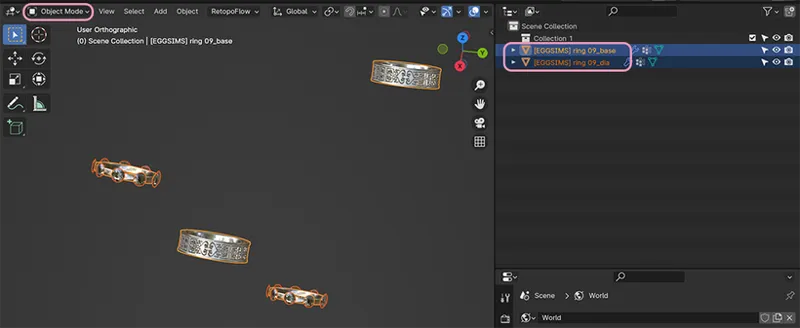
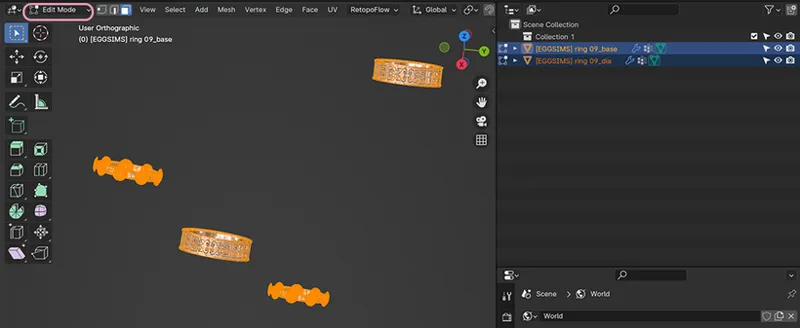
아이템의 크기 조절이나 위치조절을 할 때는 반드시 에디트 모드에서 수정해주세요. 오브젝트 모드에서 수정 할 경우, 포즈 적용을 하거나 위치 변경을 했을 때 오류가 발생할 수 있습니다.
오브젝트가 두 개 이상일 땐 오브젝트 모드에서 모두 선택한 뒤 에디트 모드로 변경하면 한번에 수정가능합니다. (shift키를 사용하면 여러개를 선택할 수 있습니다.)
When adjusting the size or position of an item, be sure to make changes in edit mode. When editing in object mode, errors may occur when applying a pose or changing the position.
If there are more than two objects, you can edit them at once by selecting them all in object mode and then changing to edit mode. (Use the shift key to select multiple items.)
[rig]
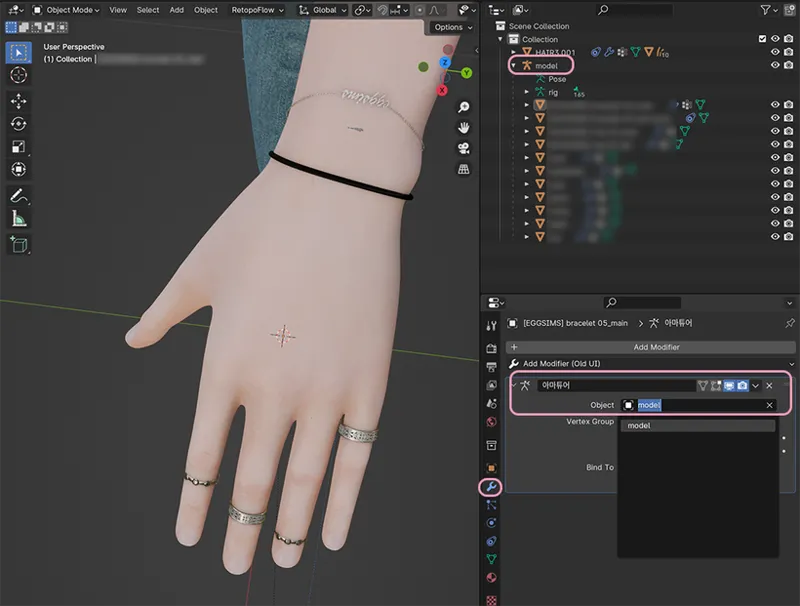
아이템이 포즈에 맞게 움직일 수 있도록 모디파이어 프로퍼티스-아마튜어-Object에 대상이 되는 심의 rig를 설정해주세요.
Please set the target rig in Modifiers-Armature-Object so that the item can move according to the pose.
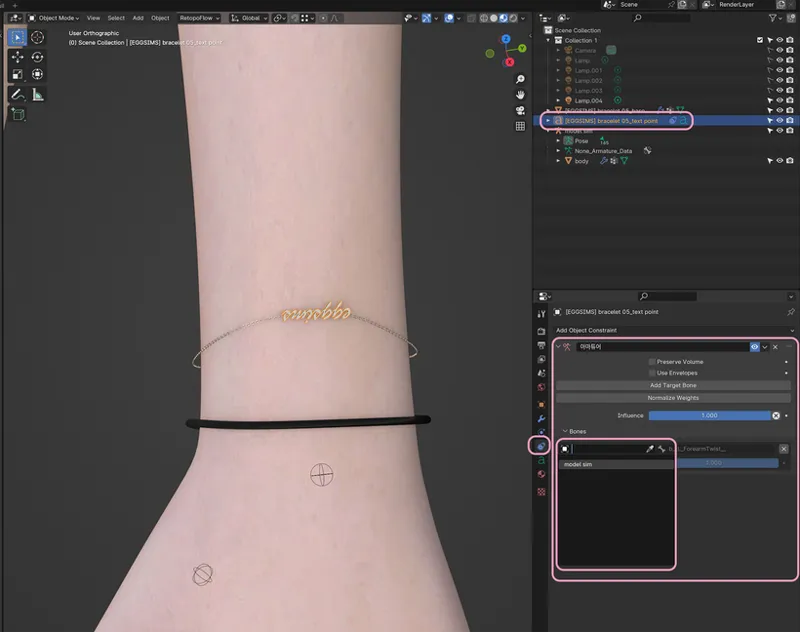
텍스트 오브젝트는 일반 메쉬와 rig설정 방법이 다릅니다. 모디파이어 프로퍼티스가 아닌 Constraints - 아마튜어 - Bones에서 rig를 설정해주세요.
The rig setup method for text objects is different from that of regular meshes. Please set the rig in Constraints - Armature - Bones, not in the modifier properties.
[Material]
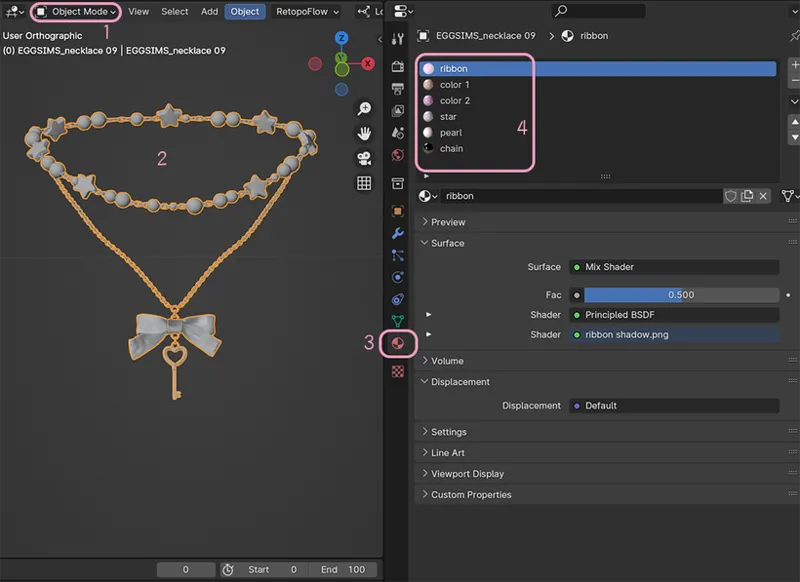
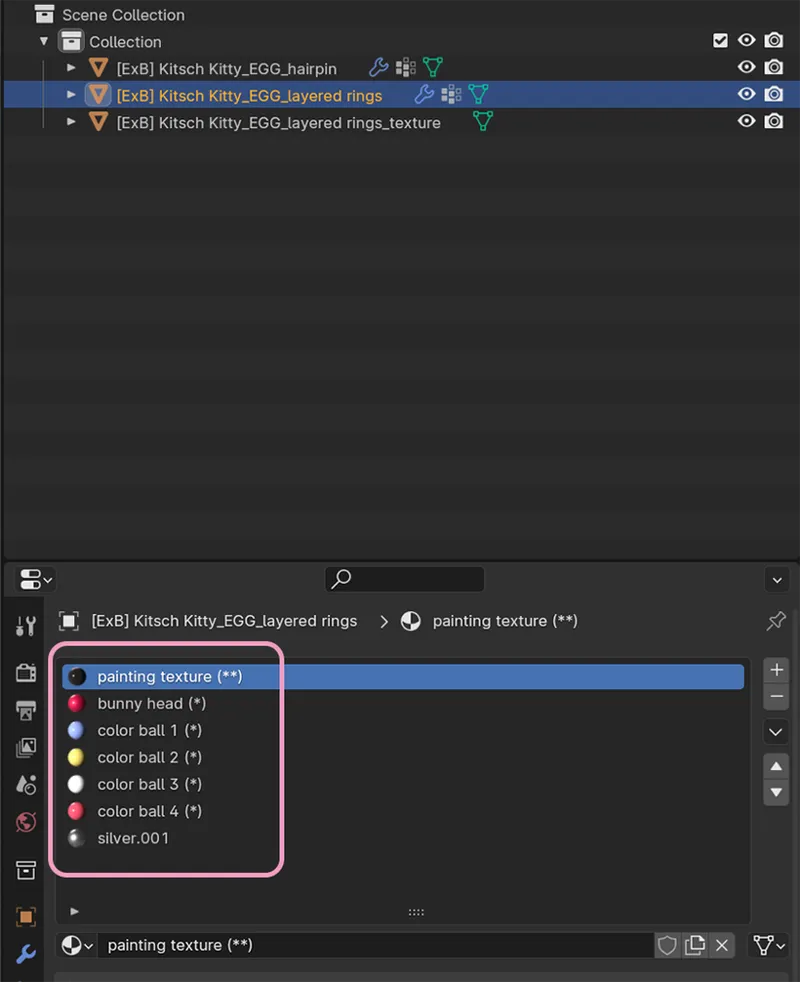
(1) 오브젝트 모드에서 (2)원하는 오브젝트를 선택 후, (3)메테리알 프로퍼티스를 클릭하면
(4) 해당 오브젝트에 적용되어 있는 메테리알을 확인할 수 있습니다.
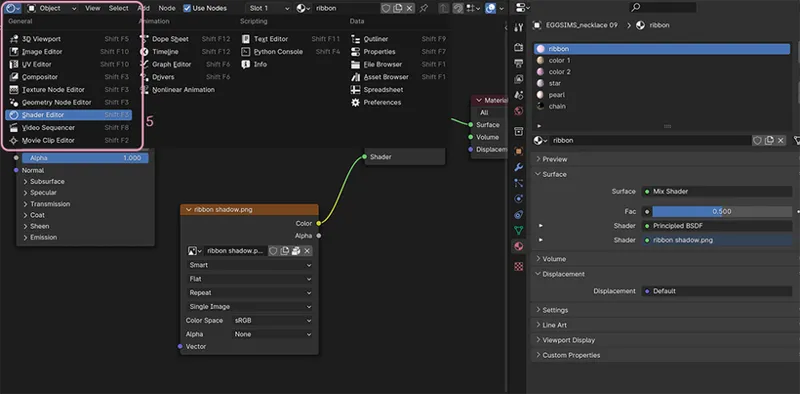
(5) 각 메터리알은 쉐이더 에디터에서 편집이 가능합니다.
(2) After selecting the desired object (1) in object mode, (3) click on Material Properties
(4) you can check the material applied to the object.
(5) Each material can be edited in the shader editor.
각각의 메터리알에는 텍스처 적용 방식에 따라 표시를 다르게 해두었습니다.
(*) 표시가 있는 메터리알은 색상변경이 가능합니다.
(**) 표시가 있는 메터리알은 텍스처 이미지 (png 또는 psd 파일)를 선택할 수 있습니다.
(-) 또는 아무표시가 없는 메터리알은 원하는대로 수정 가능하지만 권장드리진 않습니다.
Each material has a different marking depending on the texture application method.
Materials marked with an (*) can be changed in color.
Materials marked with (**), you can choose a texture image (png or psd file).
Materials with a (-) mark or no mark can be modified as desired, but it is not recommended.
(*)
최근 작업하는 블렌더 아이템들에는 각 메테리얼마다 추천 색상을 제공하고 있으므로 Material Output - Surface에 연결해서 바로 사용할 수 있습니다. 제공되는 컬러외에도 원하신다면 함께 제공되는 RGB나 color ramp에서 세부적으로 색상을 조절하여 사용하는 방법도 있습니다.
The Blender items I've been working on recently have recommended colors for each material, so you can connect them to Material Output - Surface and use them right away. In addition to the colors provided, if you want, you can also use the RGB or color ramp provided to adjust the colors in detail.
업로드 한지 오래된 아이템들은 추천 스와치가 없을 수 있습니다. 이 경우 아래의 방법으로 색상을 조절할 수 있습니다.
Older items may not have recommended swatches. In this case, you can adjust the color using the method below.
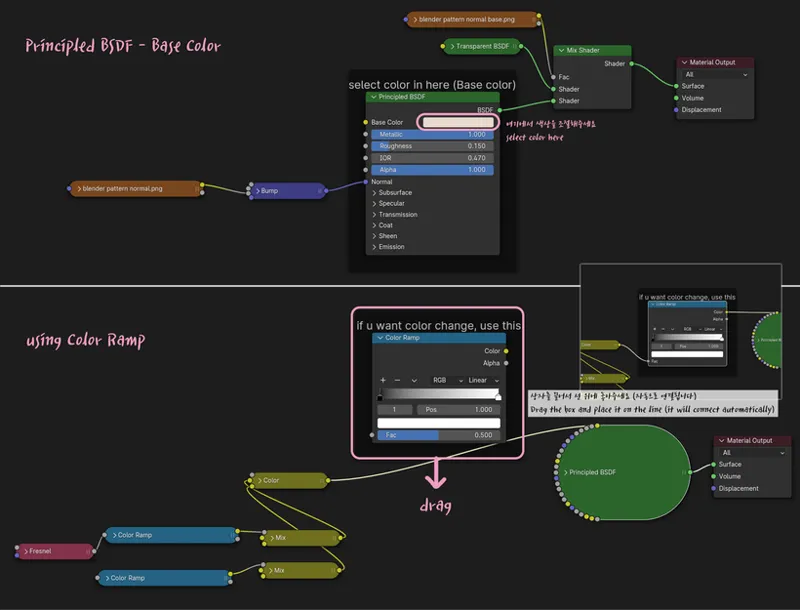
Principled BSDF - Base color에서 원하는 색상을 고르거나, color Ramp를 이용할 수 있습니다. color Ramp를 잘 활용하면 이미 적용되어 있는 텍스처 이미지의 색상도 변경 가능합니다.
color Ramp의 사용법은 간단합니다. 박스를 끌어서 base color와 연결된 라인 위로 위치시켜주세요. 아래 사진과 같이 연결되었다면 잘 연결된 것이니 원하는 색상만 선택하면 됩니다.
You can choose the color you want from the Base color in Principled BSDF, or use the color ramp. If you use the color ramp well, you can also change the color of the texture image that has already been applied.
Using color ramp is simple. Drag the box and position it above the line connected to the base color. If it is connected as shown in the picture below, it is connected well, so just select the color you want.
(**)
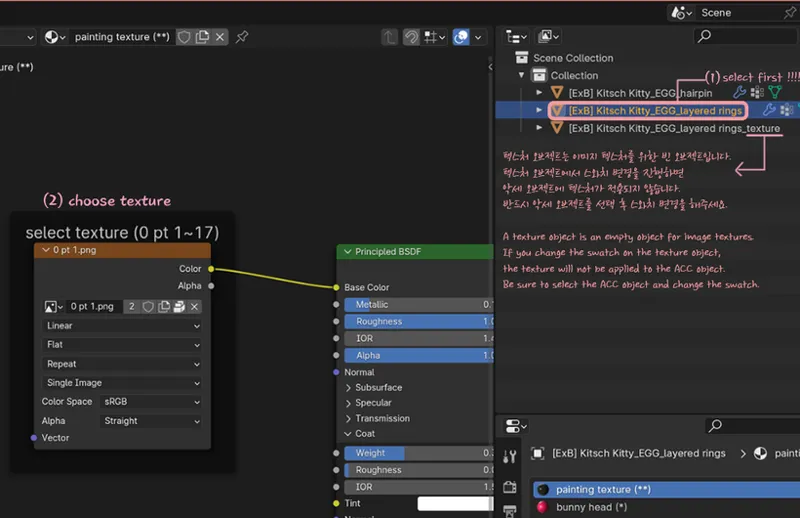
반드시 텍스처 오브젝트를 함께 불러와주셔야합니다. 앞서 언급했던 것과 같이 텍스처 오브젝트는 이미지 텍스처를 첨부하기 위한 빈 오브젝트입니다. 텍스처 오브젝트에서 스와치 변경을 진행하면 악세 오브젝트에는 변경한 텍스처가 적용되지않으니 반드시 (1) 오브젝트 모드에서 메쉬 오브젝트를 선택 후 (2) 스와치를 변경해주세요.
You must append the texture object together. As mentioned earlier, texture objects are empty objects used to attach image textures. If you change the swatch in a texture object, the changed texture will not be applied to the accessory object, so (1) be sure to select the mesh object in object mode and then (2)change the swatch.
[Text object]
ㅡ
이밖에 문의사항 또는 문제가 있다면 댓글로 알려주세요.
감사합니다 😚💕
If you have any other questions or problems, please let me know in the comments.
Thank you 😚💕