
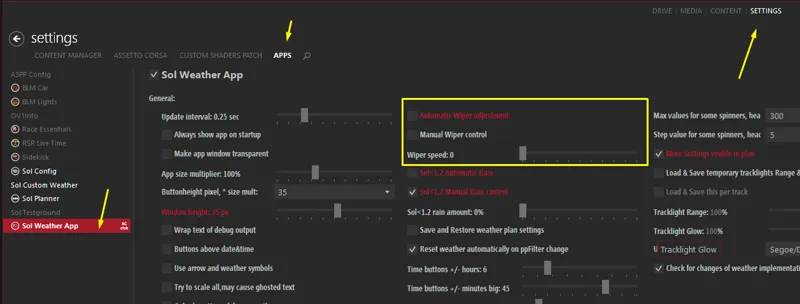
Proper wiper control with Sol Planner + Sol 2.x controller
Please deactivate Sol Weather's wiper control completely, to use Sol Planner's wiper control. Now you have a proper manual control via keys/buttons of the wipers, if you set them to:
-2: Wipers are not controlled by Sol Planer
or
-1: Wipers are controlled by Sol Planner automatically
Comments (16)
Got it working love the automatic wipers big guy!!! Now to figure out how to adjust the speed of them would be cool if rain amount and speed changed the speed for you good stuff
Hi, how do I assign a key or button on my wheel to the wipers?
CM > Settings > Assetto Corsa > Controls > Patch
Thank you, I knew is not that you can adjust that
Hi Peter, Pure is too bright in VR. Here are 3 pictures, the bright ones are of Pure, the dark of Sol with Sol_Extra https://ibb.co/xLXvSzb https://ibb.co/wSLphyt https://ibb.co/4TSyxSf
Just use pageUP and pageDOWN keys to adjust autoexposure. There is too much dark cockpit in the view which autoexposure is trying to brighten up....
After doing a clean install of Sol 2.2 alpha 13, Pure 0.27 is looking and performing much much better. Looks fantastic actually. Union Island at 60x speed with intermittent rain, fog, clouds etc is such a buzz.
Good info, thanks!
In controller script selection, SOL 2.2 is the option that it is optimized for pure. 2.1 are not available.
You copied the folders manually to AC root folder? Maybe install Sol 2.2 alpha 13 before Pure. As long it is a dev preview, I need some parts of Sol...
Peter, you need to make a corection in pure's directions. In usual sol versions, before installing a new sol version, first we put the unistall.bat file into ac root folder in order to unistall first the old version before install the new. Today, i tried to install latest pure vesion with the traditional way (using latest CSP also). Unistall old Sol first and then install the new. But as it seems, that was problematic. There wasn't any sol weather system in CM drive tab, there wasn't any Sol weather app selection in settings->APPS to deactivate Sol Weather's wiper control completely. I was thinking about it for a moment and the next step was to get back to the latest Sol version (alpha10). So, unistall.bat again in AC root folder, run it and then i install SOL Alpha10. Then, open CM selecting the usual controller/weather script, ppfilter etc... Then i tried to install pure without unistall SOL Alpha 10 and everything was working just fine! So, to everyone....: DO NOT UNISTALL SOL IF YOU WANT TO INSTALL PURE!
The next version will be different. Maybe its better to combine Sol 2.2 and Pure, as long as both using the same app for weather controlling.
CSP 1.72-PREVIEW92, SOL controller shows DEFAULT, SOL (v2.0) and SOL 2.2 (the one I have selected) in SOL Script I have SOL (v2.2) Ive tried pure but still doesn't show any rain when in game
Which track you tried?
I don't know.. but I folowed every step from this post and from the other one (Pure 0.27) and I got no rain... no wet floor, nothing what are the settings to get the rain to work when I choose rain and get the wippers to work by them selves?
Do you have the preview version of CSP (also from Patreon)?