
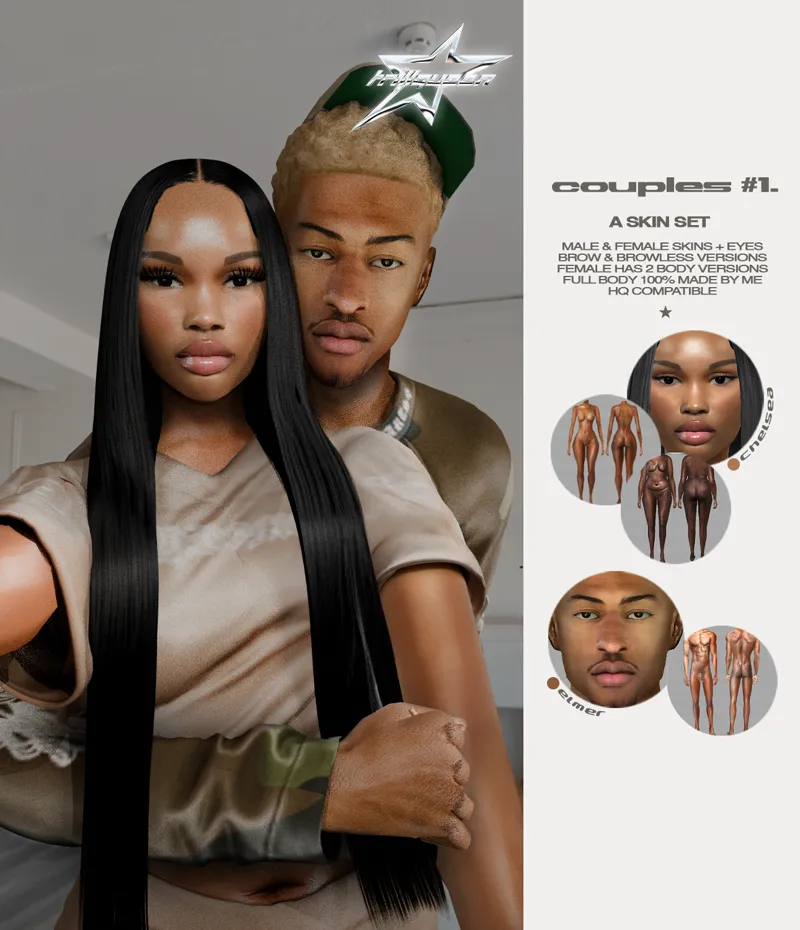




couples #1 set
TAG ME IF YOU USE MY CC SO I CAN REPOST IT ❤️
✫ don't share it and don't reupload it anywhere (including cc folders)
✫ don't edit it and reupload it as your own (i'm not dumb i will notice it's my cc and you'll have to take it down don't play w/ me)
✫ don't convert it (to sims or other games, including second life, GTA etc)
✫ i ALWAYS test cc in game before releasing but if there's any problem with the files please let me know
chelsea T/YA/A/E full body skin (female) - 4 swatches (brow & browless versions / 2 body types) - located in skin details ("right cheek mole" category)
elmer T/YA/A/E (male) - 2 swatches (brow & browless versions / 1 type of body) - located in skin details ("right cheek mole" category)
custom eyes - all genders and ages IU-EU - 2 swatches
✫ 100% made by me
✫ hq compatible
✫ compatible with all body frames
✫ textures found on google
✫ disallowed for random
CC INCLUDED!!
Comments (4)
Hi, i was wondering which file I download? is the houseload one both of the skins in one download?
no, the files named "household" are the tray files (these files contain the sims shown in the picture, in case you wanna have them in your game). • “TRILLQUEENDaCouple1SetSkinAF” = the female skin • “TRILLQUEENDaCouple1SetSkinAM” = the male skin • “TRILLQUEENDaCouple1SetEyesIU-EU” = the custom eyes, available for all ages and genders!
hey boo! love your work btw! I'm fairly new to modding and cc's when i download the zip files do they go in the tray folder or the mod folder? and is there like any easier way to do it vs going in and removing stuff out of each individual folder
hey love, welcome ❤️ so all package files (the ones that end with .package, that includes the 'Mods' folder inside the zip folder) goes inside your Mods folder. when you unpack the zip file, you will see one folder called Mods (drag all of them to your Mods folder), and a bunch of files outside that folder, with random numbers ending with '.householdbinary', '.trayitem', '.hhi' and others. these must be inside your Tray folder. you can download a software called Sims 4 Mod Manager (https://gametimedev.de/S4MM/). that way you can put multiple files to folders in an easier way, making it easier to organize your Mods folder, and can see a preview of each cc you download. but i don't think there's a mod that automatically places everything to your mods folder directly. if you have any more questions, i'd be glad to answer and help you out! ty ❤️