
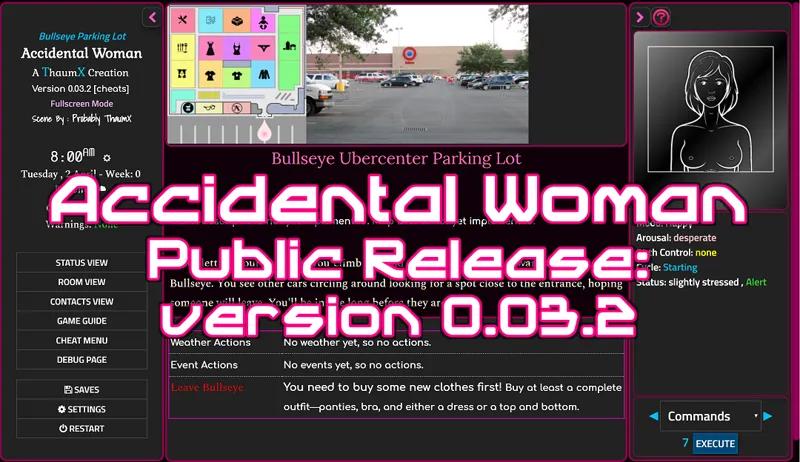
Public Release: Version 0.03.2
Hello everyone, I'm here with the October public release. It looks a bit different, but there aren't any real updates to content from 0.03.1, just implemented some of the CSS3 I've been working on. Please let me know if you have any problems with text size or other appearance issues!
And of course, if you like where this is going, your pledge is certainly welcome! Whatever you decide though, there will always be a regularly-updated public version.
« Change Log »
Statistics: Passages: 228; Words: 197,491; Size: 46,460 KB
Implemented new system for arranging text size designed to work with various aspect ratios and browsers.
Improved CSS styling of UI elements.
Created new screen areas for map information and action bar, with centrally scrolling text window, and integrated with theme settings (map divs not fully implemented).
Customized game scroll bars to fit theme.
Subdivided right sidebar into content-specific divs.
Minor tweaks, including new arrow pointer for map navigation and a new help button.
Added styling for "disabled" buttons, for later use with unavailable actions.
Added ability to inject an HTML5 canvas element dynamically based on passage tag, for use with direct js output/animation
Added simple js animation effect to start screen (mostly fooling around to test canvas element).
Some minor bug fixes, including limiting ability to "offer help" multiple times in Bullseye parking lot event.
Comments (8)
I like the new UI, mixed on the buttons, they seem too "shiny". Not a fan of the world of goo style cursor, though its only on the main menu so I don't care too much either way. The maps are good, although it can be hard to see which areas are available to visit without moving the mouse over everything.
I agree on the buttons, I've made some changes. The cursor thing isn't actually staying in the game, was just showing a result of some experimentation with HTML5 canvas display.
I love the new content, but a few complaints: the new UI and graphics are a bit too intensive for my computer to run, and it's noticeably laggy, especially while scrolling. The scrolling map makes the visible text area really small, and I personally don't find it very aesthetic. And I feel that the previous button style was better looking than the new pink buttons.
A new public version has been released. I would be very curious to find out what kind of computer setup you have, as my tests have shown no significant lag on-page, with exception of the start page with animated pink ball.
First time I've tried your game, giving some feedback: I didnt realise the character was a guy till it hit me, name of the game and all.
Hmm... Perhaps I need to add some more writing early on to make that more clear.
This is a grandiose work! You're a pro! I wish you a successful development of your project!
Thanks!