
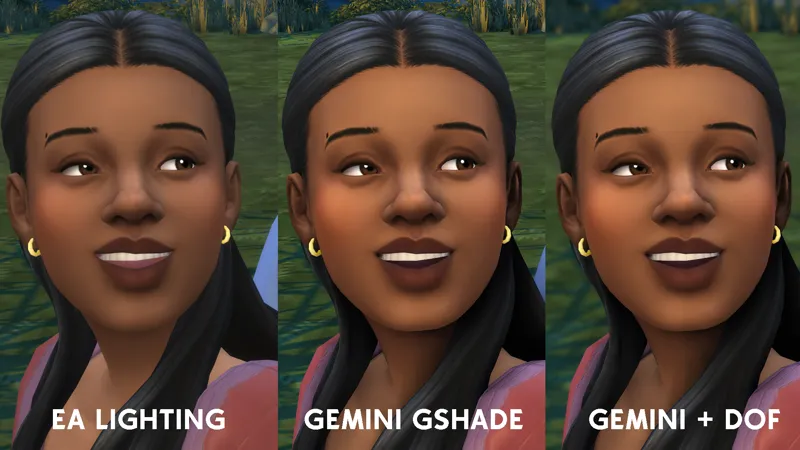
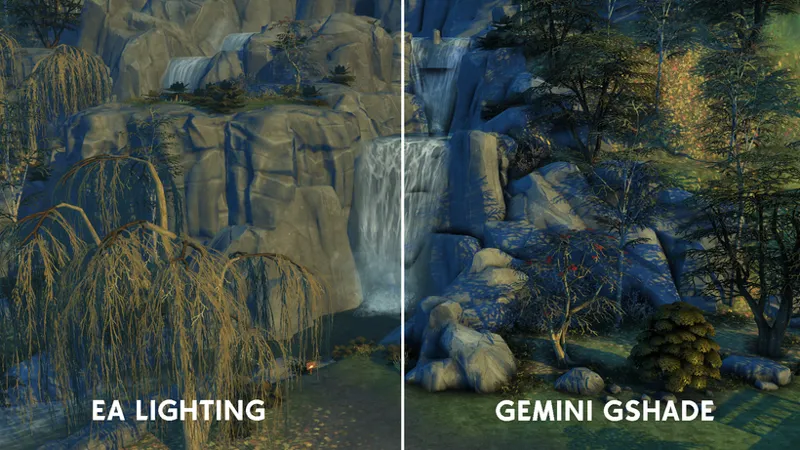
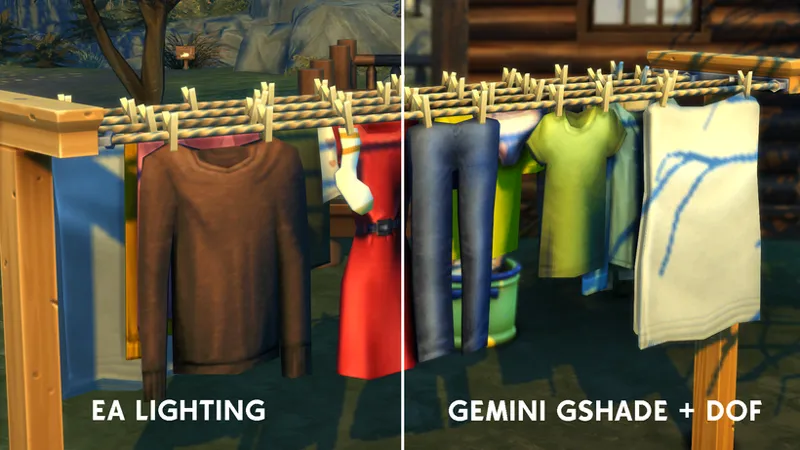
New Gemini - Gshade Preset.
This preset is based on the foundation of just making your game look better with out over doing it. I love me a heavy Gshade preset but I understand that's not everyone's vibe.
What makes Gemini different from my previous Gshades/Reshades is I've included a MXAO shader and a DOF shader (Depth Of Field) which can be enabled/disabled by pressing SHIFT + 5. Which will help you capture the perfect screenshot.
YOU NEED GSHADE IN ORDER TO USE THIS PRESET HERE'S AN EASY TO FOLLOW TUTORIAL ON HOW TO GET IT TO WORK: https://www.youtube.com/watch?v=bzaSskKHeE8
BELOW ARE ADDITIONAL EXAMPLES OF GEMINI
WARNING: You may get a warning about the file, however IT IS safe to download.
Please DO NOT REUPLOAD OR CLAIM AS YOUR OWN!
Socials: Youtube | Twitter | Website | Instagram Personal - Sims Related
I HOPE YOU ENJOY 💜
Comments (16)
It won't let me download this shader. It says [Urban] - Gemini.ini was blocked because this type of file can harm your device."
That message is just a standard Windows warning for .ini files. It’s a non-executable config file used by GShade/ReShade and is completely safe. Your PC isn’t at risk, Windows just doesn’t recognize custom preset files ❤️
Where can I find aries or get a copy of it?
Ah, yes it's down from my old website. I do believe I have a copy of it which you can find here! https://www.mediafire.com/file/oo80r0v470v7a2f/%255BUrban%255D-Aries.ini/file
If you can't press SHIFT + 5 to remove/add blur, check if you are in performance mode at the bottom of your shader menu. Additionally, if it doesn't clearly say SHIFT + 5 next to the checked blur effect in your shader menu (it'll appear grayed out to the right of each effect) then you may be in performance mode. Check to be sure your GShade or Reshade program is updated. Hope this helps!
Hello, thank u. It's beautifull but, i don't have the blur effect. I pressed SHIFT + 5 but it's doesn't work. Can u help me please ?
Check my comment for full instructions on a possible fix for this
is it a me problem or is the depth of field not working? i press shift+5 and it doesn’t work
Check my comment for full instructions on a possible fix for this
Is the Aries Gshade Preset still available for download?
The instructions say use Shift+5 to enable or disable it. Hope that works for you.
Is there a way I can turn the DOF off? The blur kind of get in the way of seeing my notifications, aspirations, things like that
I love this my game looks amazing
This is really nice. I love a basic reshade/gshade
how can i install it?
Here's a video on how to install Gshade! https://www.youtube.com/watch?v=bzaSskKHeE8