
How to create and edit a screenshot
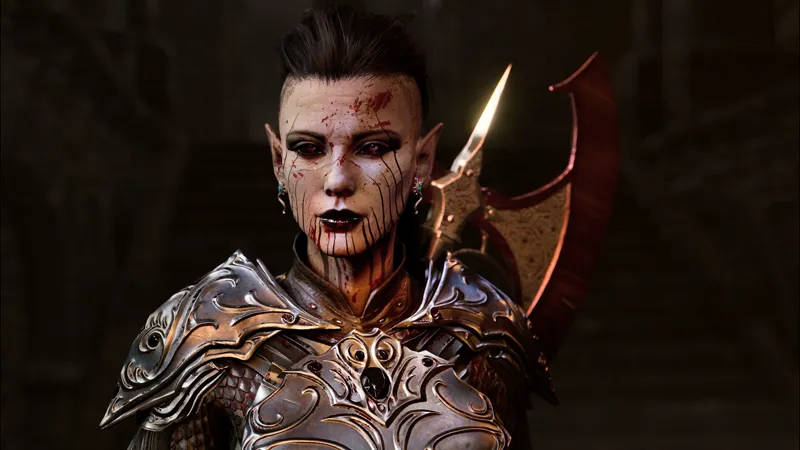
In this short video I show how to create a screenshot with my camera tools for Baldur's Gate 3 and then edit it in post using Lightroom CC. Not mentioned in the video: I do change the FoV with a small amount.
The video illustrates how to set up the shot, to apply reshade shaders, and after taking the shot, how to edit different areas in Lightroom for the final result.
It's not a video illustrating how to get started, as it assumes you have everything setup already.
Comments (24)
I need a lighting tool, where can I find it?
links are in the description of the video on yt!
Black screen appears when I render the image
Hello, I have a problem with taking pictures. Why are they not saved in 4K resolution? The other problem is that when I take a picture directly, my screen turns black and the igcs cooectorb file disappears.
Game RE4R
Thank you for this! It got me to buy Marty’s effects, however I cannot get any of it to work due to the Display Depth not working. My whole screen is blue (I can see the characters through it) and not colourful like it should be. I’ve fooled around with the “edit global preprocessor definitions” but no luck. Could it because of MSAA? How do I disable if it is?? I’ve been at this for like 6 hours and the display depth is ruining my plans 🥲
Which game? MSAA does ruin depth buffers, if you can pick another AA option I'd pick that. Also see this guide: https://framedsc.com/ReshadeGuides/setupreshade.htm Plus, Marty has a discord, perhaps you can get help there?
Thank you for this great tutorial video, also, your character looks badass :)
Thanks :) This is lae'zel btw. After 2 playthroughs I remodeled all standard characters to keep it a bit fresh :) I used the appearance mod for this, it still works ok :)
Hi, when I use Relight I cannot seem to arrange them like you do in the video, when I move them back and forth they are either really big or disappear, so it's impossible to set a light for example right next to the characters face like you did in the video. Any tips why this can be the case?
Be sure you've setup the depth buffer in reshade correctly (both you pick the right depth buffer and also whether it should be reversed or not (it should be 1 in bg3). See for a guide: https://framedsc.com/ReshadeGuides/setupreshade.htm#checking-depth-buffer-access
@harry thanks, I'm aware. please don't post links to these sites here for obvious reasons.
I might've missed this, but does the Relight shader (Martymod) come with Reshade or is it a separate download? Being able to adjust the lighting manually like that seems so useful.
Ah nvm! I ended up finding what I was looking for! Thank you so much :DD
When installing ReShade, which effect packages besides OtisFX are good ones to install?
immerse/marty's, prod80's corgifx, sirkobra's
I might need to update my ReShade as I don't think I've got the shaders used in this video (apart from that nice IGCS DoF you created last year.) Does that Depth Darkness you mentioned to someone above come as an installation option when you install ReShade?
these shaders are not coming with reshade, some of them from another creator. depth darkness is installed with the whole otis.fx package
Where I can get this presets for light and darkbackground?
they're not presets but separate shaders. Depth darkness is here: https://github.com/FransBouma/OtisFX/blob/master/Shaders/DepthDarkness.fx, the others: see the video description
Where do you upload high res jpgs now that abload.de is down?
IF you have a photoshop sub, you can use Portfolio, it's free with a PS sub from adobe. Behance (also free, no sub needed) is ok, flickr works (but up to a 1000 shots for free). My images are stored on a site made with adobe portfolio (as I got it with the sub anyway :) ) ( https://fransbouma.com )
that's interesting! i always love to watch someone making their screenies, there's always something i didn't think about
Great tutorial! Adding a mask to reduce glare - that’s SUCH a good tip!