
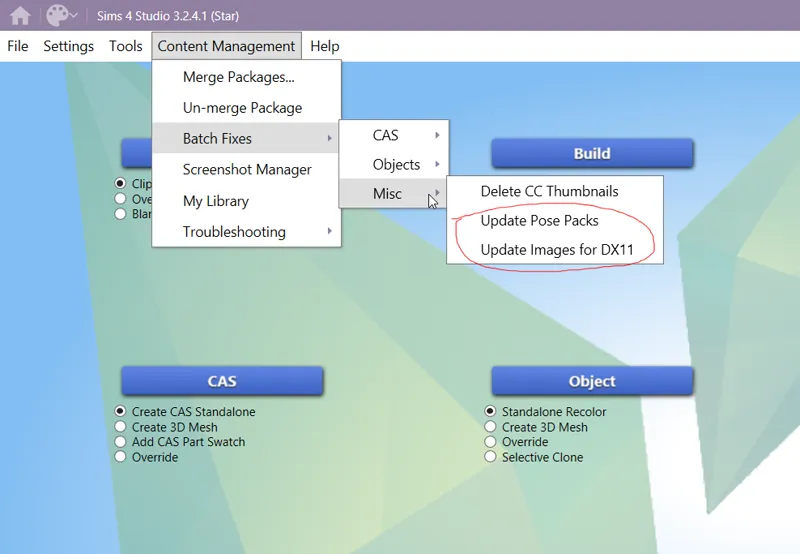
HOW TO FIX INVISIBLE OBJECTS AND BLANK THUMBNAILS IN POSEPACKS
GUYS, GUYS GOOD NEWS. My friend and i were testing a new feature on S4S [STAR] and we found THIS FIX FOR OUR PROBLEMS SINCE THE DEATH PACK.
I've seen many people asking me to fix posepacks cuz they were blank and some objects that were not showing in game[dementors, wine and glasses, rugs etc]
This is how you fix them. Download the newest version of Sims4Studio STAR and update your cc folder with both options. This happens because you are using DX11, i use DX9 on my game, that's why i dont see the bugs you all are saying that is happening.
Forgot to say but you can place the files in a folder and select only the ones you want to fix, in case you have many ccs like me [70gbs+] Also, s4s always make a backup of those fixed files.
Comments (10)
Is it useful for invisible clothing?
Idk honey, my game is dx9, for me, everything works fine. U will need to test it
I used the author's method to fix some handheld items that do not display on the CAS interface, but they still do not display. It may be due to the game upgrading the underlying code, which is said to be related to tattoos and conflicts with handheld items. I wonder if this can be resolved in the future?
After upgrading the game, many handheld items are no longer displayed on the CAS interface, and the props needed to create short dramas cannot be found. I am troubled and hope this method can be restored. Thank you!
I have not found any of your poses are broken now, I got a lot of your poses. They were at first but once someone told me to turn on the new graphic thing all poses came back! Good to know that if some are broken that there is a fix! Totally awesome!
ah yeah, i changed my game to DX9 cuz my gshade wasn't working so all the stuff keeps working fine, but my friend that tested all the stuff on DX11 had the blank poses problems for all the poses she had. i also saw many people sad about that for the last months without a solution
The Problem is, that you also "fix" other PPLs CC, so it can cause errors for other CC too :(
My friend tested with other cc and fixed the ones with similar problems. but you can always choose the folder, so you can put only the cc you want in a folder and fix only them. s4s Also makes a backup folder, so if cause some kind of error, you can place the backup in game.
where can I download safely sims4studio?
https://sims4studio.com/thread/29786/sims-studio-windows-star-open