

FM26 3D Stadium Megapack "Going European" Update 2.2
Hey all! Exciting update coming up. Back from my break, but I've had some breakthroughs recently that I wish to share, as well as some prominent bug fixes. The biggest feature is the European Experience where many new stadia across Europe have been added :D
I was wondering if I should make this an update or a full download, but in the interest of it being as smooth a transition as possible, I've added the full megapack for download. It means it is 17gb in size.
Performance, Bug Fixes and Stability:
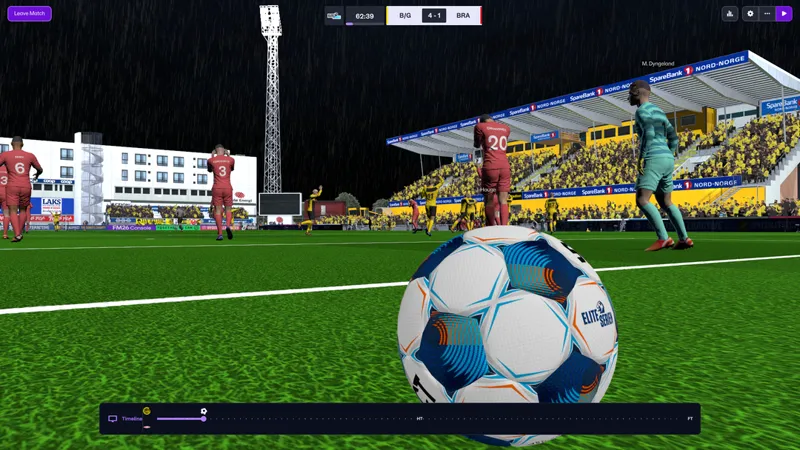
The skyboxes now have been revamped to no longer have an effect on the lighting. This was the case which led to poor lighting at night and evenings.
Match Balls now also appear with lighting as a result of that.
Crowds now retain their lights
As do Adboards.
Numpad 0 menu now remains on screen and with the selection/visibility patched to work.
Newgen Dark Faces have been fixed.
Addition of a Linux pack again.
Tweaked lighting values to be more globally applicable and changed intensities of global lights at evening and nights.
Ball Pack:
Added in balls for:
Eliteserien
Croatian First Division
Stadiums Added / Reworked:
ENGLAND:
Bradford City - added in crowds
Salford City - added crowds
King Power Stadium
NETHERLANDS:
Ajax - Redid grass textures
SCOTLAND:
Easter Road
CROATIA:
Stadium Maksimir
Only made the Dinamo Zagreb model, but works on NK Lokomotiva Zagreb too.
SPAIN:
Deportivo La Coruna's Riazor
ARGENTINA:
Estadio 15 de Abril
FRANCE:
Stade Paul-Lignon
NORWAY:
Aspmyra Stadion
Intility Arena
SERBIA:
Fixed Rajko Mitic.
CZECHIA:
Fortuna Arena
CROWD KITS:
Since Tony and FC29 have been busy with their kitpacks for the crowds, I will add in two links to their packs. It will add in kits for the crowds in the custom stadiums, but not the FM Stadia.
Installation:
The link below is where you can download the files. The password is that which you received earlier in your mailbox if you have lost the passkey, shoot me a DM and I'll send it your way!
STADIUM PACK
OR
KITS
OR
NOTE: If you changed your configs from last version to now, they will be set to my versions. This means you will have to redo them yourself!
THIS UPDATE IS A STANDALONE ALL IN ONE, IT WOULD BE BENEFICIAL TO REMOVE ALL YOUR EXISTING FILES FROM EARLIER PATCHES (REMOVING THE FOLLOWING FILES):
You can then add in the new files!
Installation path for Steam is:
Program Files (x86)\Steam\steamapps\common\Football Manager 26
Installation path for Xbox Game Pass is:
XboxGames\Football Manager 26\Content
Installation path for Epic Games is:
Program Files (x86)\Epic Games\FootballManager26
From there to install the kits, be sure to extract them first and place them in the
"Football Manager 26/BepInEx/Plugins/CrowdInjectV2" folder so your Kits folder contains the leagues/nations.
Steam Deck (Desktop Mode):
Download the Linux version of BepInEx
Download r2modman and extract it
In that folder you go to r2modman app image
Follow the path -> home-deck-config-r2modmanplus-local-fm26-profiles-default-
Add my files to that path.
You can make a shortcut on your homescreen of the r2modman app image and click execute
Search game: -fm26 and then select profile
Showing on this screen is bepinexpack-footballmanager26 click on it and install
In the top left click on start modded, not vanilla.
Game will load
Again huge thanks to Luke for the find.
Furthermore, when you install the files, make sure you place all subfolders into those directories above. That is two folders and 4 loose files. If you do not do that it will not load.
If you are having extraction issues, try using winrar or winzip to extract the files.
The first boot after an update to FM or running for the first time will take a long time.
IT HAS NOT FROZEN, IT IS LOADING. DO NOT INTERRUPT IT!
Should you get an anti tamper message do this:
Remove the files from the directory when FM is closed.
Boot the game, play a match, close FM.
Reinstall the files whilst FM is closed.
Then you will be able to play.