
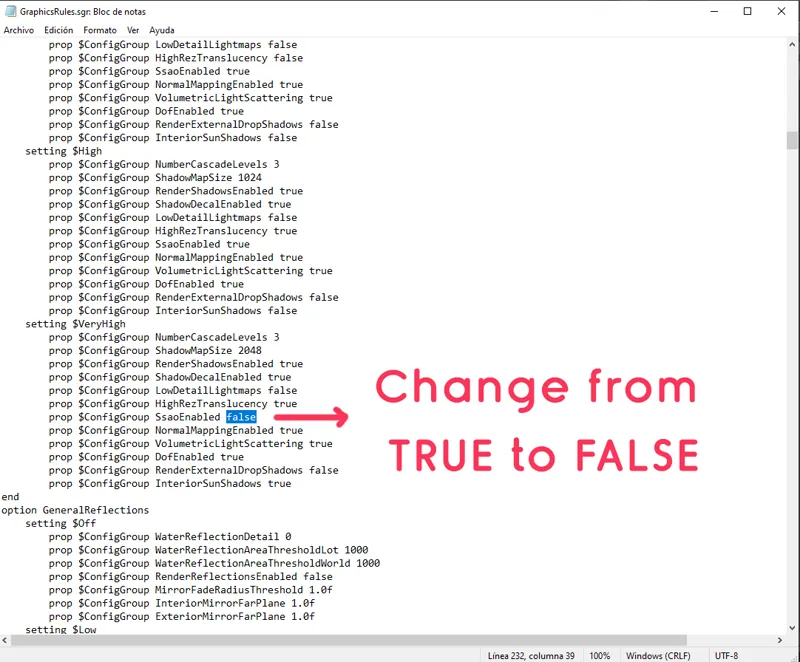
How to remove Dynamic shadows
Hi everybody, Im sure many of you already know about this, but for those who are new to the community, here is a little tutorial on how to remove dynamic shadows (SSAO)). I personally dont like them, so heres how you remove them.
Go to your game folder, that would be: program files/origin games/the sims 4/game/bin. There you will find a file called graphicsrules.sgr Open it, its a text file, use the search to find the word LIGHTING, and you will modify according to what settings of lighting you use in game, Low, high or very high. Look at the screenshot. I use Very high, so where it says $VERY HIGH I will change the value of SSAOenabled from TRUE To FALSE. And this will remove SSAO.
Then click save. If you cant save, "save as" leave the file in your desktop, copy it and paste it back in your bin folder, replace previous file. I would recommend making a backup of the graphicsrules.sgr before modifing it :D
Comments (10)
Thank you. That shadow was killing me
yeah its pretty bad lol
hello! is this the same search that could be done on mac? I'm having a hard time finding it
Hi, honestly I dont know how to find these files on a mac :S did you try googling it?
how do you find the bin on EA? my game folder is Documents/Electronic Arts/The Sims 4
this should be the rout c:/program files/origin games/the sims 4/game/bin, not in documents, thats were mods are, you have to find the game folder, were game was installed, its in program files.
is anyone having an issue where the shadows are still enabled in game. I even checked my graphicsrules.sgr file and I definitely followed everything correctly. I play with my game on ultra so my lighting is very high. I don't know if since the update, sims 4 has changed the way they configure shadows but this way isn't working for me anymore and I've only seen a few others talking about
Hi, sorry I didnt replay earlier. This is still working, you must have done something wrong, if you want, messege me on tumblr with a screenshot of what you edited in the graphicsrules file.
I love this and have been using this since I known about it. What about purple/dark shadow reflected on the wall/cabinets/objects... do you know to remove it? Kinda annoyed when it make my kitchen worktop have black spot on it🤗☺️
Gosh shadow is a huge problem in this game, and seems like its getting worst and worst since Home decorator pack :( For example you place two chairs one next to the other, same swatch, but they have different color because of how the game processes lighting now :( Anyway, maybe you can try this, it fixes many things in the graphicsrules https://www.patreon.com/posts/overhaul-01-55891224