Srsly's Complete Cooking Overhaul - 7.1.2
All important information for SCCO is in a "Read Me" in the download.
Inside the download is a "Read Me" file explaining the install guide on this page, as well as important information. In the major folders inside the mod, will be other "Read Me" files that will go over all features in detail and explain them. (If you have questions, please come by the discord for assistance, feature breakdown/video coming soon.)
The most recent changelog can be found here.
The changelog is updated publicly before release days. This gives you tl;dr detailed information about specifics for this update. Some information is only listed on the changelog.
The "Srsly's SCCO Info Doc" can be found here.
This google spreadsheet has all info about SCCO that users and creators would need to have. This includes a list of all EA and SCCO recipes, EA/SCCO/Other Creator Ingredients, Tuning Overrides, and more.
--------------------------------------------
There is a .txt document included in the download to walk you through installing SCCO.
If you have any suggestions, questions, or issues please join my Discord for more help!
--------------------------------------------
Before installing, be sure to remove all previous versions of SCCO & Clear your Cache!
Changelog
You can find the most recent changelog here with a list TL;DR of all the important information about this update.
Continued Updates
As you can see from the changelog, this update is another big batch of upgrades to the mod. To continue to remove as many EA overrides as possible. This allows SCCO to be compatible with more mods that might have overridden the same files that SCCO did.
Some things will still be "incompatible", such as features already included in SCCO or the minimal overrides that SCCO still has.
All of the features that were overrides and removed, are now handled via Lot51 or SCCO scripts. So these features have not left the mod, just no longer override EA directly.
Overrides that were left in the mod, can not currently be handed by any available scripts. So these were all updated for the newest version of the game and left within the mod.
Subscription Boxes Updates
All subscription boxes have had their loots updated. You will now get a new set of various items relating to the subscription your Sim has ordered. All items will be delivered to the mailbox and can be opened to the Sim inventory again.
All sims in the household can have their own subscriptions. When signing up for a subscription the notification will now tell you which you have signed up for/canceled.
Go Shopping Updates
All stores have been updated to ensure they have no single items listed, where "packaged" versions should have been listed instead. Prepped ingredients have been removed from grocery shopping (these will return as new "packaged" items in a future update).
Recipe Updates
Some recipes still called for a single object definition instead of an "Any Ingredient" tag for that item. There should be only a handful of single definition items left in recipes. Many new tags were added to bridge the gaps here and those recipes have been updated to call for the tag instead of a single item. This allows you to use other creators items instead of 1 specific item in a recipe.
Fixed some recipes calling for the wrong prepped/fresh ingredient. All recipes should no longer call for dough instead of milk or other misc items that dont seem to match the recipe.
Ingredient Updates and Ingredient Crafting
Some ingredients were not tagged correctly for the current version of SCCO, so all new tags that could be added to items that were missing were added.
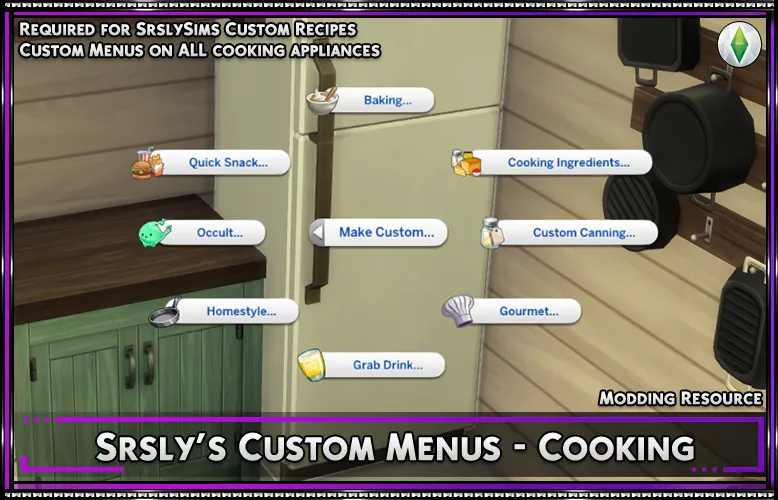
Almost all custom SCCO ingredients are now craftable! Using the fridge "Craft Ingredients" menu you can now make these ingredients at home.
Things like meats/etc that arent "craftable" items directly, were not made craftable. Instead you can use some of the new SCCO features to collect these items.
Meat Wall for Everyone - When you have the meat wall enabled from the vertical planter from Eco Lifestyle you can gather SCCO meats.
Butcher Livestock - You can now butcher Cows/Chickens/Roosters to obtain meat, this will delete that animal from your active household.
Milking - EA default you can milk Cows for milk and goats. Goats will now give a new "Goat Milk" ingredient and there is also a matching "package/case of milk item". Cows will still give their appropriate milk based on the treats they are given.
Forage for Meat - With Enchanted by Nature, you are able to forage for ingredients. If you have this pack with SCCO you can now "Hunt Animals" option to gather SCCO meats and fish.
Batch Fondant Crafting - Before you could only make Fondant on the stand mixer. You can now craft these recipes in bulk on the fridge just like my bulk prepped ingredients. These items can be open to get multiple servings, those single servings are what a recipe calls for to use.
New Cookbooks and Updates
Some "taste first" or "career unlock" recipes were missing from some cookbooks. All of these recipes have been added to their appropriate cookbook.
Two new cookbooks have been added "Life and Death" and "Eco Lifestyle", these were added since there are a few recipes for these packs that could be unlocked.
SCCO Tools Debug Settings
A new SCCO debug menu has been added, the old one has been retired. This new debug menu will allow you many different cheats/clean up behavior/unlocks/and more. You can enable "testingcheats on" then shift+click a sim to find the new "SCCO Tools" menu.
When using the log information, all support commands used will be logged to the "SCCO_Log.log" file which you can share with my support staff in Discord for better assistance with SCCO.
Further Creator Compatibility
NOTE: This is an experimental feature, released via Early Access for testing. If you have issues, please post in #supporter_helpdesk in discord.
SCCO has tried since its birth to be as compatible as it can be for other creators, as well as be a repository for any cooking related mods to work together without much work by a creator. But this also requires other creators to keep their items compatible on their end, which doesnt always happen.
One of the biggest things people have asked for is to have other creators ingredients to be fully compatible with SCCO (as in be accepted by "Any Ingredient" tags) So instead of sending you to the creator to ask them to make these compatibility changes, or walking users through how to do this themselves. I have made native compatibility within SCCO.
In 7.0.0+ version of SCCO you will now find a new folder called "SCCO Compatibility" inside this folder is 1 package file per creator that needed compatibility patches.
Some creators have kept up with keeping their mods compatible, but this will fix the ones that werent. This does not mean that ALL mods by these creators are compatible, mods that do the same thing as SCCO or edit the same files wont always work together. But their ingredients will be fully compatible.
This incudes:
Icemunmun / Oni / Robn / BrazenLotus
If you use any of the above creators items, you wll want to use their compatibility file.
Delete any compatibility files you do not need. If you leave them in, it wont cause issue. The game will just ignore these files. But theres no need to keep them in if you dont need them.
🌟 Hard Requirements
You need the following for SCCO to function.
Base Game (all non-bg files are marked with a pack number)
🌟 Optional, but Recommended
Some features of SCCO are built around the additions of these packs. For the full experience of The Sims 4 cooking I recommend these packs.
Cottage Living
Home Chef Hustle
🚨 Standard Install Guide 🚨
1a. Download "Lot51 Core Library" is now REQUIRED for the mod to function. Install this mod as directed on their mod page, or simply place their script directly into your mods folder.
1b. Using an old version of SCCO? Delete all old files before updating. Do not just override old files. Sometimes packages are moved around, or renamed. This will cause issues/duplicates.
1c. Download the most recent version of Srsly's Complete Cooking Overhaul. If using windows, un-zip the file using WinRar or 7-Zip.
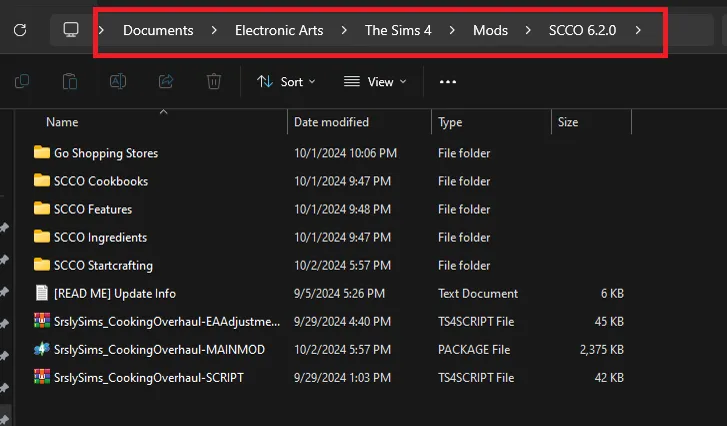
2. Put the "SCCO v#" folder that you un-zipped directly inside your "Mods" folder. Documents/Electronic Arts/The Sims 4/Mods
DO NOT drag and drop files from inside this folder into other folders/or directly in your mods folder. You need to leave the folder intact. This is the best way to ensure the mod is working correctly and the fastest way to update when a new version is released.
If you installed SCCO correctly, your file path should look like the red highlighted path:
(version number and content inside of the folder will be different depending on the current up-to-date version being installed.)
NOTE: Make sure you DO NOT have "Microsoft OneDrive" controlling your computers Documents Folder, if you see little green check boxes this means you are not using a local documents folder, and OneDrive needs to be disabled. OneDrive is incompatible with The Sims 4 [Pic]. This will cause major issues to your game/saves/mods/etc. If you need help with this, come by the Discord for assistance. [Disable OneDrive]
3. Remove any Features for packs you do not own, or do not want. You can read about each file in the "text document" found in each pack folder. All features for the pack are listed to explain in depth what each item does.
4. Pick and Choose Ingredients! With SCCO v5.0.0+ you are now able to choose which SCCO ingredients you would like to use in your game. If there is an ingredient you do not wish to install you can delete it.
All SCCO Ingredients are 100% optional.
NOTE: If you are using the EA Cottage Living "Simple Living Lot Challenge" you must use all SCCO ingredients or use another SCCO compatible creators ingredient that uses the same tag, or type. With the Simple Living Lot Challenge active you must have all ingredients to create a dish. You will not be able to spend money to craft recipes. (You can only spend money to craft a missing "Any Ingredient" requirement with the lot challenge disabled.)
Example, if you do not have SCCO chocolate (or compatible creators chocolate) installed you will not be able to fill the requirement for any recipes that call for "Any Chocolate".
Want to make something compatible? Stop by Discord for an beginner friendly (super easy) tutorial to make any creators item compatible.
5. Remove any Cookbooks for packs you do not own/have installed. Some EA packs have recipes that are locked by careers/achievements/tasting first at market stall. Reading these cookbooks unlocks these recipes for your sim to be able to craft at home. There is also a cheat when shift+clicking on the sim to unlock these recipes if you have the cookbook also installed.
6. Remove any additional files you do not wish to use. You can use SCCO as is at this point, all features are highly recommended for the best cooking experience. But if you didnt want a specific feature/expanded recipe/Go Shopping you can remove those now.
Note: I do not recommend deleting "Go Shopping" even if it has been made optional. You will be unable to purchase any SCCO groceries in the mod, and all cc items relating to shopping will need to be removed as well. All shopping related features REQUIRE the "Go Shopping" files.
7. Download any external SCCO compatible downloads you want to play with. You can now download any other creators content that is compatible with SCCO. As long as the creators files are custom they will work with SCCO. Some creators even rely on features provided by my mod to bring further compatibility to the cooking community.
A list of compatible creators as of this update are:
SrslySims | KingZace | IceMunMun | Oni | Robin | LittlBowBub | Rex | Amelice | YourFalseHope | AroundTheSims4 | LuSimLaStars | & More!
Partial Compatibility (See Mod Pages):
Somik and Severinka
Are you a SCCO compatible creator and want your name listed above? Reach out to me on Discord.
Looking for the FULL SrslySims Cooking Experience? Go grab the following mods in addition to SCCO.
8. Enjoy! All other files in SCCO are currently required for the overhaul. If you have any questions on installing, have suggestions, or just need help come by the Discord for assistance.
-----------------------------------
🗨️ Need Help? 🗨️
If you have any issues, or need help, please come by Discord for assistance. I cannot assist you via the comment section for support issues.
-----------------------------------
NOTE: Remember, DELETE ALL OLD FILES, before installing the new update. Some files have been removed/renamed/etc.
Changelog 7.0.2 to 7.1.2
Fixed issue where string tables were missing their instance number, causing missing strings and making other mods seems like they fixed the issue by removing them.
Changelog 7.0.0 to 7.0.2
Fixed issue with some phone shopping stores missing, these stores are no longer using the old store IDs.
Fixed issue where some ingredients were not being delivered via delivery_bag after EA override removals
Fixed craftable ingredients delivering via delivery_bag as empty plates
Fixed the optional creator ingredient compatibility files being read as object tuning, which could prevent households from loading alongside some script mods.
if you have any issues, please post in #supporter_helpdesk in Discord for assistance.