
ModifiersMixer v9.3: Settings Templates
v9.3 [31/05/2026]
Merged all settings interactions in one.
Re-added gallery sims presets export logic.
Added gallery export settings.
Added settings templates for keywords, folders and gallery exports.
v9.2 [01/12/2026]
Updated the 'Generate Presets' notification button to correctly target the randomized Sim’s demographics instead of the active Sim's.
v9.1 [01/11/2026]
Fixed missing text on interactions.
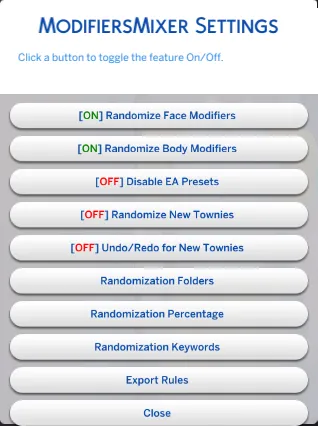
Replaced toggle interactions with a single settings popup.
v9.0 [01/10/2026]
Updated for game version 1.120.117.
Fixed WickedWhims incompatibility causing infinite loading screens.
Renamed interactions, descriptions, and notifications for clarity.
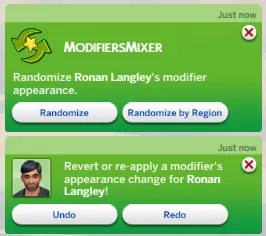
Added interactive notifications.
Adjusted randomization logic to avoid repeating presets.
Removed gallery sims reading logic.
Added in-game configuration interactions.
Added an interaction to revert all changes.
Added a new randomization mode.
XMLInjector is no longer required.
Interactions are no longer cheats.
Description
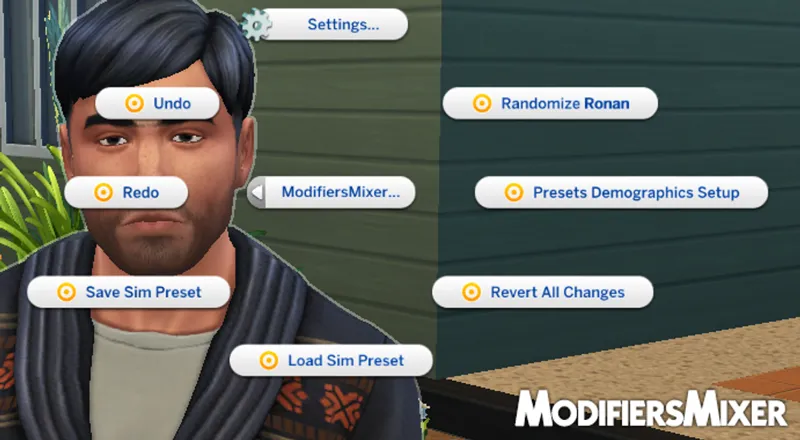
Adjust face and body sliders without entering CAS.
Features
Randomization
To get started, simply click on any Sim and select the Randomize Sim interaction. A notification will appear presenting two distinct modes; select your preferred option to instantly randomize your Sim’s appearance.
Undo / Redo
Undo: Reverts the last modifier adjustment or randomization.
Redo: Restores the next change in your history.
Revert All: Returns the Sim to their original state.
Save Preset: Captures the Sim's current modifiers and stores them for future use.
Load Preset: Instantly applies a saved look to any Sim with a single click.
Setup
Presets Demographic Setup: Creates randomization presets based on similar Sims in your library. It matches age, gender, and species.
EA Presets: Includes a library of presets based on EA’s premade Sims. This feature can be disabled in the settings if you prefer to use your own creations exclusively.
Settings
Face/Body Randomization: Toggle off to exclude the face and body from being modified.
Toggle Townies Randomization: Enable or disable automatic appearance randomization for newly generated NPCs ("Townies"). When enabled, the mod will automatically apply custom presets to every new Sim the game creates.
Toggle EA Preset Folders: Enable or disable the built-in EA preset library. Turn this off if you prefer to use your own preset collections exclusively.
Folders: Specify folders for randomization. This allows you to restrict the mod to certain preset collections instead of using the Default ones.
Percentage: Specify how much of the original Sim's appearance is kept during the randomization process.
Keywords: Specify which regions are affected during Region Randomization. This feature lets you lock certain traits and only randomize the specific areas you've selected.
Export Rules: Allows you to set preferences for the Sim's presets you want and how to export them.
Templates
Folders: Saves a set of specific folders for reuse.
Keywords: Saves a specific list of keywords for reuse.
Export Rules: Saves file-naming, format, destination, ages/gender/species to filter in or out, maximum of households to read and the reading order, settings for reuse.
Commands
Press Ctrl + Shift + C to open the command console.
Type MM.HELP and press Enter.
A full list of available ModifiersMixer commands will be displayed.
Installation
Extract the zip file and drop the ModifiersMixer folder directly into your Mods folder.
Important: This is a script mod. Script mods cannot be more than one subfolder deep. For the mod to work, the path must look exactly like this:
.../The Sims 4/Mods/ModifiersMixer/Crilender_ModifiersMixer_Scripts.ts4script
OR placed directly in the root: .../Mods/Crilender_ModifiersMixer_Scripts.ts4script
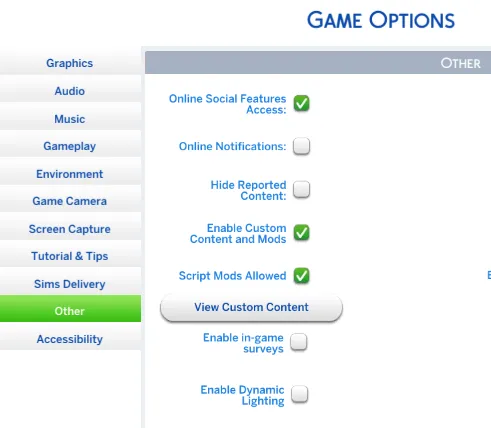
Ensure that you have both Enable Custom Content and Mods and Script Mods Allowed checked in the "Other" tab of your in-game Options menu.