
Download: ModifiersMixer v6.0 [01/08/2025]
v6.2 [01/08/2025] (Tested on PC: 1.111.102.1030)
Fixed not_age negated arguments not working.
v6.1 [01/07/2025] (Tested on PC: 1.111.102.1030)
Mix Sim Random command now accepts a input for percentage of a folder to use.
Hey, it's been a while,
Introducing Interactions :
- XML Injector is required.
- To enable these cheat interactions, open the game console with CTRL + SHIFT + C and enter TestingCheats True. After that, you can access them by pressing Shift + Click on a Sim.
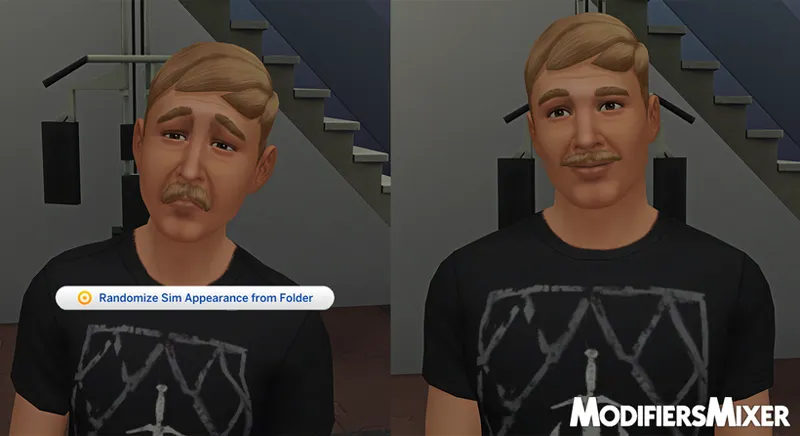
Randomize Sim Appearance from Folder
This interaction introduces the mod and showcases its capabilities. It executes the command MM.MSR 0.0 MAXFILES=4. Picking 4 random appearance modifier files, assigns a random percentage to each, mixes them and applies the result to the target Sim.
- Before you can begin to use this interaction you'll need to have at least 1 appearance modifier file, which can be generated with the MM.DM command.
- For a quick start, dump all your 'My Household' Sims with the following command:
MM.DM FOLDER=MEN PLAYER_SIM HUMAN MALE NOT_MINOR NOT_TEEN
FOLDER=MEN Ensures the appearance modifier files are saved in the specified subfolder.
PLAYER_SIM Ensures the Sims in 'My Households' are chosen.
HUMAN Ensures Sims of species smalldog, dog, cat, fox, and horse are excluded.
NOT_MINOR Ensures baby, infant, toddler, and child Sims are excluded
- Use MM.F without any arguments to view the available filters.
- Make sure to use the 'Choose Folder for Appearance Randomization' interaction to set the folder containing the appearance modifier files you'd like to randomize. Otherwise, it will randomize the files in the same folder as the .ts4script.
Now you can go ahead and try the interaction on any Sim.
Choose Folder for Appearance Randomization
This interaction displays a dialog, allowing you to specify a subfolder for the 'Randomize Sim Appearance from Folder' interaction to read files from.
Preserve Modifier Percentage
This interaction displays a dialog where you can specify the percentage of the Sims current appearance modifiers to keep when using the 'Randomize Sim Appearance from Folder' interaction.
Reworked Commands :
- Use any of the commands without arguments to view their help message.
- All commands now optionally work with all Sims, featuring an Include/Exclude filtering option.
- All commands filters are safe now; you'll get an error message if a filter doesn't exist.
MM.HELP / MM.H
Displays a list of available commands with brief descriptions.
MM.DUMP_MODIFIERS / MM.DM
Exports the Sim's appearance modifiers to a file.
MM.FILTER / MM.F
The core function: Filters Sims based on attributes.
- Use this command to test filter combinations and ensure they produce the desired result before applying them to other commands.
MM.APPEND / MM.A
Sets an appearance modifier to a specific value.
MM.CLEAR / MM.C
Removes all appearance modifiers of a specific type from the Sims.
MM.APPEND_MODIFIERS / MM.AM
Applies appearance modifiers from a file to the Sims.
MM.MIX / MM.M
Combines multiple appearance modifier files into one.
MM.MIX_SIM / MM.MS
Combines the Sim's current appearance modifiers with those from files.
MM.MIX_SIM_RANDOM / MM.MSR
Combines the Sim's current appearance modifiers with random files.
Recommended for an enhanced experience with the mod :
Notepad++: A better environment for editing text files.
Ditto: A clipboard manager with a search bar and groups, useful for copying multiple file names.
TwistedMexi's Better Cheat Console: Allows text selection in the game console. (Note: IU override mods may break frequently with game updates.)"
Installation :
Drop the ModifiersMixer folder directly into your Mods folder. This is a script mod, and script mods cannot be more than one folder deep. Ensure the .ts4script file is on a path like:
.../Mods/ModifiersMixer/Crilender_ModifiersMixer_Scripts.ts4script
OR
.../Mods/Crilender_ModifiersMixer_Scripts.ts4script
- Ensure that you have both Mods and Script Mods enabled on the "Other" tab in your game options.
Have fun! Feel free to reach out with any questions.
Download:
Comments (7)
Hi, I use your mod a lot! How do I delete the preset and install a new one with characters I created later?
Hey, I'm glad someone uses it, lol. Currently there's no interaction nor command to delete files, you need to check in the same folder as the .ts4script of the mod, and delete the folders/files manually
If I want to include teens,child, toddlers and infants sims, will I change the “NOT_MINOR NOT_TEEN” to “YES_MINOR YES_TEEN”?
Hey sorry late reply... No need for "YES_". MINOR includes "BABY INFANT TODDLER CHILD", adding "NOT_" to it makes it do the opposite, exclude them. * Use MM.F or MM.FILTER, it'll show you all the available filters. you can also use this command with the filters and it'll display the sims that match them. E.G., MM.FILTER PLAYER_SIM HUMAN MALE CHILD MM.DM FOLDER=CHILDREN PLAYER_SIM HUMAN MALE CHILD This command will export the sims to a folder named "CHILDREN" PLAYER_SIM is a filter to include only your "My Household" sims, adding "NOT_" would make it so it does the opposite, exclude your sims. HUMAN is important to specify if you have other species in your game, E.G., cats and dogs. alternatively you can use "NOT_CAT NOT_DOG NOT_SMALLDOG NOT_HORSE NOT_FOX", but that'd be redundant. MALE will exclude FEMALE sims. alternatively you can use "NOT_FEMALE" CHILD will include children sims and exclude all other ages "BABY, INFANT, TODDLER, TEEN, YOUNGADULT, ADULT, ELDER". More examples: MM.DM FOLDER=FemaleTeens PLAYER_SIM HUMAN FEMALE TEEN Exports your human female teen sims to the folder "FemaleTeens". MM.DM FOLDER=MaleChildren PLAYER_SIM HUMAN MALE CHILD Exports your human male child sims to the folder "MaleChildren". MM.DM FOLDER=AmalgamFemale PLAYER_SIM HUMAN NOT_MINOR FEMALE Export your human female teen to elder sims to the folder "AmalgamFemale". *You can put the filters in any order after the "MM.DM". MM.DM FEMALE CREATION_SOUCE=PRE_MADE HUMAN NOT_PLAYER_SIM FOLDER=F_EA NOT_MINOR This one exports EA teen to elder female sims to a folder named "F_EA"
Is this just for male sims? also say for instance i make sims using presets.. does it apply these
Any sims works. Most presets are made of modifiers so it apply them yeah. In post I give a example for male sims, but you can export any kind of sims playing with the filters. MM.DM FOLDER=MYSIMS FEMALE YOUNGADULT PLAYER_SIM HUMAN This should create a folder within the same folder than the .ts4script named MYSIMS, that you can use to start using the interaction. PLAYER_SIM will make sure only your "My Households" get included 'NOT_PLAYER_SIM' for the opposite. YOUNGADULT to include only young adult sims. HUMAN to exclude pets in case you have any of the packs that add them.
Interaton 💀✔