
BUSTERse
Here is big brother of "BUSTER" with tons of improvements and new features!
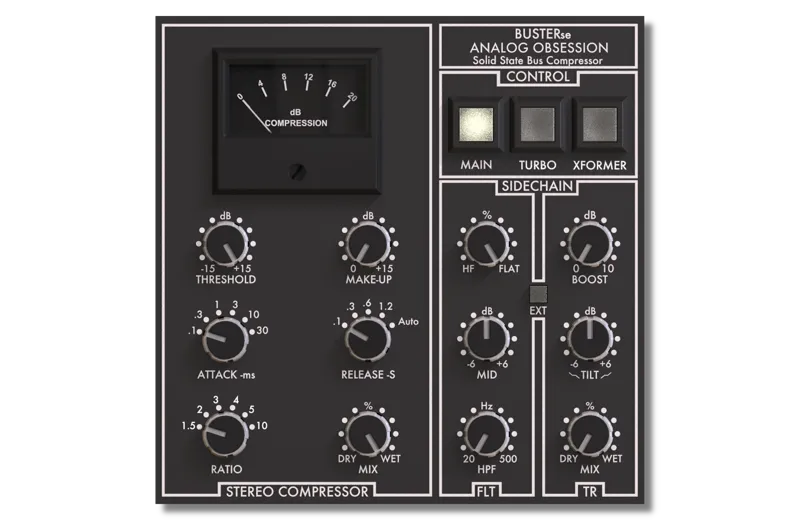
Classic console compressor with extra Filter and Transient sidechain options to dominate whole signal!
FEATURES
STEREO COMPRESSOR : Compressor Section
FLT : Filter Section
TR : Transient Section
CONTROL : Control section
Compressor Section
- THRESHOLD (dB) : +15 to -15
- ATTACK (ms) : 0.1, 0.3, 1, 3, 10, 30
- RELEASE (sec) : 0.1, 0.3, 0.6, 1.2, Auto
- RATIO : 1.5, 2, 3, 4, 5, 10
- MAKE UP (dB) : 0 to 15
- MIX (%) : DRY to WET
Filter Section (Sidechain)
- HPF (Hz) : 20 to 500
- MID (~1500Hz) : -6dB to +6dB
- HF (~10kHz) : 0dB to -10dB *Will work like famous optical-tube compressor and help you to control high frequencies, better.
Transient Section (Sidechain)
- BOOST (dB) : 0 to 10 *While boosting attack, it will reduce decay/release of signal to make compressor more sensitive with only attacks/peaks.
- TILT (~1kHz Center) : -6dB to 6 dB *It's placed before BOOST to send only dedicated range to BOOST. So, BOOST will affect only given frequency range and will boost only this range's transients. If TILT is default, BOOST will affect overall transients.
- MIX (%) : DRY to WET *Will blend DRY and WET signal. After boosting transients, you can blend with DRY signal to keep reduced release of signal. When MIX in default position, TR is off. So, you can turn MIX knob to all the way up to engage TR section.
*EXT (External Sidechain) : When you engage EXT, sidechain circuit will listen incoming signal and you can stil use Filter and Transient sections on incoming signal.
Control Section
- MAIN : General Bypass
- TURBO : Turbo Mod *Turbo mod will help to compressor to affect whole signal range. Otherwise, compressor will focus on mid frequencies. This mod added to keep original sign of hardware.
- XFORMER : In/Out Transformers *If you engage XFORMER, in/out ICs will be replaced with transformer to balance it. This will affect to impedance, character, overall sound.
- ANALOG OBSESSION label is oversampling. Simply click it and engage 4x oversampling.
- Touchscreen support
- Resizable interface. Simple "Bottom Right Corner Handle" to resize. 50% to 200%.
*Resizing Tip: When you duplicate plug-in, it will remember current state of GUI size. But if you load new instance, it will be opened at default size. To get rid of this issue, simply follow these steps;
1. Open plug-in for the first time
2. Resize GUI according to your screen resolution or you liking before setting any knobs
3. Save this state as default preset with your DAW
Now, you will be able to load new instances with same size.
(If you want to go default size, simply double click to resize handle.)
AVAILABLE FORMATS
VST3 / AU / AAX Native - Audiosuite | Mac 10.11 or Higher | Intel / Apple Silicon
VST3 / AAX Native - Audiosuite | Windows 10 - 11
Mac Versions require a graphic card that supports “Metal”
Windows Versions require a graphic card that supports “OpenGL”
VERSION 7.0 - 21.12.2022
- Added AAX support
- Added resizable interface
DOWNLOADS
Comments (60)
how to instal pleas?
Hello, it won't let me download the plugin. Could you help me? I am a member. Thanks.
I have tried this plugin and what other people are saying is true... the amount of compression on the readout is double. Bug? Maybe because it's doing two tracks in stereo and thus that's the full readout? I'd be willing to send the author a few bucks to at least address this because it gives the impression that these plugins have bugs that won't ever be addressed and it's a "you get what you pay for" situation. There's lots of potential with Analog Obsession so going over some of these problems with a FAQ or Known Issues section would be a major improvement, imo.
Whadaya mean it doesnt have quad built in?
itd be so bad ass if someone actually started making a quad version of this again.
Hello. I've downloaded both the Windows Installer and the Windows Zip file and installed and uninstalled them both (separately and alternately) several times, but I can't get the plugin to work. It opens, but no matter what I adjust, there's no effect on the compression meter. Can you please help me? Procesador 13th Gen Intel(R) Core(TM) i9-13900K 3.00 GHz RAM instalada 64,0 GB (63,8 GB usable) Almacenamiento 1.82 TB SSD KINGSTON SNV3S2000G, 932 GB SSD WDC WDS100T2B0A-00SM50, 1.82 TB SSD WD Green SN3000 2TB, 2.73 TB HDD ST3000DM001-1CH166 Tarjeta gráfica NVIDIA GeForce RTX 3050 (8 GB), Intel(R) UHD Graphics 770 (128 MB) Tipo de sistema Sistema operativo de 64 bits, procesador basado en x64 Lápiz y entrada táctil Compatibilidad con entrada manuscrita Edición Windows 10 Pro for Workstations Versión 22H2 Instalado el 12/08/2020 Compilación del sistema operativo 19045.6466
i just downloaded sounds awesome really great
I saw some youtuber complain about metering not being correct. I tested it with a sine wave and for effective 4dB GR it is showing as 8dB in the plugin meter. Will this be revised at some point? Otherwise, amazing plugin!
This SSL comp has replaced my main master bus comp. Kudos! I am in LOVE with all your plugins.
Hello. I just downloaded BusterSE to try. It opens with the meter, threshold, makeup gain, mix and side chain blacked out. Ironically, the knobs work but you just can't see them. The specs say OpenGL required. I have NVIDIA Geforce 310 which has OpenGL 3.1 is that good enough? Would upgrading to a OpenGL 4.5 make a difference? Is there something else I am missing? Thanks!
Hi! Any plan on fixing the metering bug? It has been pointed out by at least two YouTubers and I can confirm it myself with a sine wave. Would be nice to have correct metering.
Hello, did the metering got fixed by any chance ? thanks for your work I recently subscribed :)
Damn, you knock it out of the park every time! I pretty much quit fooling around with Waves and all their ridiculous updates/upgrades. Any plans for an ADT plugin? I'll keep spreading the word about all your great work. Many cheers to you!
I love this plug and it's always on my masters and I cancelled my SSL plan because that's the only plugin I used from them :) however since I upgraded to Apple Silicon M1 My Busterse doesn't load it's settings from a session so I have to go in and change them for all the sessions I open....it's no biggie because I know the settings and there almost always the same how ever it's a bit of a pain in the butt...... Any tips? My System MacBook Pro_Max- 16" 2021 32gb-URAM and 10cores system OSX 12.6 I would be very thankful if this little glitch would go away :)
Sounds amazing. Just compared it to my native SSL plugin - it comes out on top with a clear, open and big sound. I've never heard an SSL comp sound BIG. nice!
I can't replicate this issue on my system. And never got this issue from another user. Installers are notarized for Catalina, Big Sur and Monterey. Do you have any other daw to test? If not, please try Reaper to test and let me know if it works or not. Thanks
OK, I will try manually removing all plugins and reinstalling from scratch.
Strange issue. My system is Monterey, too. And all working on Logic. Let me check what is wrong. Thanks
Hi AO. I can't get any of your plugins to pass validation on Logic 10.7.x in Monterey. I am setting up a MBP M1MAX laptop, which comes with Monterey, meaning I cannot go to any earlier OS. I can't work without your plugins at this point. Any help on the horizon for Monterey compatibility?
Hi. Did you try system restart after installing? And re-validate after restart. Thanks
I agree with Angelo Chery MORE REVERBS !!! (plates). But as for this plugin in seriously its better than any other version of the SSL Bus I have ever used. I do seem to have an issue with Reaper. After some use the Meter stops working, I am not sure why. I restart the project and its fine. I think it might be because I am using the free Reaper so after some time (same amount of time set so I will have to click the x to use the evaluation version again) the meter stops working. Anyway I can live with it and maybe its just me.
I saw some youtuber complain about metering not being correct. I tested it with a sine wave and for effective 4dB GR it is showing as 8dB in the plugin meter. Will this be revised at some point? Otherwise, amazing plugin!
Who fix???
Really excited about this! I’ve heard great things about your SSL comp being even better at handling transients than the Brainworx Townhouse which is my current go-to. 🙌🏻
This is sounding really nice! Perfect on the mix bus.
Hi Tunca! My DAW Studio One 5 on Windows 10 is not replacing the previous versions that are still inserted in the tracks by these new versions, just appearing as another new plugin on the effects list. Is it just like that? I have already installed both components DLL and VST3 to check. Thank you for your attention to this matter.
Hi! Thanks for feedback. I believe categories are different for new version. That's why you still see both. Cleaned cache? Thanks
Dear Mr. Tunca, I ask you very sincerely not to make such saturated shades for your plugins. I already wrote to you about what exactly I meant in the instagram. Only because of this, I will not be able to use your new update (((.
Sorry to hear that. I am just making GUIs crispy and easy on eyes. Thanks.
Hey bud, just wanted to let you know that it's not working on M1 in LPX. It scans it but when I try to load the plugin it doesn't show up as an option. I can see it in my plugin manager tho. If you need a tester on the M1 for LPX let me know.
Hi, tested on two different M1 system and Logic. It's working with no issue. Please, send me email about details. Thanks.
I've just installed the new version. I'm using Reaper 6.27 and Windows 10, and, I think there might be a bug with the plugin not working when I first load up a project. I have to open it and move some controls and only then it seems to have an effect on the signal...
Was it clean install? If not, it's normal for first time.
When will you update Buster (non-SE)? I prefer its sound over this one and use it in mastering.
Buster won't be updated. I combined both. Now, both without turbo and transient section. Thanks
Hello, thanks for your job it's amazing. I was wondering why this plugin works perfectly on Reaper but not on AbletonLive 11. It's an Ableton thing or there's any problem with Apple users who has BigSur as operator system?
Because compressor plugins are different. Logic X and 9 have different channel systems.
Question which plugins are 32/64bit?
All plugins only 64bit.
Hmm High Sierra should work. Did you check plugin manager?
Yes, I dragged all of them into library/audio/plugins/components folder and logic isn’t seeing them in plugin manager, even with full restart 😒
Hello, I just joined as a subscriber and I can only get the plugins with install packages to work in Logic. This one and most of the rest of them as drag and drop components aren't loading in logic. Any ideas? Thanks!
Hi! Thanks for your interest! Plugins which have installers notarized for Catalina and Big Sur. I am about to update all of them for Catalina and Big Sur. To you non-updated plugins, you can try this trick. https://www.osirisguitar.com/how-to-make-unsigned-vsts-work-in-macos-catalina/
Hi . I cant access the download. tried many times. just keeps sending me back
Hi! Please try right click and save as for old plugins. And you can download with one click plugins which have installers. I am about to update all of them. Thanks.
Do you have any solution how to install on Catalina OS?It won't work need to breakout...thanks
It's not updated, yet. But possible to use. First, download with right click and save as. Then try this simple trick. https://www.osirisguitar.com/how-to-make-unsigned-vsts-work-in-macos-catalina/
Waves SSL bus - goodbye )
I was wondering if someone was gonna compare them! Whats the big difference you hear?
Great unit! Thank you.
Been using it everywhere lately, sounds fantastic
Many thank yous for your excellent work! This is a really nice compressor! 👍
Most of the plugins you have released have either replaced my other plugin counterparts from big developers like waves I love the quality of them but I would love to see tape emulations if you ever get the opportunity to get your hand on those, cheers!
Just got here and I can't wait to check out all these plugins. If these are good as I think they are, I can't wait for a warm tape emulation from this guy as well!
Great! It's not that exciting when you make a new plug-in, as it is when you revisit an old one. What was once good now becomes great and hopefully, going forward, even fantastic. Keep up the good work!
Hello, all great. Do I have to subscrube to receive email notifications or it is just there are no emailnotifications?
Hi, patrons will be notified when i send new post or edit. No need any other subscriptions.
never mind, I just saw the Ableton disclaimer.
Wow, this is great! I have noticed the AU version of this (and Loaded) are not working in my setup. The VSTs work fine but the COMPONENT files don't seem to instantiate for me. Any ideas why?
Hi, Live and Logic have different channel handling options. If i can make it for Live, Logic can't see plugin because of channel settings. So, i have to cover Logic users first if i release AU... Sorry about that issue...