

EQProfiler
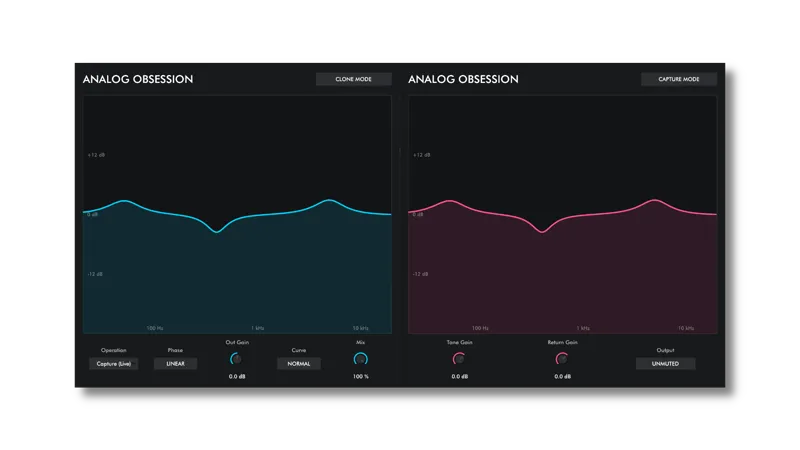
EQProfiler will help you capture your hardware EQ in real-time! Now, you can use only one hardware EQ with all of your tracks!
One plugin with Capture and Clone modes.
Capture Mode will capture your hardware and send curve to Clone Mode.
It's also useful for high CPU usage EQ plugins, too.
Note that, it's only capturing linear frequency response. No harmonic content.
ROUTING SETUP
Create 3 tracks
Name them "Clone" "Effect" "Capture"
Add "Clone" plugin to "Clone" track
Add hardware or software EQ to "Effect" track
Add "Capture" plugin to "Capture" track
Disable "Effect" and "Capture" Master send
Send "Effect" track to "Capture" track
Send "Capture" track to "Effect" track
REAPER USERS: Open "Project Settings" and enable "Allow feedback in routing"
Routing is done. Now, steps for plugins.
PLUG-IN SETUP
Set "Clone" plugin's mode to "Capture(Live)"
Set "Capture" plugin's "Output" to "Unmuted"
Now, you can set your EQ on "Effect" track. You can see frequency response, too.
After setting EQ, set "Clone" plugin's "Operation" to "Hold"
Also, if you want change or add another eq to already processed track, select "Operation" to "Add (Stack)"
Resizable interface. Simple "Bottom Right Corner Handle" to resize. 50% to 200%.
*Resizing Tip: When you duplicate plug-in, it will remember current state of GUI size. But if you load new instance, it will be opened at default size. To get rid of this issue, simply follow these steps;
1. Open plug-in for the first time
2. Resize GUI according to your screen resolution or you liking before setting any knobs
3. Save this state as default preset with your DAW
Now, you will be able to load new instances with same size.
(If you want to go default size, simply double click to resize handle.)
Version 1.2 - 1.10.2026 - Update
Added zero latency Minimum-Phase mode
Available Formats
VST3 / AU / AAX Native - Audiosuite | Mac 10.11 or Higher | Intel / Apple Silicon
VST3 / AAX Native - Audiosuite | Windows 10 - 11
Mac Versions require a graphic card that supports “Metal”
Windows Versions require a graphic card that supports “OpenGL”
DOWNLOADS
Comments (7)
I'm trying to clone a hw eq setting, but the guide you provided is not clear about the I/O patching. I connected everything as suggested but no audio is passing by and I don't see any curve forming on the clone plugin
Very cool! Does it only copy one EQ setting or can you change the gain/q within the plugin?
You can’t edit captured eq curve. But possible to add extra eq curve in Add mode.
With Pro Tools already open, it crash when I try to open the plugin.
Just fixed. Will be updated in a couple of hours. Thanks
Crash in Pro Tools 26.4.1.179, with Mac Studio - Apple M2 Max - MacOS 26.7
Thanks for reporting. Crashing while loading?