






How To Use Persona 4 Golden PC Mods (Steam)
==========================================
USER GUIDE TO SETTING PERSONA 4 GOLDEN MODS
==========================================
Hey Guys,
Maybe some of you already read few tutorials out there to use P4G mods and they are, I admit it's pretty complicated and hard to understand.
But as I promised, I made them slightly more simple for you to do quick setup and play.
Please follow slowly, and carefully.
Okay, Lets begin :
---------------------------------------------------------------------------------------
1. Install All 4 Microsoft Software :
- 2 Windows Core Runtime 3.1 installer :
-- x86 for P4G Game
-- x64 for Reloaded Tools
- 2 Visual C++ Redist 2015 - 2019 installer :
-- x86 for P4G Game
-- x64 for Reloaded Tools
If you want to download the latest version from Microsoft directly, go here :
After install 4 software above, you may restart your computer.
---------------------------------------------------------------------------------------
2. Setting Up Reloaded Tools
A. Extract & run Reloaded II.exe as Admnistrator.
Then it will ask you to download some additional files if this is your first time.
Allow it to download & install them and wait until finished.
B. Setting up SteamHook Compatibility
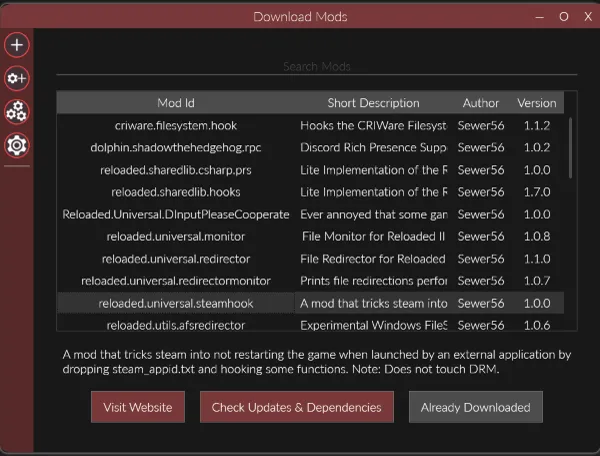
- On left side bar, click Download Mods icon ("Gear +" icon)
- Choose "reloaded.universal.steamhook" and click download if it isn't already.
- If it's already downloaded, then go to next step.
---------------------------------------------------------------------------------------
3. Setting P4G Mod Loader
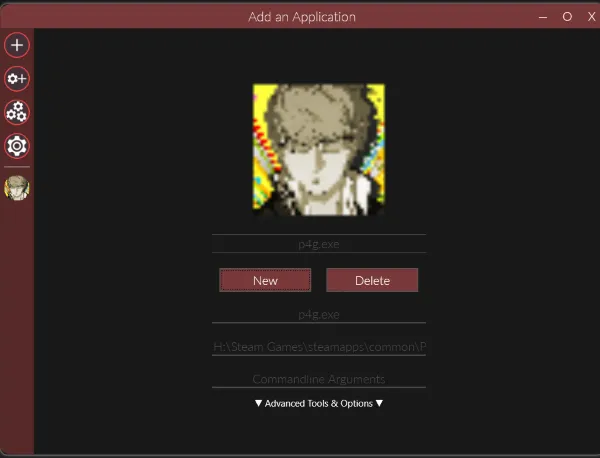
- Navigate on left side bar and click Add an Application icon ("+" icon).
- A new screen to add new application show up, then click NEW button
- Navigate to your Steam Game folder -> Persona 4 Golden -> P4G.exe
- Click Open
- You should see P4G blurry main character icon picture
- You also should see in the left side bar that P4G icon has been added (below setting icon)
---------------------------------------------------------------------------------------
4. Mapping P4G Mod Loader
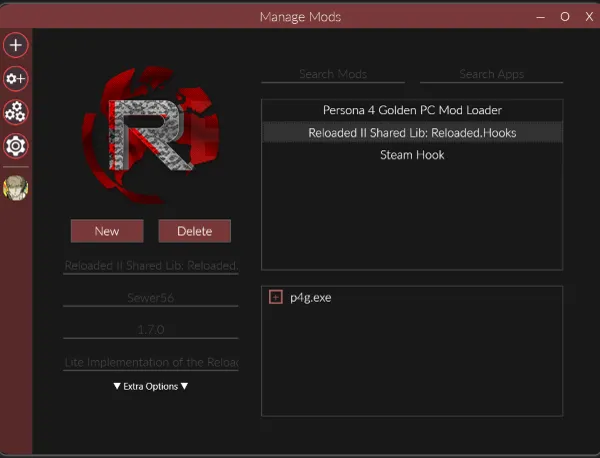
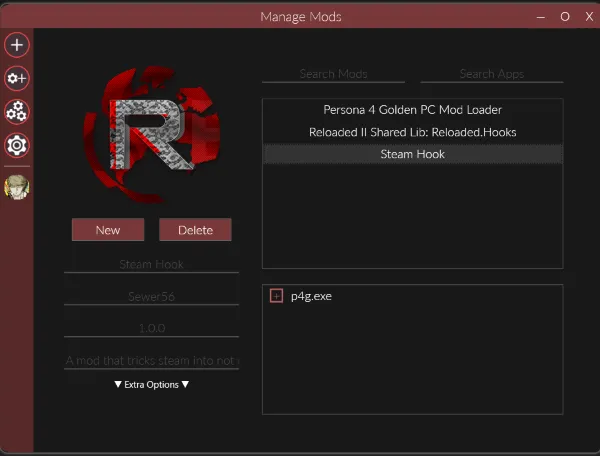
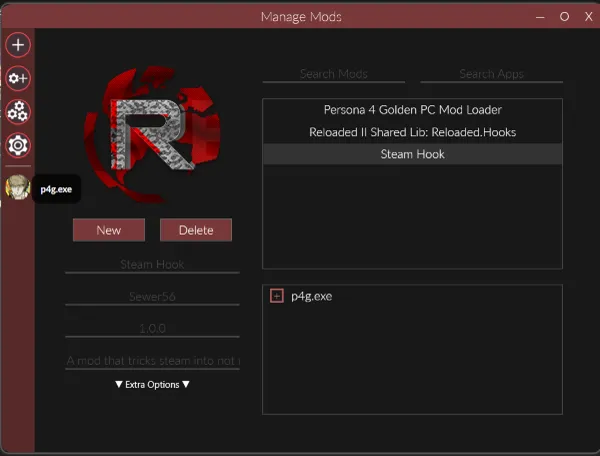
- Click Manage Mods on left side bar (3 gear icon)
- Screen Manage Mods show up like this.
- Activate (or enable) by click the check box "p4g.exe" below in each 3 mods, like this :
- And you are done, but not finished yet.. :D
---------------------------------------------------------------------------------------
5. Activate P4G Mod Loader
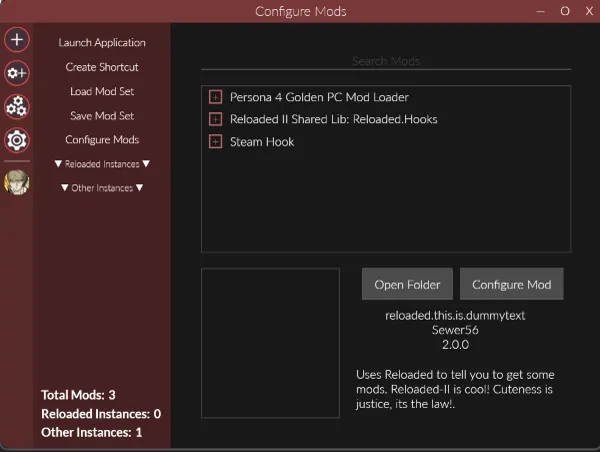
- Click on P4G icon on left side bar.
- Activate all of three in Mod List by click on their check boxes, like this :
- And, you are done, congratulations.. 👍
---------------------------------------------------------------------------------------
6. Test Start Game
- Still on the same screen as step 5, click on Launch Application.
- If P4G can be started, then it's success.. 😊
- Click Create Shortcut, and it will create shortcut on your desktop with name
"p4g.exe (Reloaded)"
- Double click to play from that shortcut and if it run, then it's double success.. 👍
- If P4G can't be started or error occured, then please check from step 2B.
---------------------------------------------------------------------------------------
7. Add P4G Mods Folder
- Go to your Steam Game P4G folder and add "mods" folder there
---------------------------------------------------------------------------------------
8. Apply Mods
- Extract and Copy Paste any mods you downloaded into "mods" folder in step 7.
- Please copy paste from "data0000x" folder, into "mods" folder.
---------------------------------------------------------------------------------------
9. Play & Have Fun.. 😎
---------------------------------------------------------------------------------------
Important Notes :
- You need to do these long steps only ONCE. and if succeed, you don't have to worry about it anymore.
- My 3 steps to apply mods works on this, just follow the instructions on where to copy paste them.. 😊
- If you follow all of my instructions, then you should be fine
- Reloaded Tools downloaded from here : Reloaded II
- P4G Mod Loader downloaded from here : P4G Mod Loader
- This Reloaded tools and P4G Mod Loader will become obsolete in the future because new tools with simple steps to set up might be created by modders out there.
- If that's the case, then I will update this tutorial later and inform you.
Thank you so much.
Let's us have fun together,
The Silver Vox
Comments (4)
Hi Silver Fox, would you kindly start making mods for Fairy Tail 2020 by Gust as well? Will be much appreciate it. Also wondering if there is a way to get rid of those thick black shadow underneath the heroines skirt. Thank you
Hi, yes, I have pre order it and actually will make Fairy Tail mod, but I need to look and play it first okay. Please DM me in Discord if you have any other question..
Yups, step 7 is for mod files.
Isn't it on step 7 for mod file? or am i wrong?