
Mastering Seedance 2.0: A Guide to Professional AI Video Creation
Multi-shot sequences, consistent characters, lip sync, VFX, product ads, and 3D texturing — here's a practical breakdown of what Seedance 2.0 can really do.
Seedance 2.0 is now available globally, and unlike most AI video tools, it isn't just about generating a single clip. It can produce multi-shot sequences with consistent characters, camera changes, and real scene progression — making it one of the most capable AI video tools available today.
After thorough testing, here's exactly what you need to know: how to use it, where its limits are, and 5 practical use cases where it genuinely makes a difference in real projects.
How to access Seedance 2.0
Seedance 2.0 is currently accessible through Higgsfield.ai, under the video menu. If you already use the platform for other AI models, it integrates naturally alongside tools like Nano Banana Pro. Once inside, you can upload image, video, or audio inputs, enable or disable audio, set video duration up to 15 seconds, adjust aspect ratio, and choose between 480p or 720p resolution.
How to prompt it effectively
The simplest approach is writing your prompt as a continuous paragraph — describing the subject, environment, camera movement, and how the scene evolves over time, almost like narrating a film. But you're not limited to text alone. Seedance 2.0 accepts multiple media inputs and can generate dialogue, music, and sound effects while keeping characters consistent across shots.
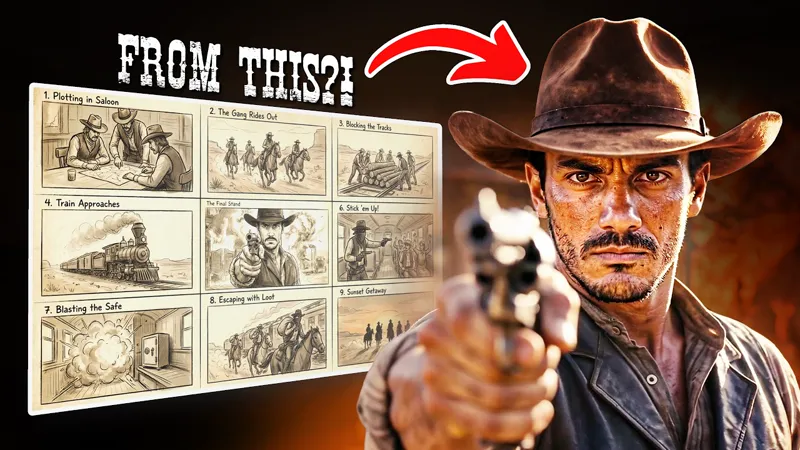
For more control, you can structure your prompt shot by shot and even add timestamps. Tools like ChatGPT can help plan sequences before you feed them in. You can also sketch a storyboard or generate a grid of shots using Nano Banana Pro, then simply say "turn this storyboard into a video" — and it works surprisingly well.
5 practical use cases
1️⃣Cinematic sequences and short films
Because Seedance maintains consistent characters and scene structure across multiple shots, it's well-suited to building short cinematic sequences or even full AI films. Storyboard-to-video workflows work particularly well here — feed in a visual grid and the output closely mirrors the intended shots.
Tip: if it skips shots or cuts too fast, your duration is probably too short for the story. Extend it or simplify the scene count.
2️⃣ Visual effects (VFX)
Upload an existing video and prompt Seedance to add new elements — explosions, environmental effects, new objects. Results can look realistic, though it sometimes adjusts camera movement slightly. To fix this, explicitly instruct it to preserve the original camera movement and structure. For adding objects, upload a reference image and use the @ symbol to reference it in your prompt.
Tip: green screen replacement works well too — upload your footage, describe the environment, or provide a reference frame generated by Nano Banana Pro.
3️⃣ UGC-style videos
Take AI-generated images of someone presenting a product, describe what you want them to say in the prompt, or upload your own audio — and Seedance generates a talking video with convincing lip sync and delivery. Compared to other tools in this space, the realism is notably better. The main constraint is the 15-second duration cap.
4️⃣ Product ads
One or a few product images are enough to generate a full dynamic ad — fast cuts, transitions, 3D-style reveals, motion graphics, and text animations. Describe how the product is introduced and how the camera moves, and Seedance handles the rest, automatically creating multi-shot output with consistent branding. This is arguably where it shines most.
5️⃣ 3D animation texturing
Take a raw 3D render (such as an animated character from Mixamo), add camera movement in Blender, and upload the render to Seedance with a style reference image. The tool textures the entire animation with impressive coherence — a level of realism that would normally require serious 3D skills and hours of work.
Key limitations to know
Seedance 2.0 will block generations that include famous people, recognizable fictional characters, or protected IP (Disney, Marvel, etc.). Use original images, non-copyrighted videos, or AI-generated content for the best results. Videos are also capped at 15 seconds per generation.
Bottom line
Seedance 2.0 is a meaningful step forward for AI video — not just for generating single clips, but for building structured, multi-shot content that holds together visually. Whether you're a filmmaker, marketer, or 3D artist, there are real workflows here worth exploring. And by all accounts, this is just the beginning.
How to Use Seedance 2.0 in Real Projects: 5 POWERFUL Cases (YouTube)