
JoiPlay 1.01.49 and RPG Maker Plugin 1.00.62 (Gotta Catch 'Em All?)
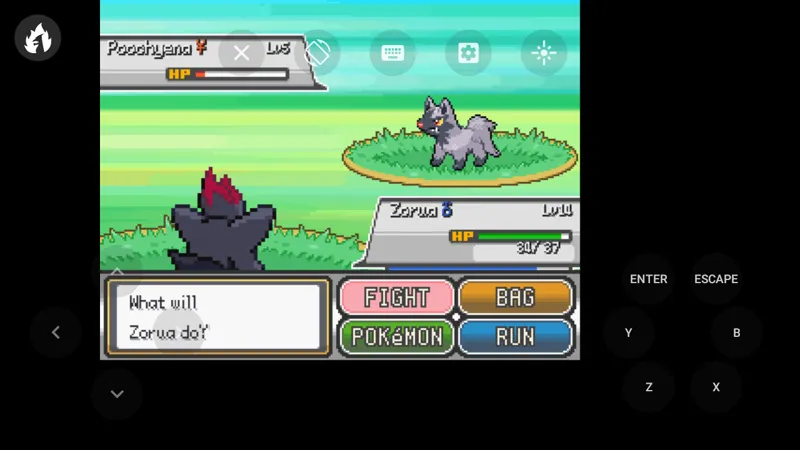
Hi everyone, this update brings more stability to RPG Maker games and fixes some troublesome bugs. Also I have some good news for Pokémon fan games players. As you can guess from image and title, some Pokémon Essentials based games are supported now.
Changelog:
JoiPlay 10149
-> Required minimum sdk version is increased to 21 (Android 5.0).
-> A HTTP server is implemented as alternative method to serve static files for HTML based games. This fixes some bugs on RPG Maker MV games.
-> Edit option is added to game menu, which can be used to change game name, version and icon.
-> Files with exe, sh, py and html extensions can be opened with JoiPlay now. When a file with these extensions are opened with JoiPlay, add game dialog will be opened with game title entered and executable file selected. So games can be added with only 2 step now.
-> Version can be entered before adding game now.
-> An intro activity and basic help balloons are added and shown on first launch.
-> Script injection bug is fixed for RPG Maker MV and HTML based games.
-> Search bar is hidden and can be shown via touching search button now.
-> Path.normalize and Path.basename functions are added to NWJSAPI and type of Process is corrected.
-> Some minor UI changes and bug fixes.
RPG Maker Plugin 10062
-> A bug, which causes issues when a wave audio file is played, is fixed.
-> Several user32.dll and kernel32.dll functions are added to fake win32api.
-> Additional fixes for Pokémon Essentials are added. These fixes make some Pokémon Essentials based games playable but there are tilemap issues on most games.
-> Plugin searches archives and ini files by executable name now.
-> A function is implemented to normalize file paths when a file read requested .
-> Fake FmodEx implementation is added.
-> Cheat scripts are modified to prevent stack level errors.
Download JoiPlay 1.01.49
Download RPG Maker Plugin 1.00.62
Comments (5)
Thanks for the solution! However, just deleting the font file still has a lot of text that cannot be displayed, which greatly affects the reading experience. Looking forward to your solution!
Thank you. I will try to find another solution for the issue.
That was my first try, but it still have the same problem :(
Thanks for feedback. You can also try deleting fonts from Fonts folder. Default font supports most glyphs for Chinese, Japanese and Korean alphabets.
Hi Developer, Thank you for the Joiplay app, I can play RPG Maker games on my phone, it's a great work. BTW, I found an issue when I play a game, some texts can't correctly display on Joiplay. Game title: A little world (帽子世界) Game website: http://www.satsukistudiotw.com/littleworld_112.html Some texts turn to square: https://i.imgur.com/kaJGMfB.png But I also found a temporary workaround: Fonts information: https://i.imgur.com/tLSs2Ru.png I decrypt file and unpack scripts, then edit Data/Scripts/Main.rb file: https://i.imgur.com/IupMjuj.png Then change C_FONT variable to font's english name: https://i.imgur.com/2i6eaNI.png At last, I repack scripts and execute game, all text are show normally: https://i.imgur.com/yUt5b7f.png I think the Joiplay unable to load non-english name's font. Hope this issue can be fixed, thank you!