



Steam Visual Editor by Sethioz [Freeware]
INTRO
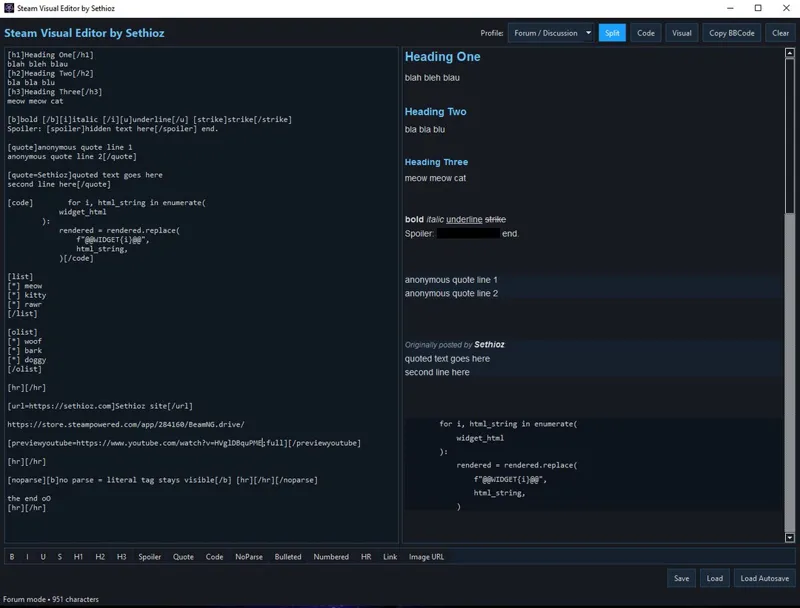
Ever gotten tired that Steam doesn't have visual editor with BBcode buttons? well i have, so i wrote this standalone Steam Visual Editor aka SVE aka Steam Visual Post Editor that makes it super easy to format your steam posts / replies properly. Even tho steam has the bbcode block in guide's section, forum discussions do not, which makes it annoying writing properly formatted steam posts/discussions.
It's written in python and compiled into standalone .exe, filesize is rather large at 48.3mb cuz i had to compile all the necessary python dependencies into it aswell or otherwise it wouldn't run without having python + necessary dependencies installed.
SCREENSHOTS
FEATURES
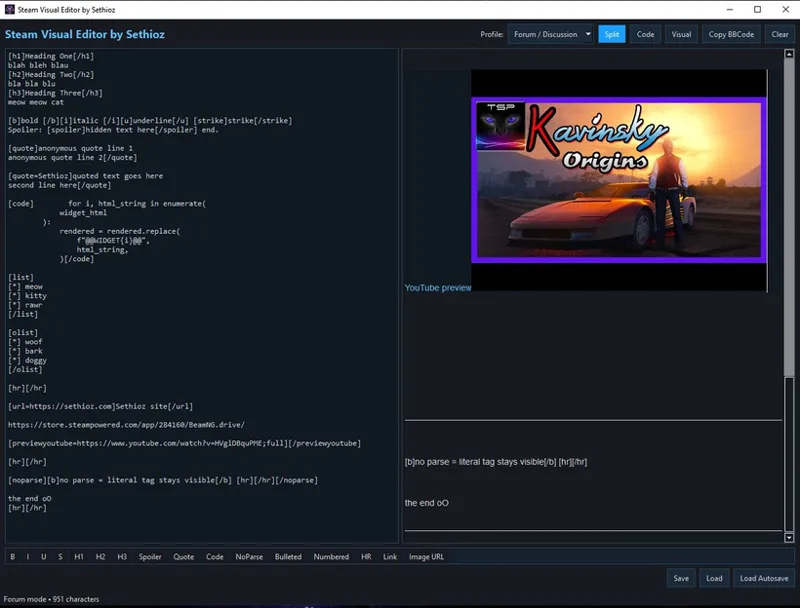
3 View modes — Split / Code / Visual
Live editing — edits are synced with other side
Steam formatting — uses same BBCode that Steam accepts on posts and guides
Interactive Spoiler blocks — blacked out, revealed only on mouse hover
Simplified Lists — When using numbered and bulleted lists you don't need [*] in front of lists, you simply write like this:
item 1
item 2
item 3
and then highlight them all and click on bulleted or numbered and it will wrap correct tags around it.Discussion / post and Guide modes — Guide mode adds Tables and Youtube embeds that are only rendered in steam guides section and not in regular discussions.
Automatic Widgets (requires internet) — bare Steam URLs are automatically fetched and parsed visually.
Save / Autosave / Load — automatically saves every 30 seconds + on exit (without confirmation) to autosave.txt, but also allows manually saving with CTRL+S or by clicking on 'Save' button, which saves into saved.txt file in tool's root folder. Autosave does not overwrite manual save and vice-versa.
Auto Load — automatically loads saved.txt when you start the tool, with option to load auto-save (in case tool crashed or you forgot to save).
Undo / Redo — CTRL+Z / CTRL+Y
Formatting toolbar / buttons — B / I / U / S / H1 / H2 / H3 / Spoiler / Quote / Code / NoParse / Bulleted / Numbered / HR / Link / Image URL, plus Table and YouTube Embed in Guide mode.
Hotkey support — (see hotkeys section below)
Custom fav icon — You can overwrite the default icon by placing 'fav.ico' file in tool's root folder, tool automatically reads it on launch and displays your custom fav.ico instead of the default one.
Character count — keeps track of how many characters your post has.
Copy All / Clear All button
100% Standalone — No installation required
HOTKEYS
Highlight your text and press any of the following combinations:
Ctrl+S — Save to saved.txt
Ctrl+Z — Undo
Ctrl+Y or Ctrl+Shift+Z — Redo
Ctrl+B — Bold
Ctrl+I — Italic
Ctrl+U — Underline
Ctrl+Q — Quote block
Ctrl+K — Opens Insert link dialog
Ctrl+Shift+S — Spoiler
Ctrl+1 / 2 / 3 — Heading 1 / 2 / 3
Ctrl+P — NoParse block
Ctrl+Shift+B — Bulleted list
Ctrl+Shift+N — Numbered list
Ctrl+Shift+H — Horizontal rule / line
Ctrl+Shift+C — Code block
NOTES & PRIVACY
Does not communicate with Steam client
No automatic uploading: you have to copy the BBCode and paste it into Steam yourself
Not associated with Valve
No telemetry, no analytics, no accounts, no spying
The only network requests are to Steam's public API (needed for showing steam widgets) and YouTube's thumbnail CDN (for fetching and showing youtube videos)
100% local: your posts never leave your machine until you manually copy-paste them into Steam
This is FREEWARE, you're free to share it, but i'd appreciate it if you didn't share it directly with others and would rather share this post instead. Updates will be posted here aswell.
Free members can download, but only paid members can comment and PM me.
KNOWN BUGS & LIMITS
leftthumb and rightthumb YouTube layouts can't wrap text the way Steam does cuz Qt has no CSS float support. They render as aligned cards instead. Functionally equivalent, visually different.
Steam emoticons (:steamhappy: etc.) are not rendered in the preview, they show as literal text. They still post correctly on steam, but won't appear in visual mode (might add it in future).
Table row/column editing is done through a dialog at insert time, not by clicking cells. Adding rows later means editing the source directly (a [tr]...[/tr] block per row).
Character limits are not enforced. Steam will reject posts that exceed the guide/comment length cap. Watch the character counter in the status bar. Currently Steam's limit is 7950 - 8000, keep it below 7950 to be safe.
virus total shows that 2 crappy anti-viruses detect it with some bullshit tags: Bkav Pro = W32.Malware.14A26D1D and SecureAge = Malicious. those are obviously false positives, feel free to send .exe to any anti-virus for testing.
DOWNLOAD & USAGE
download SethiozSteamVisualEditor.7z below (available to FREE + PAID Members)
extract with any archiving tool (peazip, 7z ..etc) — password = sethioz (this is needed as patreon is intrusive: extracts archives and then whines about .exe files not being safe)
run SethiozSteamVisualEditor.exe